
Diepske - Minecraft Skins & Skin History
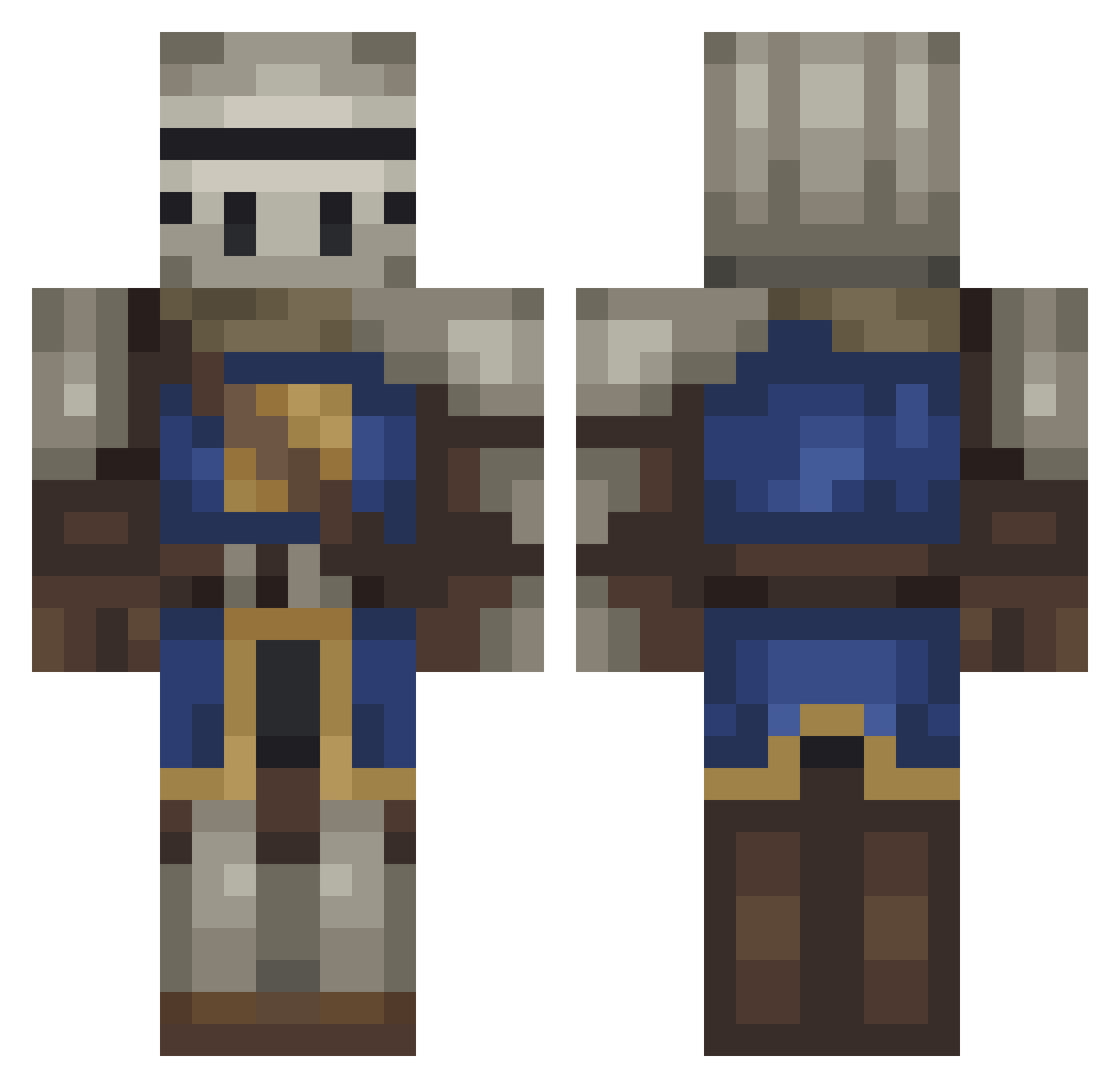
Current Minecraft skin of the player Diepske, loaded from the official Mojang API. Rotate the 3D model with your mouse or finger, then download the skin as a PNG file and use it in Minecraft: Bedrock Edition or Java Edition for free. When Diepske changes their skin, this page updates automatically and the old skin stays in the history below.
Other players with this skin (228)
Diepske was the 54th player we have seen with this skin, first spotted on 17.08.2026. The same skin was seen on these players. Open a nickname to see their current skin and skin history.
 mercadolivre Ojos_Saltones obsgtg TheKingThukuna Josh7035 Artoriass_Knight RicardoRuiz FruitoPops Biking_Maniac Byramsistaken
 BloodShot18 Absalon__ TacoShorts174 iMelllo Erogenous VitorKAC Rekler Naberiukh TacosSiuu SylveonTheFurry Niagaraaw relax_wind Rinkashii_ exefiles vex_898 olknar TaurusSilverr yvngwach ItsKaecy ImCurIy mipiex
 XDdude2137
 MIniMan1052 MrRief tarotaroto Ateboi AppleLight BobaMilkTeaFett Truckie600 7706 MichelX9 Nordine_EL
 Willy_1 Frenso SodyumNitrit Arlikino jozonix09 Gustahiro LargeBleb thegurningbambi ADozenRoses Pipoplank Max_57_War Merzotvar handychannel PastaConoisseur Donnerd BurgerMiester Quisable DM1234567890
More Medieval Minecraft skins
How to install the Diepske skin
- Press the Download button above to save the skin as a PNG file.
- Minecraft: Bedrock Edition (PE): open the Dressing Room from the main menu (or tap your character → Edit Character), go to Classic Skins → Owned, press the + (new skin) button, choose the downloaded PNG and pick the Classic (Steve) model. Works on PC and mobile; consoles cannot import custom skins.
- Minecraft: Java Edition: open the Minecraft Launcher, go to the Skins tab, click New Skin, load the PNG, pick the Classic (Steve) model and press Save & Use. You can also upload it at minecraft.net → Profile → Change Skin.
The skin does not show up after import - what should I do?
Restart Minecraft and open the Dressing Room again - imported skins sometimes appear only after a restart. Also make sure you selected the imported skin and picked the Classic (Steve) model.
Which model should I choose, Classic or Slim?
This skin is designed for the Classic (Steve) model. If you pick the wrong model, the arms of the skin will look stretched or squeezed.
Is the skin of Diepske free to download?
Yes. Press Download, save the PNG file and use it in Minecraft: Bedrock Edition or Java Edition - no payment or registration needed. The skin also works on multiplayer servers and Realms.
More skins
Looking for more? Go back to all Minecraft skins and check the top skins of the week, month and all time, or find any player's skin by nickname.