
Didishuki - Minecraft Skins & Skin History
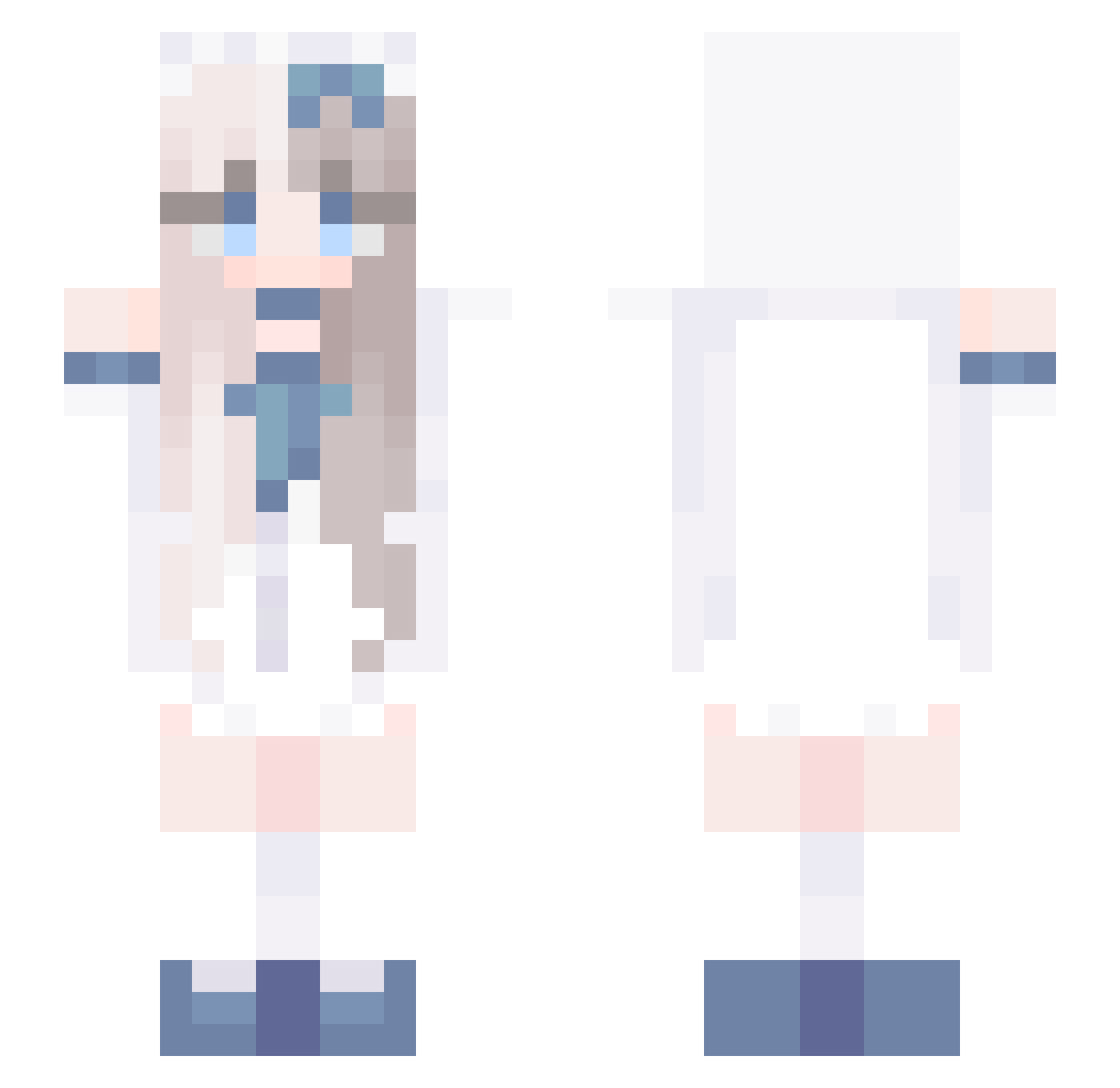
Current Minecraft skin of the player Didishuki, loaded from the official Mojang API. Rotate the 3D model with your mouse or finger, then download the skin as a PNG file and use it in Minecraft: Bedrock Edition or Java Edition for free. When Didishuki changes their skin, this page updates automatically and the old skin stays in the history below.
Other players with this skin (729)
Didishuki was the 115th player we have seen with this skin, first spotted on 11.08.2026. The same skin was seen on these players. Open a nickname to see their current skin and skin history.
 Alyonsa FayeeRose guilv1
 Dzbanix kungaole 555ee VaharV Glacer1999 AlexTheYoukai sabertanX qiaowuyi yyellll hexuanmc pon1009 Shirley0712 SSFCC Justyna14 Nemu1nqq muymy Gurring remymo MeruliA BlueShade208 ZENFEARLESS MollyThem 2lne Sophie_star YYL05 ilylittle AGLOSHMAN cychaha Bloom57 dia_ded xiaohongyun simple_3192 yixian_0923 hanqieeeeeeeee jiahui1 lgc0628 Vtuber_Lilian xiaopei07 milktea6 HuangtianEmperor V_silver_V why22 orange0808 yyss22 rlarlqja24 xihao1 xiaotuli bartleby31 huanghe520 Iola_Iolana justruru04 PlaidAlise N0a1000 mzxyl Neldia Shader11 ywnwn
More Anime Girl Minecraft skins
See all 13497 Anime Girl skins
How to install the Didishuki skin
- Press the Download button above to save the skin as a PNG file.
- Minecraft: Bedrock Edition (PE): open the Dressing Room from the main menu (or tap your character → Edit Character), go to Classic Skins → Owned, press the + (new skin) button, choose the downloaded PNG and pick the Slim (Alex) model. Works on PC and mobile; consoles cannot import custom skins.
- Minecraft: Java Edition: open the Minecraft Launcher, go to the Skins tab, click New Skin, load the PNG, pick the Slim (Alex) model and press Save & Use. You can also upload it at minecraft.net → Profile → Change Skin.
The skin does not show up after import - what should I do?
Restart Minecraft and open the Dressing Room again - imported skins sometimes appear only after a restart. Also make sure you selected the imported skin and picked the Slim (Alex) model.
Which model should I choose, Classic or Slim?
This skin is designed for the Slim (Alex) model. If you pick the wrong model, the arms of the skin will look stretched or squeezed.
Is the skin of Didishuki free to download?
Yes. Press Download, save the PNG file and use it in Minecraft: Bedrock Edition or Java Edition - no payment or registration needed. The skin also works on multiplayer servers and Realms.
More skins
Looking for more? Go back to all Minecraft skins and check the top skins of the week, month and all time, or find any player's skin by nickname.