
DcBeatS - Minecraft Skins & Skin History
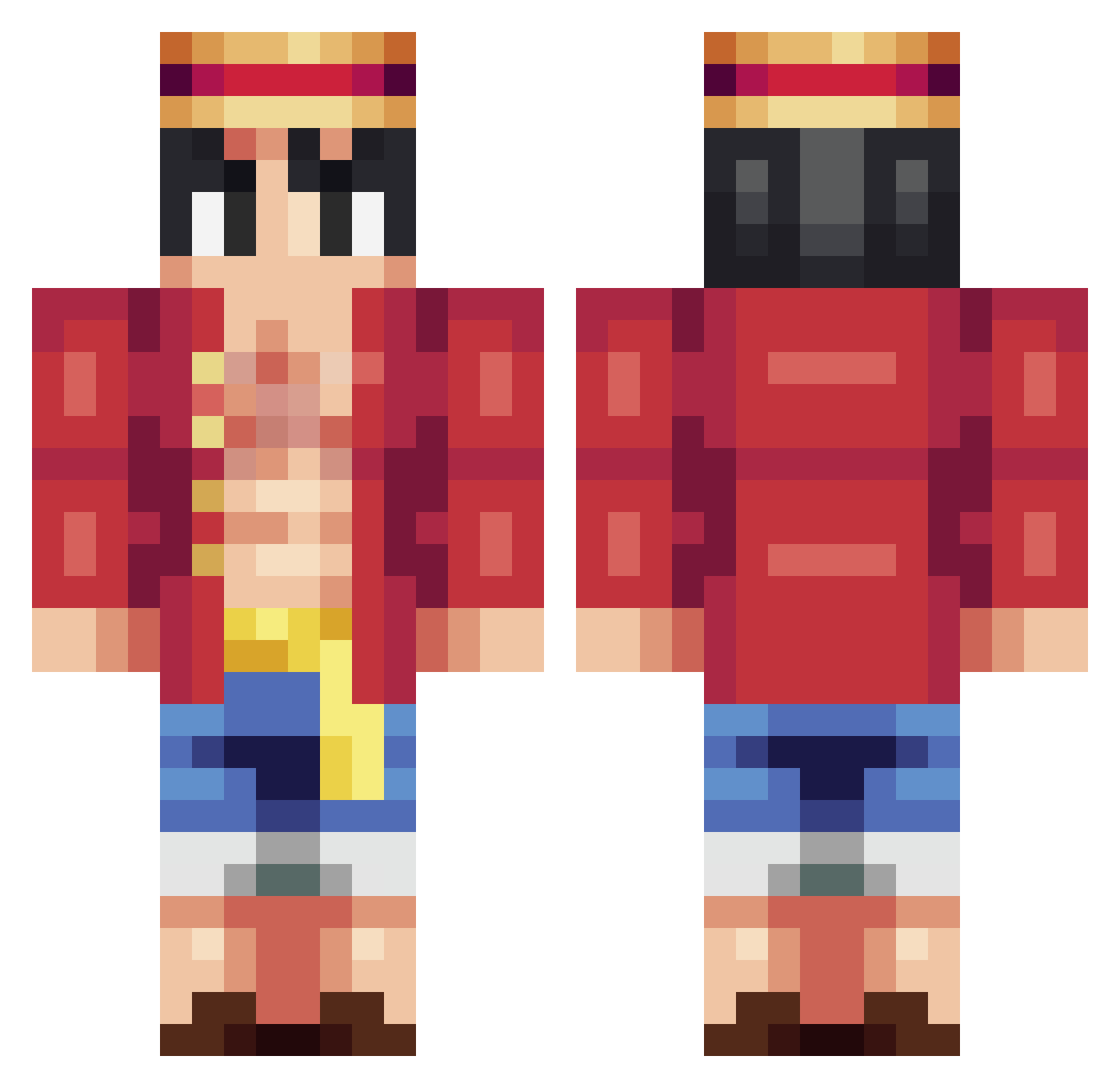
Current Minecraft skin of the player DcBeatS, loaded from the official Mojang API. Rotate the 3D model with your mouse or finger, then download the skin as a PNG file and use it in Minecraft: Bedrock Edition or Java Edition for free. When DcBeatS changes their skin, this page updates automatically and the old skin stays in the history below.
Other players with this skin (259)
DcBeatS was the 115th player we have seen with this skin, first spotted on 11.09.2026. The same skin was seen on these players. Open a nickname to see their current skin and skin history.
 soonatron
 DevilFang smysiol Agush Shiftiing Luffy Mophy2 DrakeisBad AlSnoww zTsynami Junes500_jj AInTrain
 LBKING2024 jklli123 Ukoda _RedRyan_ MuggaMan Vended luffy1929 elp_x TheSavageGhost seelas2017 Towlie1312 monkeyfin JAEWOO1126 Dios_Griego LomieHomie orthic breno2571 Griboom H4douk NortyOG WikiWikiMami Phantom2745 Barberrrr sino1129 395flame junmin28 ghostfacer15 Mast3rK4n3ki2 GaFikV ExalityRaph Cashdean44 xRealify krustymann Athernite Headfirstcorn d1no34vr ElHombreBarba Fllorian Kami__sama Thperao lulukoikou philqq ziteww Srantonio zalachenko Braeydd LeoBM49 savege_12
More Monkey D Luffy Minecraft skins
See all 925 Monkey D Luffy skins
How to install the DcBeatS skin
- Press the Download button above to save the skin as a PNG file.
- Minecraft: Bedrock Edition (PE): open the Dressing Room from the main menu (or tap your character → Edit Character), go to Classic Skins → Owned, press the + (new skin) button, choose the downloaded PNG and pick the Classic (Steve) model. Works on PC and mobile; consoles cannot import custom skins.
- Minecraft: Java Edition: open the Minecraft Launcher, go to the Skins tab, click New Skin, load the PNG, pick the Classic (Steve) model and press Save & Use. You can also upload it at minecraft.net → Profile → Change Skin.
The skin does not show up after import - what should I do?
Restart Minecraft and open the Dressing Room again - imported skins sometimes appear only after a restart. Also make sure you selected the imported skin and picked the Classic (Steve) model.
Which model should I choose, Classic or Slim?
This skin is designed for the Classic (Steve) model. If you pick the wrong model, the arms of the skin will look stretched or squeezed.
Is the skin of DcBeatS free to download?
Yes. Press Download, save the PNG file and use it in Minecraft: Bedrock Edition or Java Edition - no payment or registration needed. The skin also works on multiplayer servers and Realms.
More skins
Looking for more? Go back to all Minecraft skins and check the top skins of the week, month and all time, or find any player's skin by nickname.