
DNKidd - Minecraft Skins & Skin History
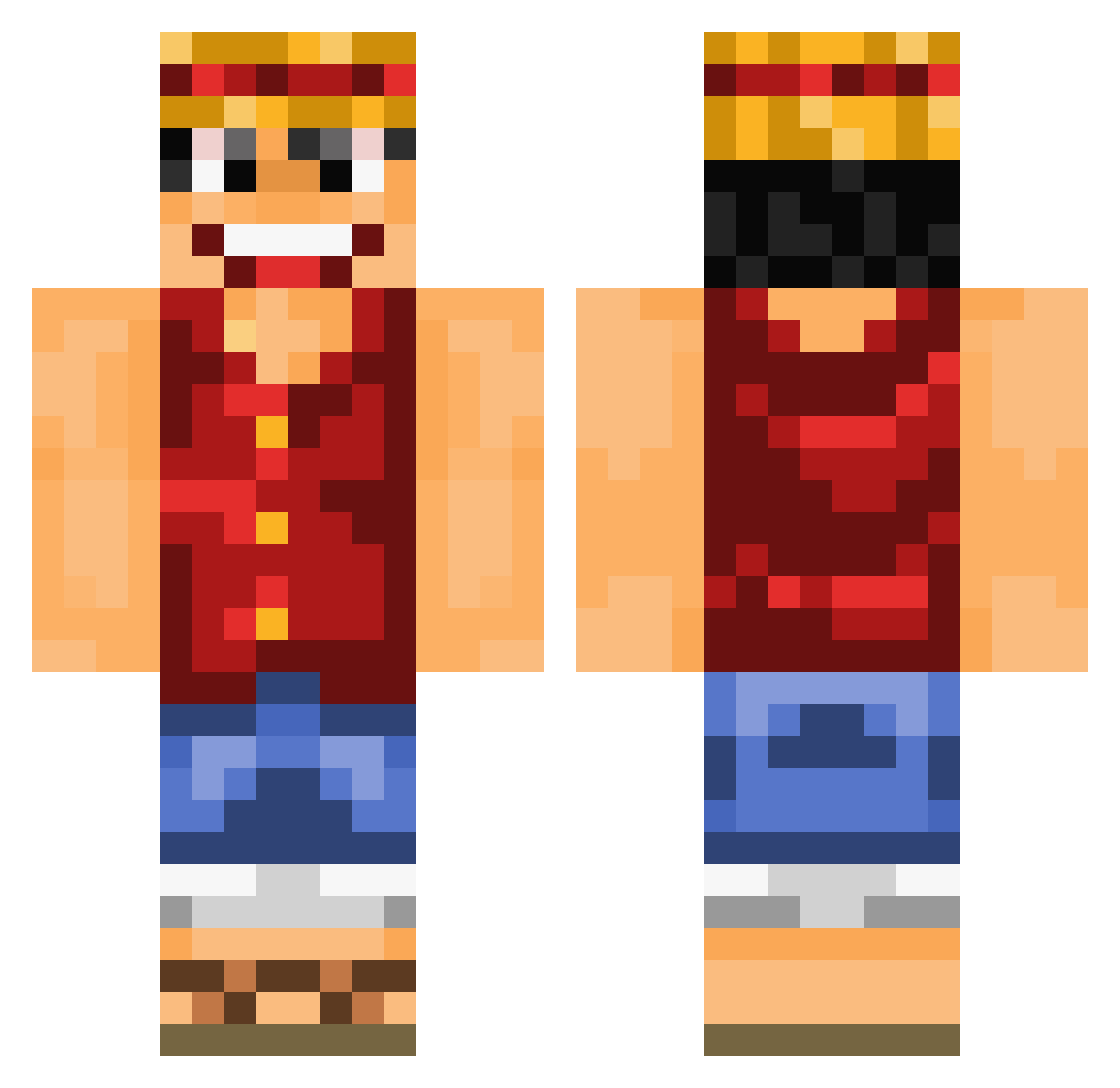
Current Minecraft skin of the player DNKidd, loaded from the official Mojang API. Rotate the 3D model with your mouse or finger, then download the skin as a PNG file and use it in Minecraft: Bedrock Edition or Java Edition for free. When DNKidd changes their skin, this page updates automatically and the old skin stays in the history below.
Other players with this skin (839)
DNKidd was the 555th player we have seen with this skin, first spotted on 03.10.2026. The same skin was seen on these players. Open a nickname to see their current skin and skin history.
 StivenRm24 TskMgr KaptainKat007 Bribri1803 Tyraq NovaJay mryan093 BigShot_Blake TDR78 STAndard2310 Optq MonkeyDRudy steve273 JMR412 kikyda kirazzz Samdoog SilentKiller7997 13frank12 Janbold Adrislayer03 RaitarionPlay CantasGaming Mazapan99 2nryuu ItsFazo TheQueen987 SupportCarry PingWarrior1 Bierjan TrueFireduck Crafto34 MarcVallde SistaB Imjeremiah ChickenWingKing1 BrennanLeeds Azoz31 Aserejerto Rawan157 Drekolo TheFlyingWeasel juniorbrito Bibendum175 Ansy08 TheRelaXin27 Captain_Yum_Yum aedakin Solary0812 Cyrillon Ricejunky Drking262 noix2cocos shamungie elephants_best10 AKINTOC93 Nicook16 MrManchichi heindz Import_DEon
More Monkey D Luffy Minecraft skins
See all 925 Monkey D Luffy skins
How to install the DNKidd skin
- Press the Download button above to save the skin as a PNG file.
- Minecraft: Bedrock Edition (PE): open the Dressing Room from the main menu (or tap your character → Edit Character), go to Classic Skins → Owned, press the + (new skin) button, choose the downloaded PNG and pick the Classic (Steve) model. Works on PC and mobile; consoles cannot import custom skins.
- Minecraft: Java Edition: open the Minecraft Launcher, go to the Skins tab, click New Skin, load the PNG, pick the Classic (Steve) model and press Save & Use. You can also upload it at minecraft.net → Profile → Change Skin.
The skin does not show up after import - what should I do?
Restart Minecraft and open the Dressing Room again - imported skins sometimes appear only after a restart. Also make sure you selected the imported skin and picked the Classic (Steve) model.
Which model should I choose, Classic or Slim?
This skin is designed for the Classic (Steve) model. If you pick the wrong model, the arms of the skin will look stretched or squeezed.
Is the skin of DNKidd free to download?
Yes. Press Download, save the PNG file and use it in Minecraft: Bedrock Edition or Java Edition - no payment or registration needed. The skin also works on multiplayer servers and Realms.
More skins
Looking for more? Go back to all Minecraft skins and check the top skins of the week, month and all time, or find any player's skin by nickname.