
DESIGNER_09 - Minecraft Skins & Skin History
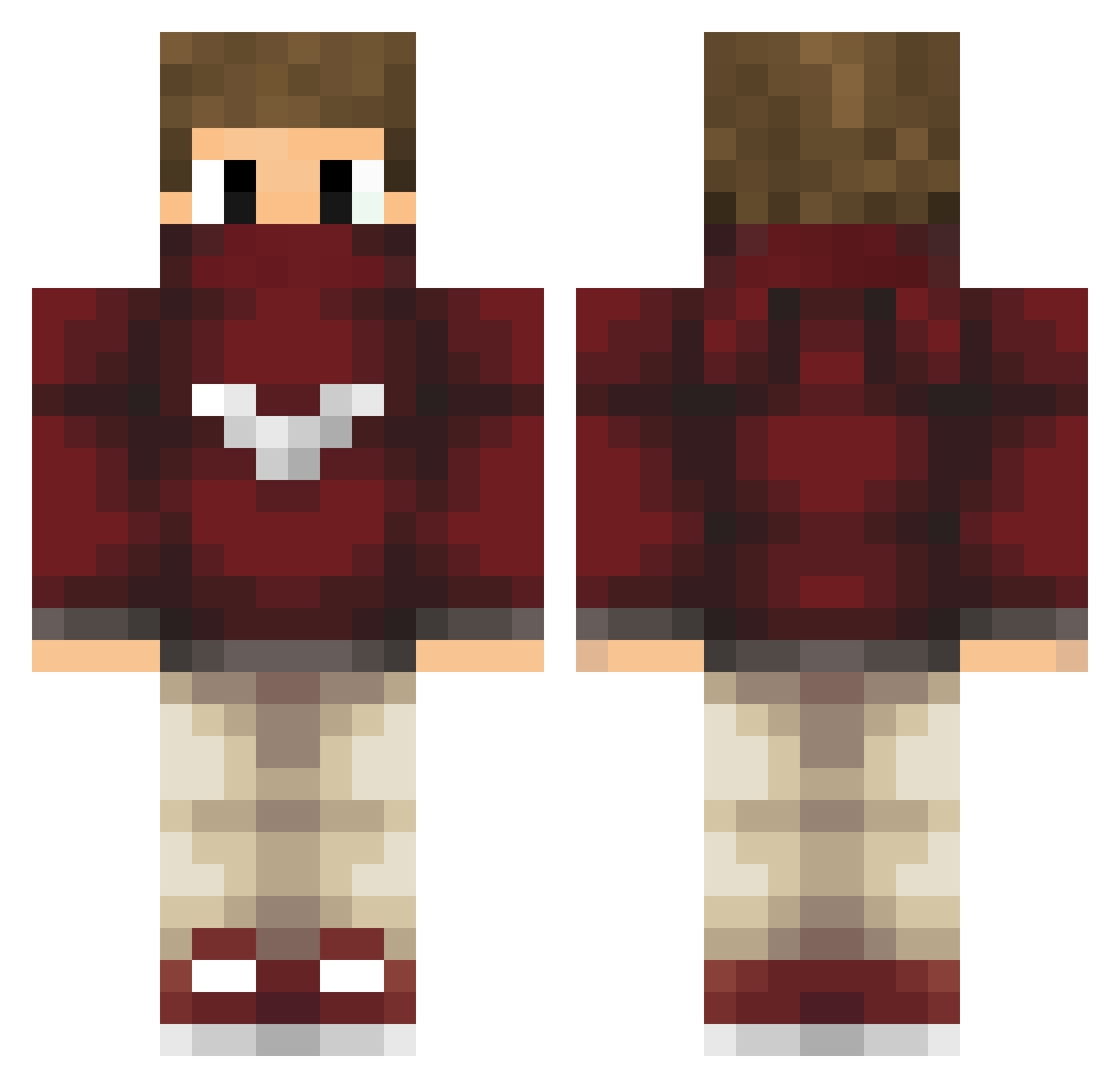
Current Minecraft skin of the player DESIGNER_09, loaded from the official Mojang API. Rotate the 3D model with your mouse or finger, then download the skin as a PNG file and use it in Minecraft: Bedrock Edition or Java Edition for free. When DESIGNER_09 changes their skin, this page updates automatically and the old skin stays in the history below.
Other players with this skin (85)
DESIGNER_09 was the 36th player we have seen with this skin, first spotted on 18.09.2026. The same skin was seen on these players. Open a nickname to see their current skin and skin history.
 StryderStue Voxym11 server1993 T_iiago99 Turkish_Chicken ffranqui Hkiess Kom0d MrPyro98 GODnexx Soloqriyer1 kubakeczot GermaanGB Static3959 D_Cohen_770 Diiiooon LennenOn JasusBate ItsGnyt kegan845 shomaru7 nico2303 dexxWE5 NonLuong 1close riyer Wolf_Darkness tsuntsun12 Gusnhde Iltadas NaGaTiB ZigZagPower Wrex__ TumbelTV tal1212 jleo96 DroperKnight Maellpr PonytaRider Arzenix diogo1804 syvido DxRichardxD Trevor2021 sandin10 Szochss Simonix_308 Francisco1st Eykoze Ollies_Mom Nomazu Mimmo02 AlfaNathan Damkos Yostr BatuhanBeyy Studio_22 wunaa boi36 Tom3s07
More Face Mask Minecraft skins
How to install the DESIGNER_09 skin
- Press the Download button above to save the skin as a PNG file.
- Minecraft: Bedrock Edition (PE): open the Dressing Room from the main menu (or tap your character → Edit Character), go to Classic Skins → Owned, press the + (new skin) button, choose the downloaded PNG and pick the Classic (Steve) model. Works on PC and mobile; consoles cannot import custom skins.
- Minecraft: Java Edition: open the Minecraft Launcher, go to the Skins tab, click New Skin, load the PNG, pick the Classic (Steve) model and press Save & Use. You can also upload it at minecraft.net → Profile → Change Skin.
The skin does not show up after import - what should I do?
Restart Minecraft and open the Dressing Room again - imported skins sometimes appear only after a restart. Also make sure you selected the imported skin and picked the Classic (Steve) model.
Which model should I choose, Classic or Slim?
This skin is designed for the Classic (Steve) model. If you pick the wrong model, the arms of the skin will look stretched or squeezed.
Is the skin of DESIGNER_09 free to download?
Yes. Press Download, save the PNG file and use it in Minecraft: Bedrock Edition or Java Edition - no payment or registration needed. The skin also works on multiplayer servers and Realms.
More skins
Looking for more? Go back to all Minecraft skins and check the top skins of the week, month and all time, or find any player's skin by nickname.