
BrandoniusGames - Minecraft Skins & Skin History
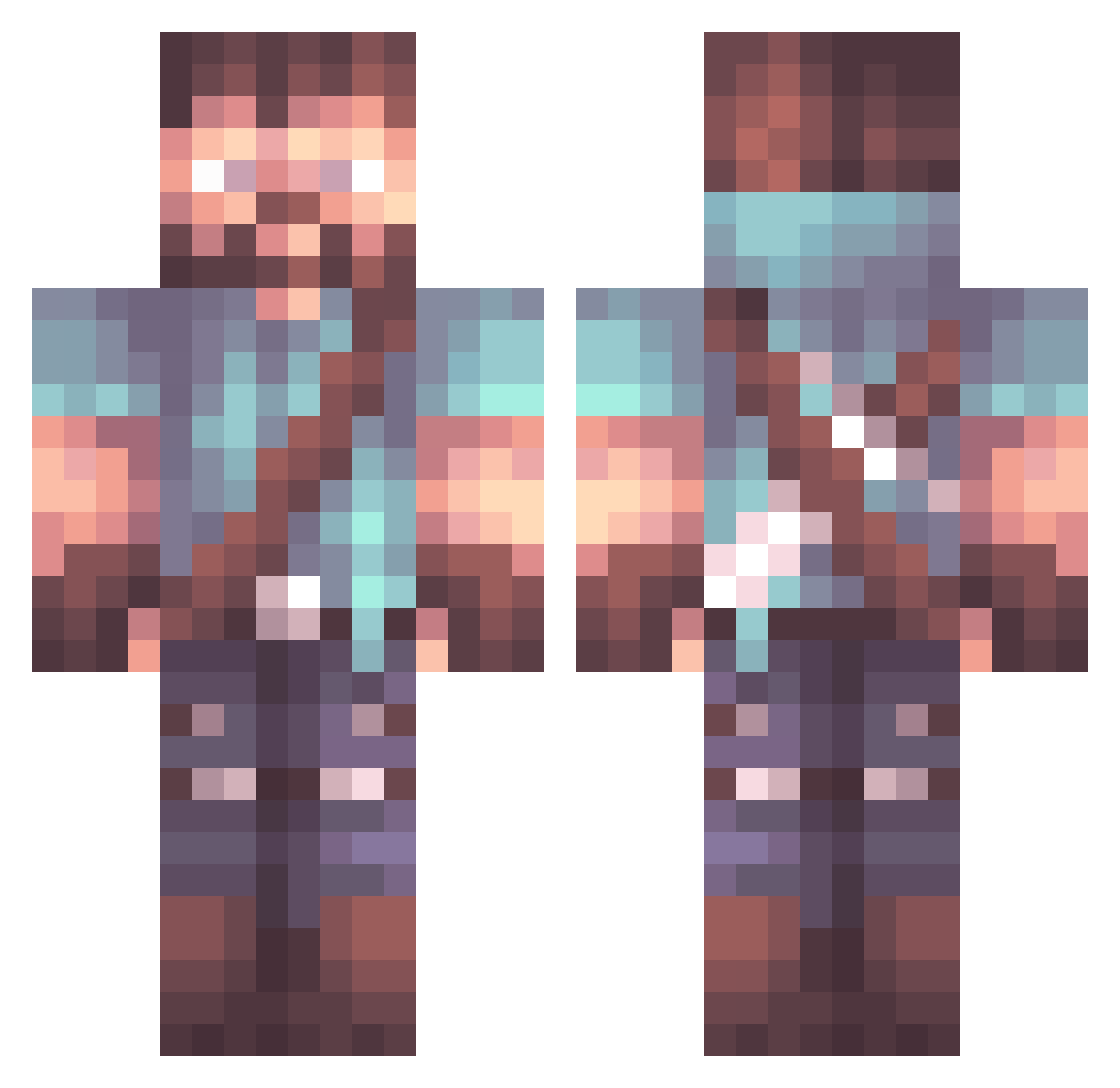
Current Minecraft skin of the player BrandoniusGames, loaded from the official Mojang API. Rotate the 3D model with your mouse or finger, then download the skin as a PNG file and use it in Minecraft: Bedrock Edition or Java Edition for free. When BrandoniusGames changes their skin, this page updates automatically and the old skin stays in the history below.
Other players with this skin (925)
BrandoniusGames was the 593rd player we have seen with this skin, first spotted on 27.09.2026. The same skin was seen on these players. Open a nickname to see their current skin and skin history.
 Settos BluLycan Lodrik97 Holywake88 Thirklol nuggetbowl SatchelKiller _wakey Redwever Kraeuterfischli CatWithLore Plasma_Lord ShtickyNotes Scrabul Andrea37522 LongSleevee OPSCOPEZ TqrtleeHypixel Linus_SEAL r3giT Ivotryl Patricho123 Wackymememan Hoovmysta PlayerOneIsaiah Thesbo a_Boggi3 iPako69 Dr_Griffin27 Crixengg MrInsane0 Galliankrue22 Bamacru Sitame456 Compugeak Dacalex09 Mmorage Hexxer_Haber CrazyShift Kulamour KenTheBean DreadWraith naughtypex RyanGrota boss10fx ocinon 2ndPrinciple Dead_Magic CoBot2000 _Dayv_ dissident07 MonkeyboyKK12 WaterIllumi LividHoney ARZ779 Rigel956 Berleaux SportKing7 RimPec pedrolito98
More Herobrine Minecraft skins
How to install the BrandoniusGames skin
- Press the Download button above to save the skin as a PNG file.
- Minecraft: Bedrock Edition (PE): open the Dressing Room from the main menu (or tap your character → Edit Character), go to Classic Skins → Owned, press the + (new skin) button, choose the downloaded PNG and pick the Classic (Steve) model. Works on PC and mobile; consoles cannot import custom skins.
- Minecraft: Java Edition: open the Minecraft Launcher, go to the Skins tab, click New Skin, load the PNG, pick the Classic (Steve) model and press Save & Use. You can also upload it at minecraft.net → Profile → Change Skin.
The skin does not show up after import - what should I do?
Restart Minecraft and open the Dressing Room again - imported skins sometimes appear only after a restart. Also make sure you selected the imported skin and picked the Classic (Steve) model.
Which model should I choose, Classic or Slim?
This skin is designed for the Classic (Steve) model. If you pick the wrong model, the arms of the skin will look stretched or squeezed.
Is the skin of BrandoniusGames free to download?
Yes. Press Download, save the PNG file and use it in Minecraft: Bedrock Edition or Java Edition - no payment or registration needed. The skin also works on multiplayer servers and Realms.
More skins
Looking for more? Go back to all Minecraft skins and check the top skins of the week, month and all time, or find any player's skin by nickname.