
BenToPen - Minecraft Skins & Skin History
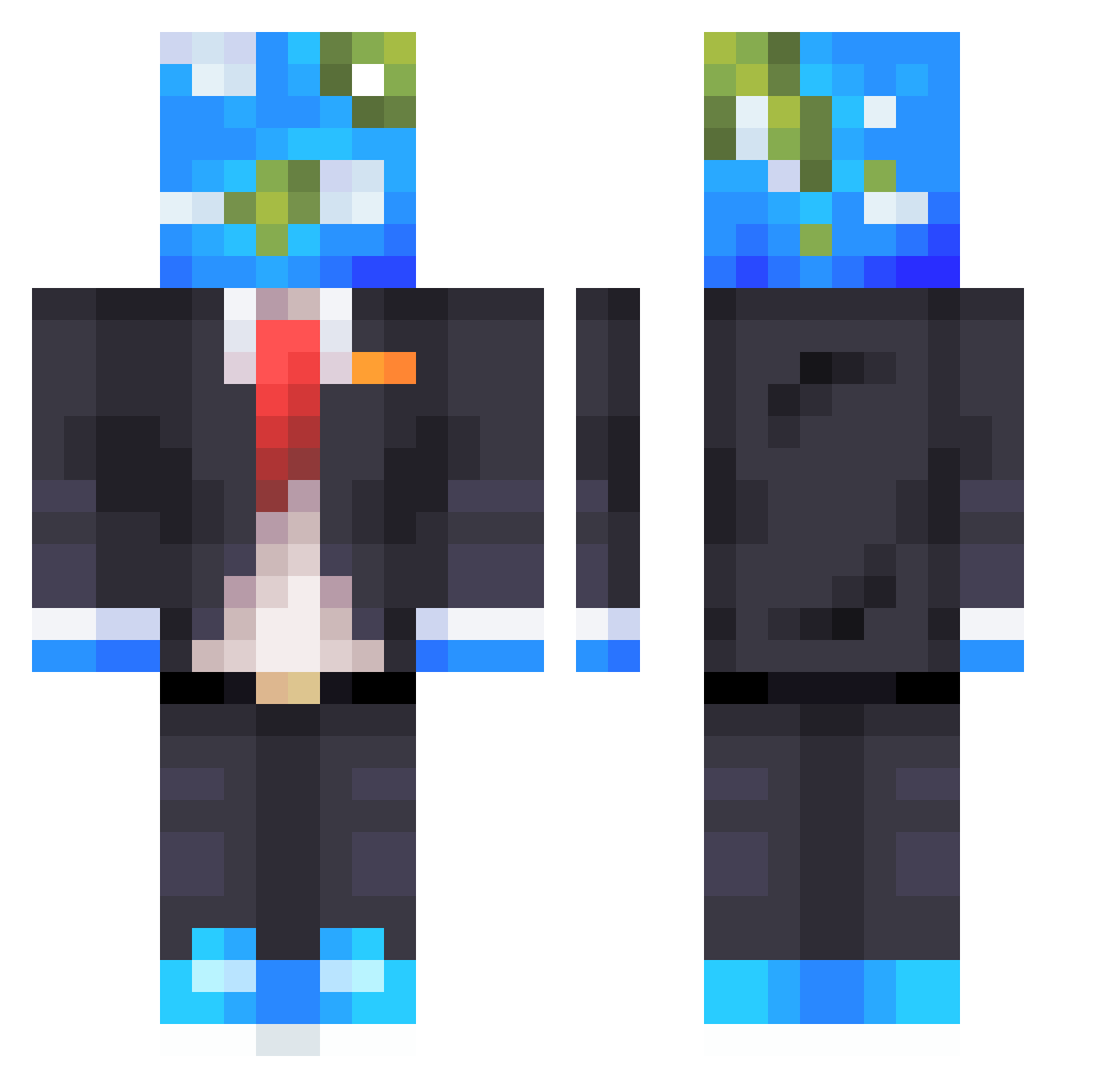
Current Minecraft skin of the player BenToPen, loaded from the official Mojang API. Rotate the 3D model with your mouse or finger, then download the skin as a PNG file and use it in Minecraft: Bedrock Edition or Java Edition for free. When BenToPen changes their skin, this page updates automatically and the old skin stays in the history below.
Other players with this skin (610)
BenToPen was the 206th player we have seen with this skin, first spotted on 31.08.2026. The same skin was seen on these players. Open a nickname to see their current skin and skin history.
 Hong_15 CyanBonsai GenetiCPoland MachPr butterflylion30 SilverLox10 Anttwun Sk3tCh14 Wvrld Katze5834 Dusse_ gagnonglobal BannedForMyName HAST0919 lund_312 GrumpyChips Jimmy8958 ToxicHunter20 Bigthree350 Andsh0vie Bradgaming1992 momoslayter GenrlGingy BMWGS80 Sorimr oFuhrer_
 NiftyBlade1234 Blurrr1146 EpicBuddy331 Yudzvki Javaa_ Stealthrecon341 Betar1ka PluSChen DoxyTheBoxy AlmightyVask serenfetti Lamas2307 vrgpn fireyices Huzdi fedblaze Stringer90 Mr_Nanyu source_69 OldUser101 creegene Insomn12 CarIototo VelzyFriday EMo9969 Cubezz_0 AdriMorgan33 LiftingLeppy Asherslain TheLoneLemon21 NexChaosX
 Ribbio Slayinsince82 maty_Vilo
More Earth Head Minecraft skins
How to install the BenToPen skin
- Press the Download button above to save the skin as a PNG file.
- Minecraft: Bedrock Edition (PE): open the Dressing Room from the main menu (or tap your character → Edit Character), go to Classic Skins → Owned, press the + (new skin) button, choose the downloaded PNG and pick the Classic (Steve) model. Works on PC and mobile; consoles cannot import custom skins.
- Minecraft: Java Edition: open the Minecraft Launcher, go to the Skins tab, click New Skin, load the PNG, pick the Classic (Steve) model and press Save & Use. You can also upload it at minecraft.net → Profile → Change Skin.
The skin does not show up after import - what should I do?
Restart Minecraft and open the Dressing Room again - imported skins sometimes appear only after a restart. Also make sure you selected the imported skin and picked the Classic (Steve) model.
Which model should I choose, Classic or Slim?
This skin is designed for the Classic (Steve) model. If you pick the wrong model, the arms of the skin will look stretched or squeezed.
Is the skin of BenToPen free to download?
Yes. Press Download, save the PNG file and use it in Minecraft: Bedrock Edition or Java Edition - no payment or registration needed. The skin also works on multiplayer servers and Realms.
More skins
Looking for more? Go back to all Minecraft skins and check the top skins of the week, month and all time, or find any player's skin by nickname.