
AnnPro89 - Minecraft Skins & Skin History
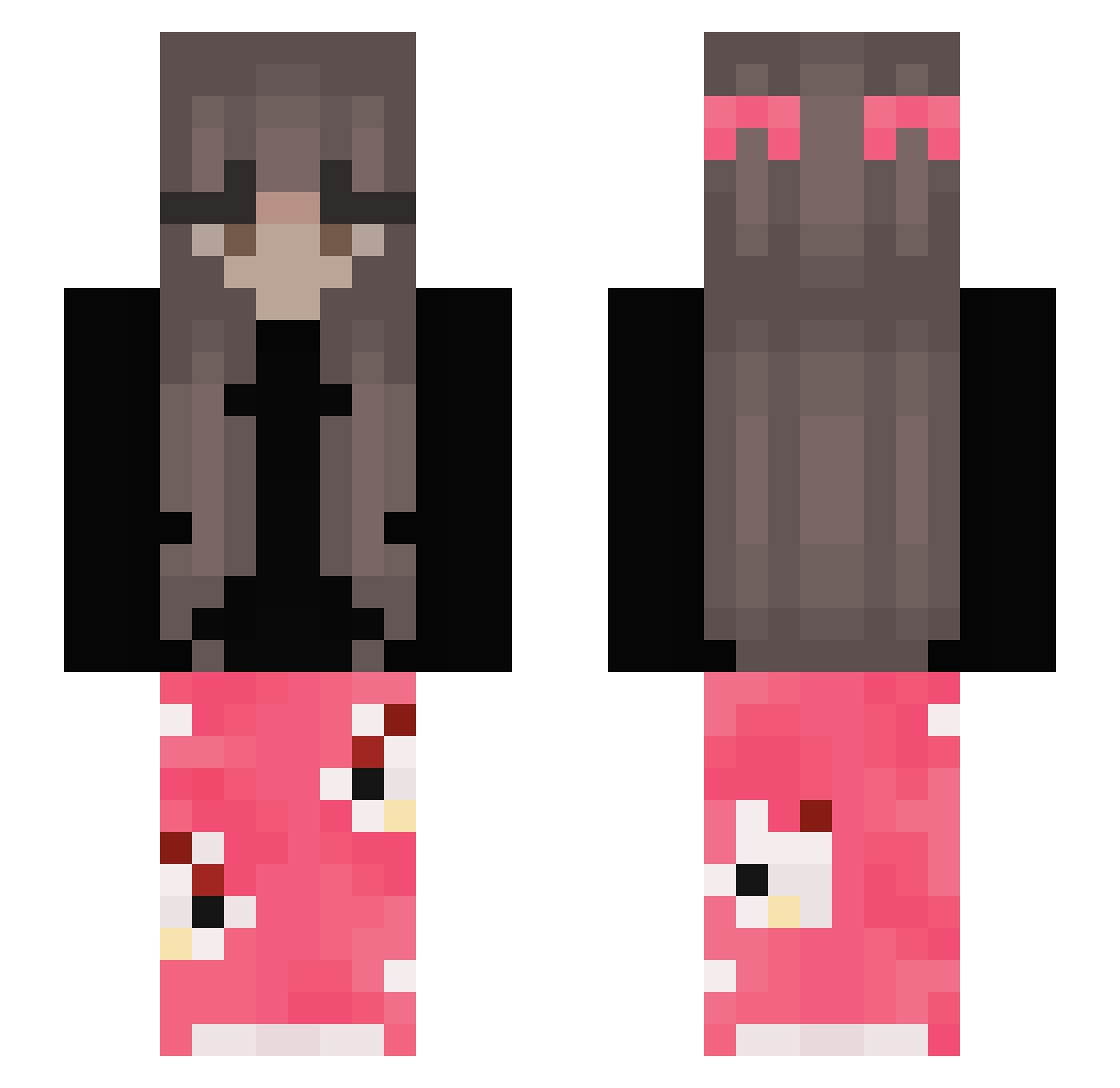
Current Minecraft skin of the player AnnPro89, loaded from the official Mojang API. Rotate the 3D model with your mouse or finger, then download the skin as a PNG file and use it in Minecraft: Bedrock Edition or Java Edition for free. When AnnPro89 changes their skin, this page updates automatically and the old skin stays in the history below.
Other players with this skin (388)
AnnPro89 was the 295th player we have seen with this skin, first spotted on 16.10.2026. The same skin was seen on these players. Open a nickname to see their current skin and skin history.
 AntoPaazz X_L1a_X ocean31220 shimiu16 vxlterxa karixxaaa ItsToots DroppedByNika Blair_17 xtalya Nikolcia10 le0nard_o0 2pnc Ronja_TT inesk Keyairr SmallAmy Shadowwasfound z4xi Wrosyqq Barbiiowo yezcx FGSleenderBR janaemran zyziaatoja IsaTheQueen012 NikiDrak140 piggie2213 ssxntiz Kamzi jochessi Pluttiges TobeyMu laethi Arn00x S0phieLovesYou manika20 wiktoria2K69 manoncek_g2017 ninebags VaniiBananii1 Wyxcyvi _Alexisss_ Heros_YT12 Pa7ry9ja Mythixit Downeetje Peyix lalilaxx Lendzia_ Fyxle187 ang3licg1rl love678 wxkoo lilcia33 bellymoon LilyGB25 Besseralslouis nomomchoimoyoung mam3e
More Pyjamas Minecraft skins
How to install the AnnPro89 skin
- Press the Download button above to save the skin as a PNG file.
- Minecraft: Bedrock Edition (PE): open the Dressing Room from the main menu (or tap your character → Edit Character), go to Classic Skins → Owned, press the + (new skin) button, choose the downloaded PNG and pick the Slim (Alex) model. Works on PC and mobile; consoles cannot import custom skins.
- Minecraft: Java Edition: open the Minecraft Launcher, go to the Skins tab, click New Skin, load the PNG, pick the Slim (Alex) model and press Save & Use. You can also upload it at minecraft.net → Profile → Change Skin.
The skin does not show up after import - what should I do?
Restart Minecraft and open the Dressing Room again - imported skins sometimes appear only after a restart. Also make sure you selected the imported skin and picked the Slim (Alex) model.
Which model should I choose, Classic or Slim?
This skin is designed for the Slim (Alex) model. If you pick the wrong model, the arms of the skin will look stretched or squeezed.
Is the skin of AnnPro89 free to download?
Yes. Press Download, save the PNG file and use it in Minecraft: Bedrock Edition or Java Edition - no payment or registration needed. The skin also works on multiplayer servers and Realms.
More skins
Looking for more? Go back to all Minecraft skins and check the top skins of the week, month and all time, or find any player's skin by nickname.