
Andres507 - Minecraft Skins & Skin History
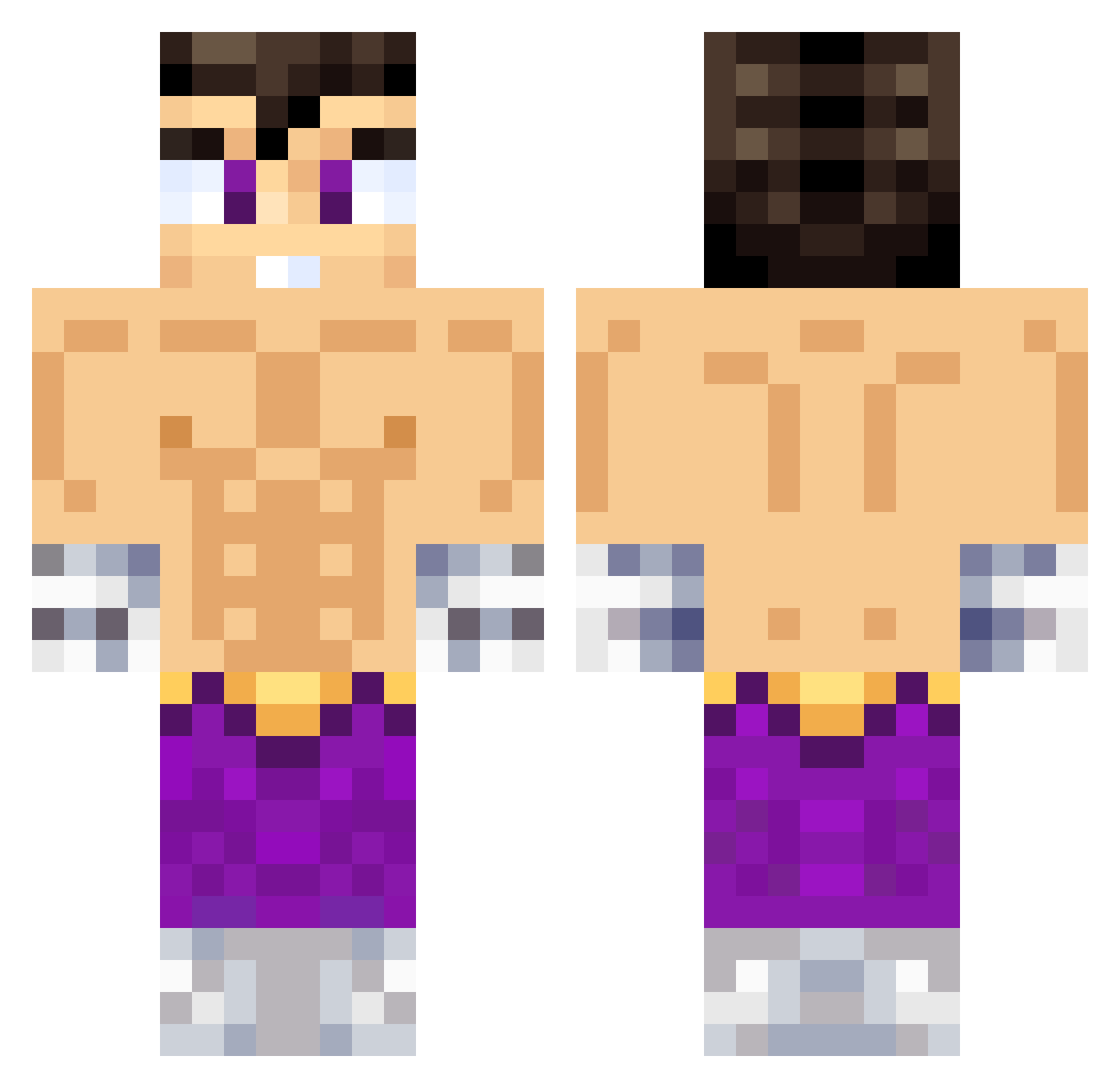
Current Minecraft skin of the player Andres507, loaded from the official Mojang API. Rotate the 3D model with your mouse or finger, then download the skin as a PNG file and use it in Minecraft: Bedrock Edition or Java Edition for free. When Andres507 changes their skin, this page updates automatically and the old skin stays in the history below.
Other players with this skin (638)
Andres507 was the 157th player we have seen with this skin, first spotted on 25.08.2026. The same skin was seen on these players. Open a nickname to see their current skin and skin history.
 Darthito LOLO13424 V1centit0 benpacal Sullivan285 StarPlatinum_SDL Alexander_172010 Grievous_777 SchoolBoy69 junacho
 drtigrin Leske_XD sh1xnl LinxIsking agutsini Oryx076
 Diecisietee ulysses_snow ROOK26 Burk4 CHICHARRAA poncho_09 LosFrancos LeoSadness juanrm74 vicentennn jonsuwu Issacnick samegas hectorete31 BENJAS_ Geinshin Walls22 P470
 ZDRS4 stelios06_yt GPepe DarckGhost171 ImDeiviiid LuQuiTaXx09 Cr7csv El_Siniestro CorFlozzy Thesubi ElFacha1305 WAJIIRO AiorosXYZ Sebatrack tupapimanu Bichotto yepppppppppppp Paippasfritas meco3000 JosersXd UmbraLeo gonzaaalol BENI2306 BrunoBG dmansell23 Darmandossj
More Jin Kazama Minecraft skins
How to install the Andres507 skin
- Press the Download button above to save the skin as a PNG file.
- Minecraft: Bedrock Edition (PE): open the Dressing Room from the main menu (or tap your character → Edit Character), go to Classic Skins → Owned, press the + (new skin) button, choose the downloaded PNG and pick the Classic (Steve) model. Works on PC and mobile; consoles cannot import custom skins.
- Minecraft: Java Edition: open the Minecraft Launcher, go to the Skins tab, click New Skin, load the PNG, pick the Classic (Steve) model and press Save & Use. You can also upload it at minecraft.net → Profile → Change Skin.
The skin does not show up after import - what should I do?
Restart Minecraft and open the Dressing Room again - imported skins sometimes appear only after a restart. Also make sure you selected the imported skin and picked the Classic (Steve) model.
Which model should I choose, Classic or Slim?
This skin is designed for the Classic (Steve) model. If you pick the wrong model, the arms of the skin will look stretched or squeezed.
Is the skin of Andres507 free to download?
Yes. Press Download, save the PNG file and use it in Minecraft: Bedrock Edition or Java Edition - no payment or registration needed. The skin also works on multiplayer servers and Realms.
More skins
Looking for more? Go back to all Minecraft skins and check the top skins of the week, month and all time, or find any player's skin by nickname.