
Ame__09 - Minecraft Skins & Skin History
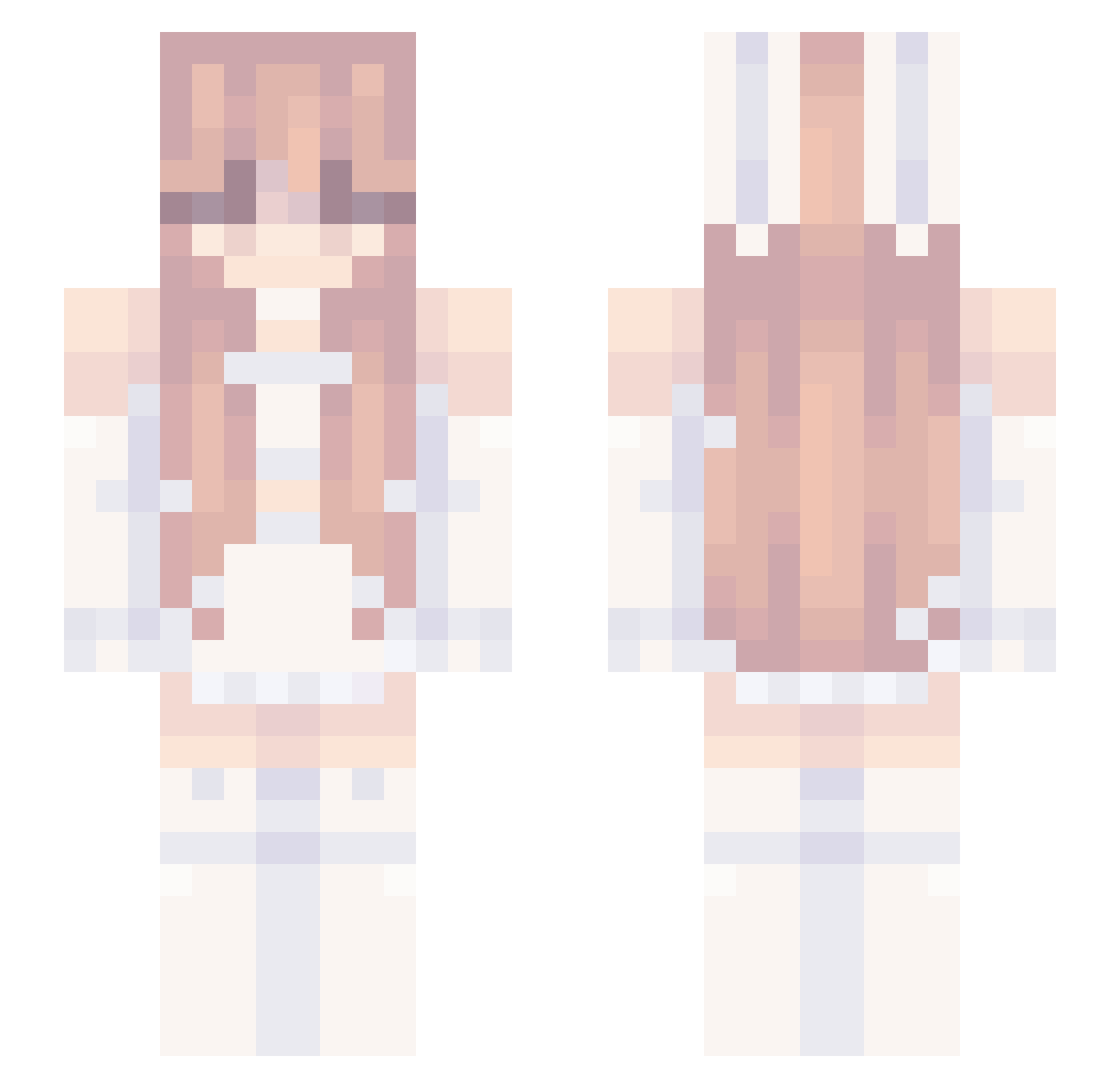
Current Minecraft skin of the player Ame__09, loaded from the official Mojang API. Rotate the 3D model with your mouse or finger, then download the skin as a PNG file and use it in Minecraft: Bedrock Edition or Java Edition for free. When Ame__09 changes their skin, this page updates automatically and the old skin stays in the history below.
Other players with this skin (239)
Ame__09 was the 233rd player we have seen with this skin, first spotted on 29.10.2026. The same skin was seen on these players. Open a nickname to see their current skin and skin history.
 Mekachirifu chunshangbhdsx SamMiyu caasiisaac Ebolinha 1cysunshine zha1fishie HtCyAAA RedBee91 Iittlelola Her_revengee__ hxllyberries LunarMoonBlossom bonklin Cytoplazma TridentScarft876 Coolhand756 4WInter CI0801 wyxo_00 kurkku81 Its_Blu_ EunoiaShop AxxxL01 HDG25 AerBeis 91uh whalee1337 Xstrystorm 67sixseven67uwu Coppermi _Fairy_ guc9 chibao11200 Schulfrei wantexxx Atif3689 _sofixxyy tianchaxh A0_I Linnea902 iiYuki Keny0815 LittleChaiLatte Luvcix MonsterMafia20 Spejn_Oficjalny Mirth7 TM3 Daeniya seokba SuperLeo781 QiongDn 2KITTYcat SaghyDesign DemonBob2 SaltedFishStar ZWLSqueaky Nicol_garcia_55 F4irygemini
More Bunny Ears Minecraft skins
How to install the Ame__09 skin
- Press the Download button above to save the skin as a PNG file.
- Minecraft: Bedrock Edition (PE): open the Dressing Room from the main menu (or tap your character → Edit Character), go to Classic Skins → Owned, press the + (new skin) button, choose the downloaded PNG and pick the Slim (Alex) model. Works on PC and mobile; consoles cannot import custom skins.
- Minecraft: Java Edition: open the Minecraft Launcher, go to the Skins tab, click New Skin, load the PNG, pick the Slim (Alex) model and press Save & Use. You can also upload it at minecraft.net → Profile → Change Skin.
The skin does not show up after import - what should I do?
Restart Minecraft and open the Dressing Room again - imported skins sometimes appear only after a restart. Also make sure you selected the imported skin and picked the Slim (Alex) model.
Which model should I choose, Classic or Slim?
This skin is designed for the Slim (Alex) model. If you pick the wrong model, the arms of the skin will look stretched or squeezed.
Is the skin of Ame__09 free to download?
Yes. Press Download, save the PNG file and use it in Minecraft: Bedrock Edition or Java Edition - no payment or registration needed. The skin also works on multiplayer servers and Realms.
More skins
Looking for more? Go back to all Minecraft skins and check the top skins of the week, month and all time, or find any player's skin by nickname.