
AARS_07 - Minecraft Skins & Skin History
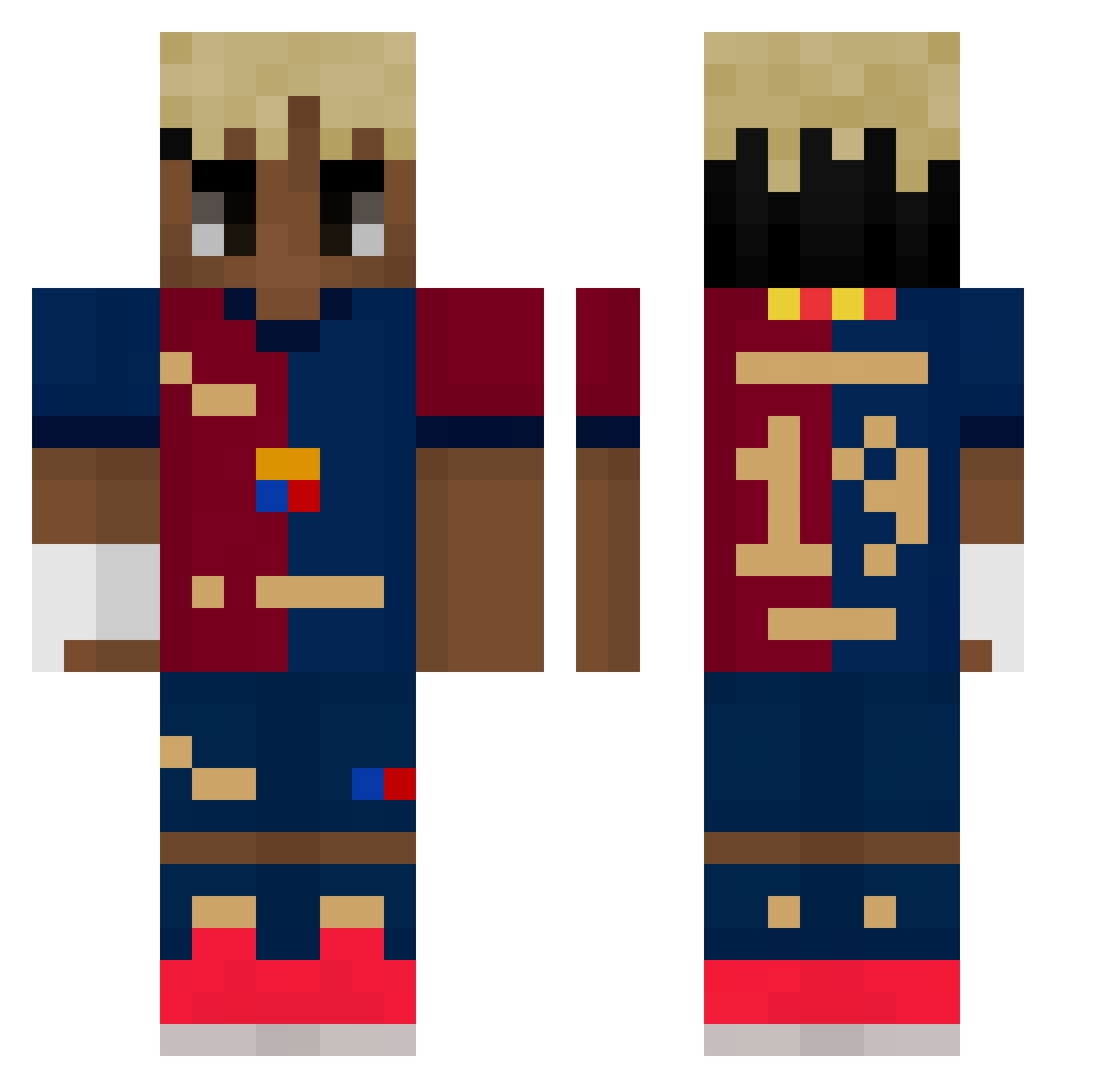
Current Minecraft skin of the player AARS_07, loaded from the official Mojang API. Rotate the 3D model with your mouse or finger, then download the skin as a PNG file and use it in Minecraft: Bedrock Edition or Java Edition for free. When AARS_07 changes their skin, this page updates automatically and the old skin stays in the history below.
Other players with this skin (488)
AARS_07 was the 347th player we have seen with this skin, first spotted on 06.10.2026. The same skin was seen on these players. Open a nickname to see their current skin and skin history.
 ivanelbautista cmatei28 iscristooo Ronaldosiuui Tambakti Julsko_91 CanDLT J3k47 dragonzanok DavN02 mistermartinZ Fulort WarzywkoToJa DoNer61 Vendy_hm benboludo DieDino molham1heen Miniuuuu Messi1GOAT S_an_d ItsAdiii DarthNatalik prortk vvnxos LamineYamall1O ReosYT Esc16 gorilaobeso moreeno5 Sidarta555 Youzinho anis_yt211 Elias2016732 _LamineYamal__ Vidalet_ k9mxn Gustav7057 kingarnacho rkdxogus1231 Katrot Trix2117 zzzzrrr Barteq2009 Subwhi EL_Miqui carlosj15_ WizKhalifeh911 jaaj2a Sammy_26 xjijk obikobi1 fluffyshy cisternasss RSMA_ALLESS zuzkav Techno_Takill TorenUp MaXeTe19 felhig82
More Soccer Kit Minecraft skins
How to install the AARS_07 skin
- Press the Download button above to save the skin as a PNG file.
- Minecraft: Bedrock Edition (PE): open the Dressing Room from the main menu (or tap your character → Edit Character), go to Classic Skins → Owned, press the + (new skin) button, choose the downloaded PNG and pick the Classic (Steve) model. Works on PC and mobile; consoles cannot import custom skins.
- Minecraft: Java Edition: open the Minecraft Launcher, go to the Skins tab, click New Skin, load the PNG, pick the Classic (Steve) model and press Save & Use. You can also upload it at minecraft.net → Profile → Change Skin.
The skin does not show up after import - what should I do?
Restart Minecraft and open the Dressing Room again - imported skins sometimes appear only after a restart. Also make sure you selected the imported skin and picked the Classic (Steve) model.
Which model should I choose, Classic or Slim?
This skin is designed for the Classic (Steve) model. If you pick the wrong model, the arms of the skin will look stretched or squeezed.
Is the skin of AARS_07 free to download?
Yes. Press Download, save the PNG file and use it in Minecraft: Bedrock Edition or Java Edition - no payment or registration needed. The skin also works on multiplayer servers and Realms.
More skins
Looking for more? Go back to all Minecraft skins and check the top skins of the week, month and all time, or find any player's skin by nickname.