
4kTrade - Minecraft Skins & Skin History
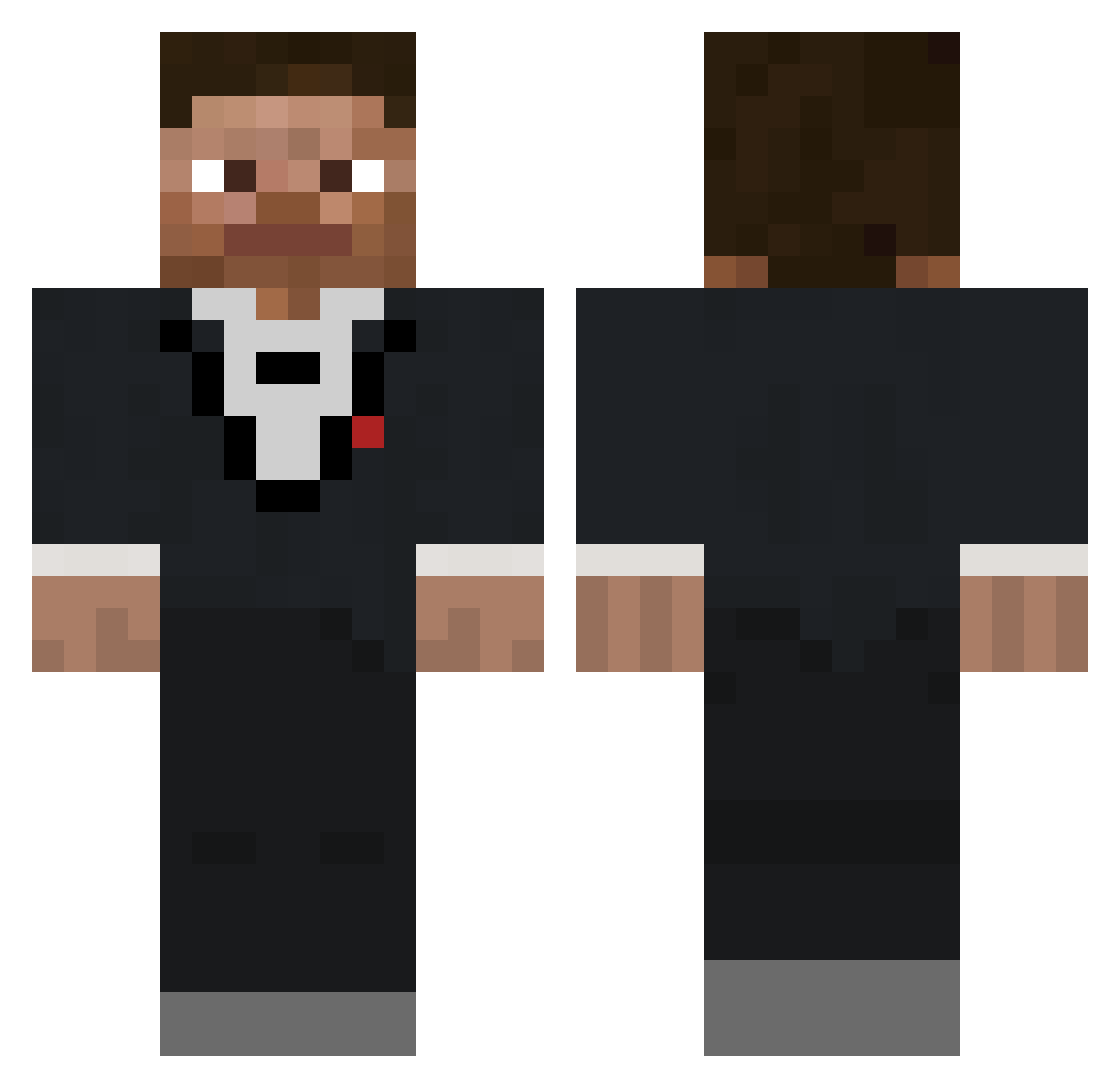
Current Minecraft skin of the player 4kTrade, loaded from the official Mojang API. Rotate the 3D model with your mouse or finger, then download the skin as a PNG file and use it in Minecraft: Bedrock Edition or Java Edition for free. When 4kTrade changes their skin, this page updates automatically and the old skin stays in the history below.
Other players with this skin (403)
4kTrade was the 155th player we have seen with this skin, first spotted on 07.09.2026. The same skin was seen on these players. Open a nickname to see their current skin and skin history.
 metin3273 TRE_TUBORG JohnTaxiDriver WButton3753
 Mckenzieeeee TheRealDonny6 RainyIV thebabywonder GlideWho Linkzy415 MY_MOM887 FormulaPunch rarerobbie DerHerrimAnzug Daigons0758 Xadnok KarmaKats AngelPonk158 SupercoloredDog MrThristQuencher JoeBo98 lukamazic ___shutup___ Sprizzy BebeSmashBob Exagel pinvolikesove OmarKabos JsonMinion Ayyyylamo Rythatguy11
 GridlockPrime23 jackbib Sr_LuisD Qsmain Kmolts KnutBuster420 JayVN_ NonGMOSalt magrao171 DemekinTV That_Potat0 DogRRavioli Samleyf_ fishholesalad macccll uxity_ Hieaki AJimenez22 GGman1KA PelmenisLV NoahOfCourseYT ndog395 RichardPhist1 MinecraftRubba IllyrianKingdom abram281 DiamondDonSelim Nicholast501 NarrowTv
How to install the 4kTrade skin
- Press the Download button above to save the skin as a PNG file.
- Minecraft: Bedrock Edition (PE): open the Dressing Room from the main menu (or tap your character → Edit Character), go to Classic Skins → Owned, press the + (new skin) button, choose the downloaded PNG and pick the Classic (Steve) model. Works on PC and mobile; consoles cannot import custom skins.
- Minecraft: Java Edition: open the Minecraft Launcher, go to the Skins tab, click New Skin, load the PNG, pick the Classic (Steve) model and press Save & Use. You can also upload it at minecraft.net → Profile → Change Skin.
The skin does not show up after import - what should I do?
Restart Minecraft and open the Dressing Room again - imported skins sometimes appear only after a restart. Also make sure you selected the imported skin and picked the Classic (Steve) model.
Which model should I choose, Classic or Slim?
This skin is designed for the Classic (Steve) model. If you pick the wrong model, the arms of the skin will look stretched or squeezed.
Is the skin of 4kTrade free to download?
Yes. Press Download, save the PNG file and use it in Minecraft: Bedrock Edition or Java Edition - no payment or registration needed. The skin also works on multiplayer servers and Realms.
More skins
Looking for more? Go back to all Minecraft skins and check the top skins of the week, month and all time, or find any player's skin by nickname.