
1sokol1 - Minecraft Skins & Skin History
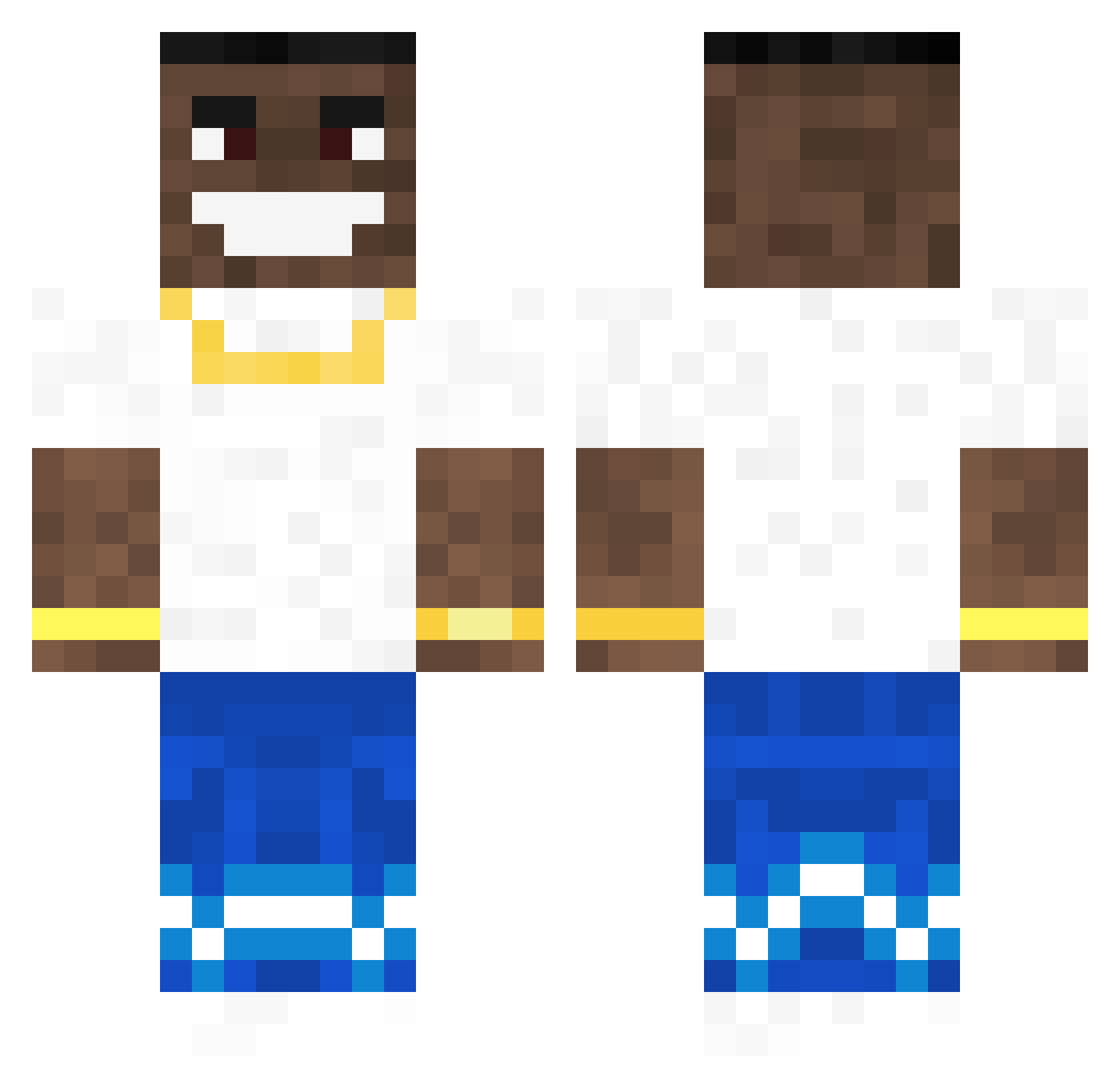
Current Minecraft skin of the player 1sokol1, loaded from the official Mojang API. Rotate the 3D model with your mouse or finger, then download the skin as a PNG file and use it in Minecraft: Bedrock Edition or Java Edition for free. When 1sokol1 changes their skin, this page updates automatically and the old skin stays in the history below.
Other players with this skin (114)
1sokol1 was the 19th player we have seen with this skin, first spotted on 12.08.2026. The same skin was seen on these players. Open a nickname to see their current skin and skin history.
 Flatted Goofyahnig Tom_Balen _Lish bigfanDABABY yung_karetka pavilionmagjack lhchdz bllessed Grant1499
 MlodyG2115 Vanillakai MrCuttlefish383 tryce420 Mongoleik kreetson smoke_br Tommyyyy_ FemboysAdoreAce Whare Djole030 Jersh99 MansDLagloog sweetcheeks123
 BarbieSlayer420 Wizardlyjust Zauch KNGDNVN davethrkid RealMeander1421 PROTOMETAPHRAST LlenodeMiedo PoopNoobRaff teend DorianTheDON Bxmba4Real volunteering PorscheLover6 _Fever_ Ararat13 Ingeberg KingB0ulder iiEddietheYeti
 Kyblmaster jjaniss Klappstuhlgang JoseMONDA taken88 nemzo Ctephfan krindz BuffOtter banan21_ Alexisfamous QuandelDingleton IZom1x AlvinGamer39 Zuvy IbRa761 jumajackson
More Dababy Minecraft skins
How to install the 1sokol1 skin
- Press the Download button above to save the skin as a PNG file.
- Minecraft: Bedrock Edition (PE): open the Dressing Room from the main menu (or tap your character → Edit Character), go to Classic Skins → Owned, press the + (new skin) button, choose the downloaded PNG and pick the Classic (Steve) model. Works on PC and mobile; consoles cannot import custom skins.
- Minecraft: Java Edition: open the Minecraft Launcher, go to the Skins tab, click New Skin, load the PNG, pick the Classic (Steve) model and press Save & Use. You can also upload it at minecraft.net → Profile → Change Skin.
The skin does not show up after import - what should I do?
Restart Minecraft and open the Dressing Room again - imported skins sometimes appear only after a restart. Also make sure you selected the imported skin and picked the Classic (Steve) model.
Which model should I choose, Classic or Slim?
This skin is designed for the Classic (Steve) model. If you pick the wrong model, the arms of the skin will look stretched or squeezed.
Is the skin of 1sokol1 free to download?
Yes. Press Download, save the PNG file and use it in Minecraft: Bedrock Edition or Java Edition - no payment or registration needed. The skin also works on multiplayer servers and Realms.
More skins
Looking for more? Go back to all Minecraft skins and check the top skins of the week, month and all time, or find any player's skin by nickname.