
yuchenn - Minecraft Skins & Skin History
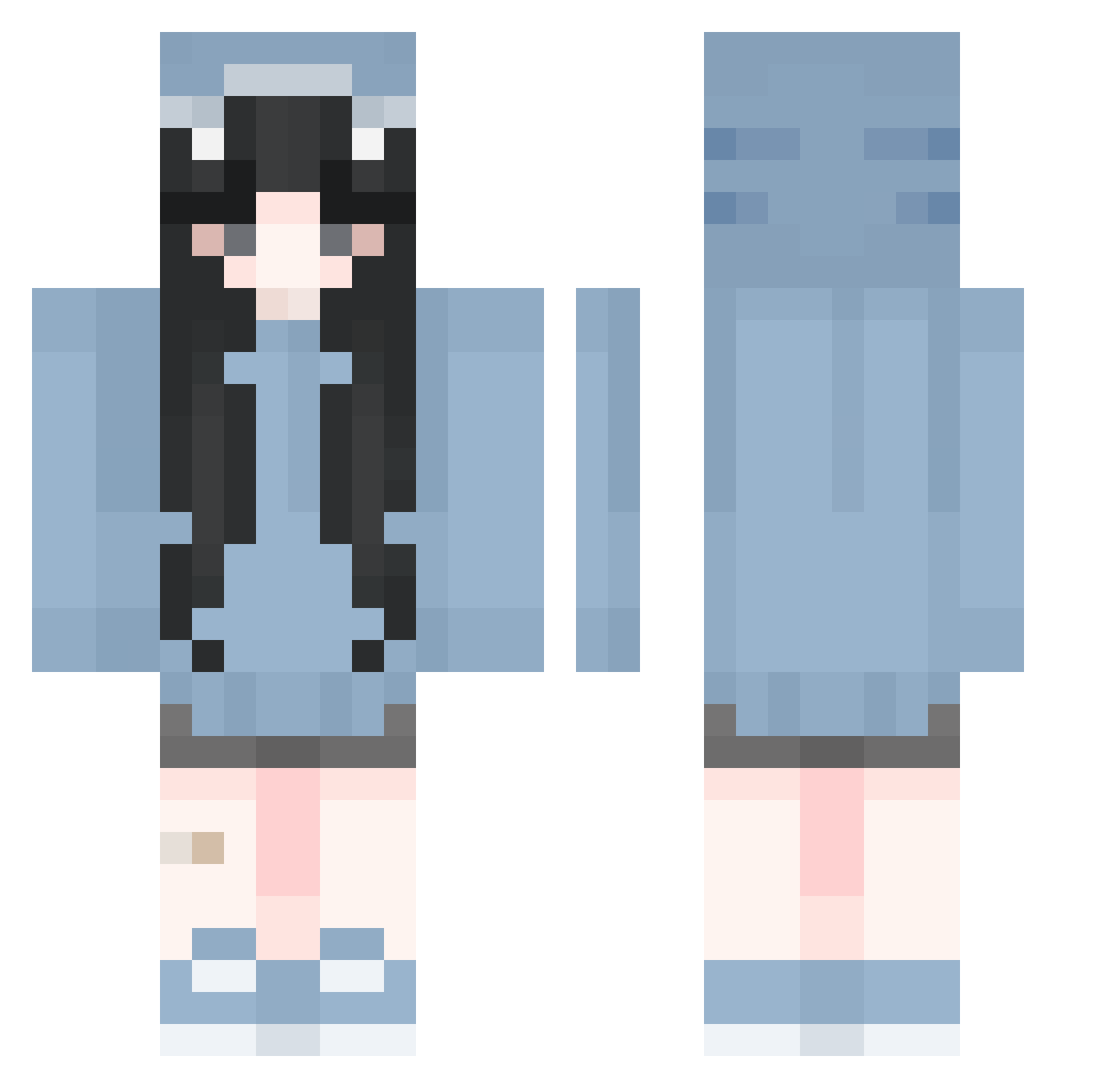
Current Minecraft skin of the player yuchenn, loaded from the official Mojang API. Rotate the 3D model with your mouse or finger, then download the skin as a PNG file and use it in Minecraft: Bedrock Edition or Java Edition for free. When yuchenn changes their skin, this page updates automatically and the old skin stays in the history below.
Other players with this skin (296)
yuchenn was the 144th player we have seen with this skin, first spotted on 22.09.2026. The same skin was seen on these players. Open a nickname to see their current skin and skin history.
 dabni0520 ashi1sigma p3t3rpark3rz alexsauria Alenxei HoneyBeeProud haeeon_8 Mahorinn Ashukq jyg_0 luotianzheng vlindre Aquatype sushi_432 DoveYz aoiwaru silverfoxhunter Harry_0309 Wuyu0929 Juliakox535 Starrx04 Tullenul Dufrenne Holisyne NV_o Tian_Yiyi yezi_miracle Puffancs0407 __dobi_ fatherkma Froggydog003 SouAlaska APPLEmelonn selenik RoyalsObbel Borowka__3000 zRejected Marimoca amelia_wbu_x Jqii_ _poppi_11 sofietjuhh8 TheDarkArchoNs Yuujirousama 2UxN_ii kiriwiwi Bloodmxxn xia_god04 suinS2 strawbrryscm teticheungoo TatsuUno mito_xyz Alittlewai V1oska Maanmaan cxLilacx riwocha yullets58 chino66
More Shark Onesie Minecraft skins
See all 191 Shark Onesie skins
How to install the yuchenn skin
- Press the Download button above to save the skin as a PNG file.
- Minecraft: Bedrock Edition (PE): open the Dressing Room from the main menu (or tap your character → Edit Character), go to Classic Skins → Owned, press the + (new skin) button, choose the downloaded PNG and pick the Classic (Steve) model. Works on PC and mobile; consoles cannot import custom skins.
- Minecraft: Java Edition: open the Minecraft Launcher, go to the Skins tab, click New Skin, load the PNG, pick the Classic (Steve) model and press Save & Use. You can also upload it at minecraft.net → Profile → Change Skin.
The skin does not show up after import - what should I do?
Restart Minecraft and open the Dressing Room again - imported skins sometimes appear only after a restart. Also make sure you selected the imported skin and picked the Classic (Steve) model.
Which model should I choose, Classic or Slim?
This skin is designed for the Classic (Steve) model. If you pick the wrong model, the arms of the skin will look stretched or squeezed.
Is the skin of yuchenn free to download?
Yes. Press Download, save the PNG file and use it in Minecraft: Bedrock Edition or Java Edition - no payment or registration needed. The skin also works on multiplayer servers and Realms.
More skins
Looking for more? Go back to all Minecraft skins and check the top skins of the week, month and all time, or find any player's skin by nickname.