
yoij - Minecraft Skins & Skin History
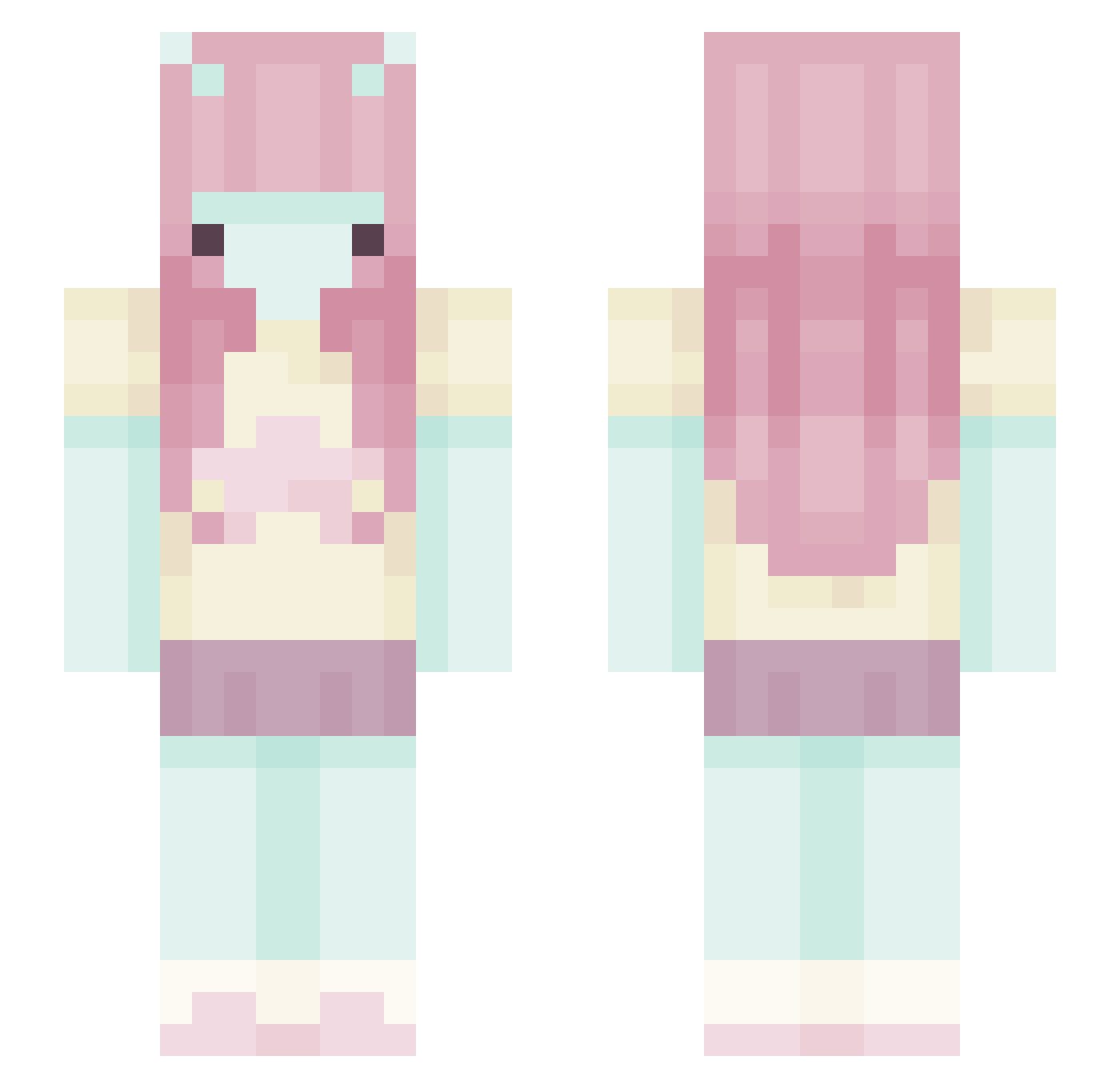
Current Minecraft skin of the player yoij, loaded from the official Mojang API. Rotate the 3D model with your mouse or finger, then download the skin as a PNG file and use it in Minecraft: Bedrock Edition or Java Edition for free. When yoij changes their skin, this page updates automatically and the old skin stays in the history below.
Other players with this skin (444)
yoij was the 214th player we have seen with this skin, first spotted on 16.09.2026. The same skin was seen on these players. Open a nickname to see their current skin and skin history.
 itim48 sunssiaya Mnmixx bellit_a fruittomato bubloomsz pillowangel ainalemuch 0_ov_ Blondii_01 PlayBrianaCookie 0dessaa rebec17 castriels MariyaSpider klozetkapagi jullzia xi40lie legoshipmaster LuluMel skibidicaitlyn silentiiene imstarlii maarvini poophia itzti Doopna mooncaake DataErrorEXE niliav alyagapon AngieLvsDreh azaza__ Kchssy
 JessiePinkwoman Lainkinniexoxo mossbaIIs sSawii va3lri coolnoodles2792 yawndeeri allixh00 aliasack Hanulkaxx TheLazy_Akigamer jellystarr Deezones shortnata jyeon709 Divinese twiigasaurus Angel0tuna RingoDoNordeste Iduu Dolldream Aiko0505 zzinnia eliviust sinhaeS2 zozowashereww
More Zero Two Minecraft skins
How to install the yoij skin
- Press the Download button above to save the skin as a PNG file.
- Minecraft: Bedrock Edition (PE): open the Dressing Room from the main menu (or tap your character → Edit Character), go to Classic Skins → Owned, press the + (new skin) button, choose the downloaded PNG and pick the Slim (Alex) model. Works on PC and mobile; consoles cannot import custom skins.
- Minecraft: Java Edition: open the Minecraft Launcher, go to the Skins tab, click New Skin, load the PNG, pick the Slim (Alex) model and press Save & Use. You can also upload it at minecraft.net → Profile → Change Skin.
The skin does not show up after import - what should I do?
Restart Minecraft and open the Dressing Room again - imported skins sometimes appear only after a restart. Also make sure you selected the imported skin and picked the Slim (Alex) model.
Which model should I choose, Classic or Slim?
This skin is designed for the Slim (Alex) model. If you pick the wrong model, the arms of the skin will look stretched or squeezed.
Is the skin of yoij free to download?
Yes. Press Download, save the PNG file and use it in Minecraft: Bedrock Edition or Java Edition - no payment or registration needed. The skin also works on multiplayer servers and Realms.
More skins
Looking for more? Go back to all Minecraft skins and check the top skins of the week, month and all time, or find any player's skin by nickname.