
xxlu7 - Minecraft Skins & Skin History
Current Minecraft skin of the player xxlu7, loaded from the official Mojang API. Rotate the 3D model with your mouse or finger, then download the skin as a PNG file and use it in Minecraft: Bedrock Edition or Java Edition for free. When xxlu7 changes their skin, this page updates automatically and the old skin stays in the history below.
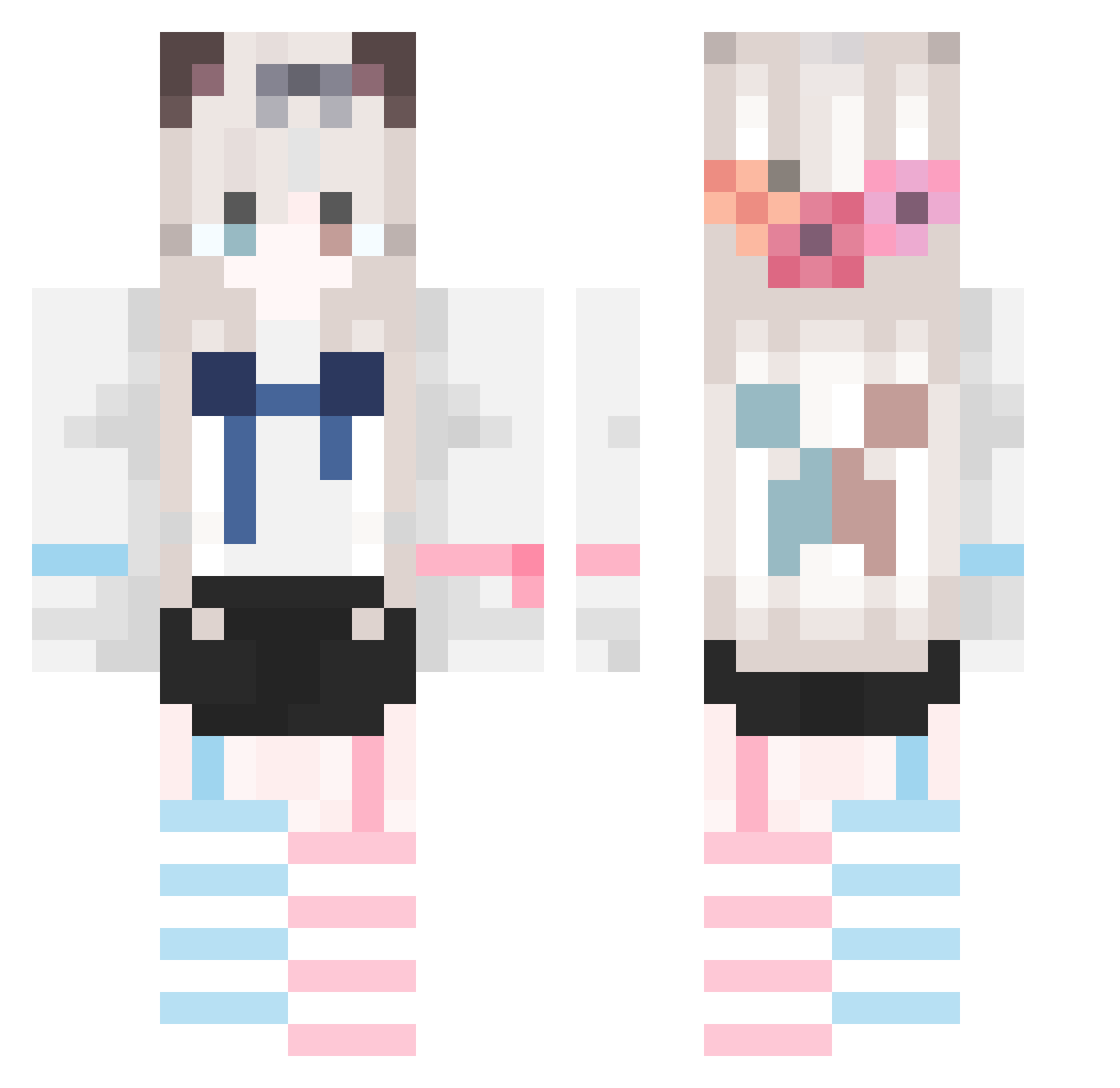
Other players with this skin (747)
xxlu7 was the 134th player we have seen with this skin, first spotted on 13.08.2026. The same skin was seen on these players. Open a nickname to see their current skin and skin history.
 Liliumq BaozZz_ Cassiuse Cyreue zero20000 yeluohuating Celestial_Meadow CXK2point5 He_Hang Theshenmin SobaSenpai da_xiang_zi muluosd LY115 yunqix La2y_D0g Chikasaur Miao_rig stars2018 NianBaiYi LaunchPad001 _YAMW_ gushuhui jubao_hua XIAOXU0533 wokusaa weiliang1 YJW_BS Xiao_yangZzz yycv123 seoulton shir_a73 Microscope01 liangchx_ HL_bomb xbo7 NANXU sanqiu_cc xuanli2157 Baiwula a_afu EHEHEIH 233w dai__zi gfdgfghgf ppxppx lumujun AdamLevin cinthy Truth12 FrveCoi Chihorika funnymudgobee Tagerman adadawaf Satori517 map666 mmmmwwad sensei10086 zhongshiji
More Cat Ears Minecraft skins
How to install the xxlu7 skin
- Press the Download button above to save the skin as a PNG file.
- Minecraft: Bedrock Edition (PE): open the Dressing Room from the main menu (or tap your character → Edit Character), go to Classic Skins → Owned, press the + (new skin) button, choose the downloaded PNG and pick the Classic (Steve) model. Works on PC and mobile; consoles cannot import custom skins.
- Minecraft: Java Edition: open the Minecraft Launcher, go to the Skins tab, click New Skin, load the PNG, pick the Classic (Steve) model and press Save & Use. You can also upload it at minecraft.net → Profile → Change Skin.
The skin does not show up after import - what should I do?
Restart Minecraft and open the Dressing Room again - imported skins sometimes appear only after a restart. Also make sure you selected the imported skin and picked the Classic (Steve) model.
Which model should I choose, Classic or Slim?
This skin is designed for the Classic (Steve) model. If you pick the wrong model, the arms of the skin will look stretched or squeezed.
Is the skin of xxlu7 free to download?
Yes. Press Download, save the PNG file and use it in Minecraft: Bedrock Edition or Java Edition - no payment or registration needed. The skin also works on multiplayer servers and Realms.
More skins
Looking for more? Go back to all Minecraft skins and check the top skins of the week, month and all time, or find any player's skin by nickname.