
xWintes - Minecraft Skins & Skin History
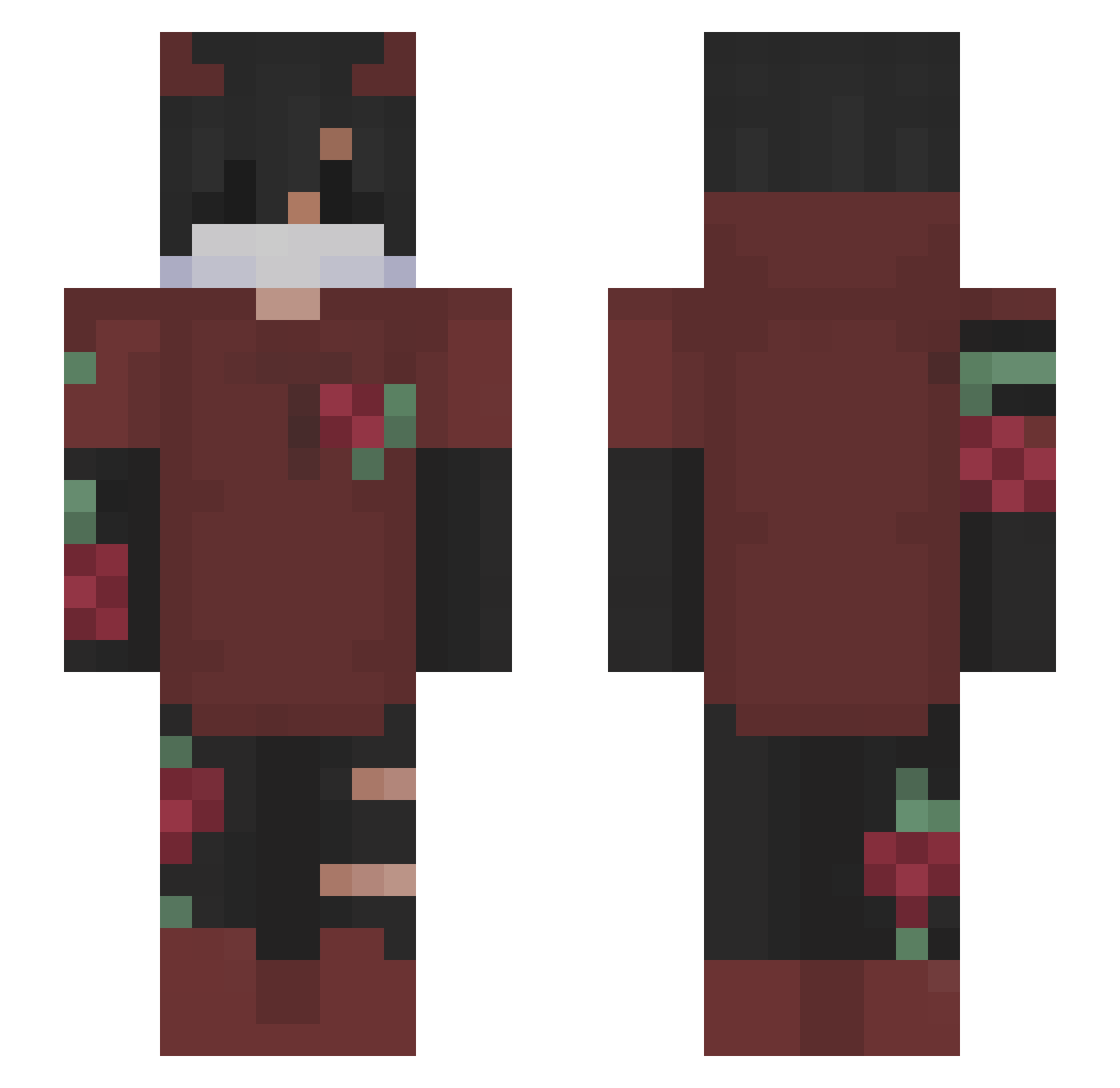
Current Minecraft skin of the player xWintes, loaded from the official Mojang API. Rotate the 3D model with your mouse or finger, then download the skin as a PNG file and use it in Minecraft: Bedrock Edition or Java Edition for free. When xWintes changes their skin, this page updates automatically and the old skin stays in the history below.
Other players with this skin (153)
xWintes was the 101st player we have seen with this skin, first spotted on 30.09.2026. The same skin was seen on these players. Open a nickname to see their current skin and skin history.
 Tucker_Poopcuck anyseMc GeckoGp Another_nickname xfr93n Hsmm1009 EwitsAden _IvDaArJi_ Bretleg THEGODGAMERXD magiru Arcaam HACOC _rAmir Yankee_wit_brim Phantamas HokirYT rxcan0 xAn4rchyx MaxiKingPLay _Limdo_ wasaby0_0 XenoXD2 jas_mp3 manurock GodWorser S1tGam3 PilotZHIR _MANDRAK Karrgo0 DrSonyRL McanTv Poly_Crate TTKrexper Maxicraft_979 MuslimBanana DRAXVOL SkyReXD RICH_CHEEZY PASTELGORE 404_Eska BoxyFoxy1201 gabodlt AigleChauve68 NectarYTT _Fairo404_ JetGamlng SadAkarii Mon_Amour arc4m Salva7w7 ItsCoronaTime101 thecure567 Monster9827 lxis__2 lantrocs Bertram03 MysticBolt17 Vince_27 g7ssen
More Demon Horns Minecraft skins
How to install the xWintes skin
- Press the Download button above to save the skin as a PNG file.
- Minecraft: Bedrock Edition (PE): open the Dressing Room from the main menu (or tap your character → Edit Character), go to Classic Skins → Owned, press the + (new skin) button, choose the downloaded PNG and pick the Slim (Alex) model. Works on PC and mobile; consoles cannot import custom skins.
- Minecraft: Java Edition: open the Minecraft Launcher, go to the Skins tab, click New Skin, load the PNG, pick the Slim (Alex) model and press Save & Use. You can also upload it at minecraft.net → Profile → Change Skin.
The skin does not show up after import - what should I do?
Restart Minecraft and open the Dressing Room again - imported skins sometimes appear only after a restart. Also make sure you selected the imported skin and picked the Slim (Alex) model.
Which model should I choose, Classic or Slim?
This skin is designed for the Slim (Alex) model. If you pick the wrong model, the arms of the skin will look stretched or squeezed.
Is the skin of xWintes free to download?
Yes. Press Download, save the PNG file and use it in Minecraft: Bedrock Edition or Java Edition - no payment or registration needed. The skin also works on multiplayer servers and Realms.
More skins
Looking for more? Go back to all Minecraft skins and check the top skins of the week, month and all time, or find any player's skin by nickname.