
willbutler69 - Minecraft Skins & Skin History
Current Minecraft skin of the player willbutler69, loaded from the official Mojang API. Rotate the 3D model with your mouse or finger, then download the skin as a PNG file and use it in Minecraft: Bedrock Edition or Java Edition for free. When willbutler69 changes their skin, this page updates automatically and the old skin stays in the history below.
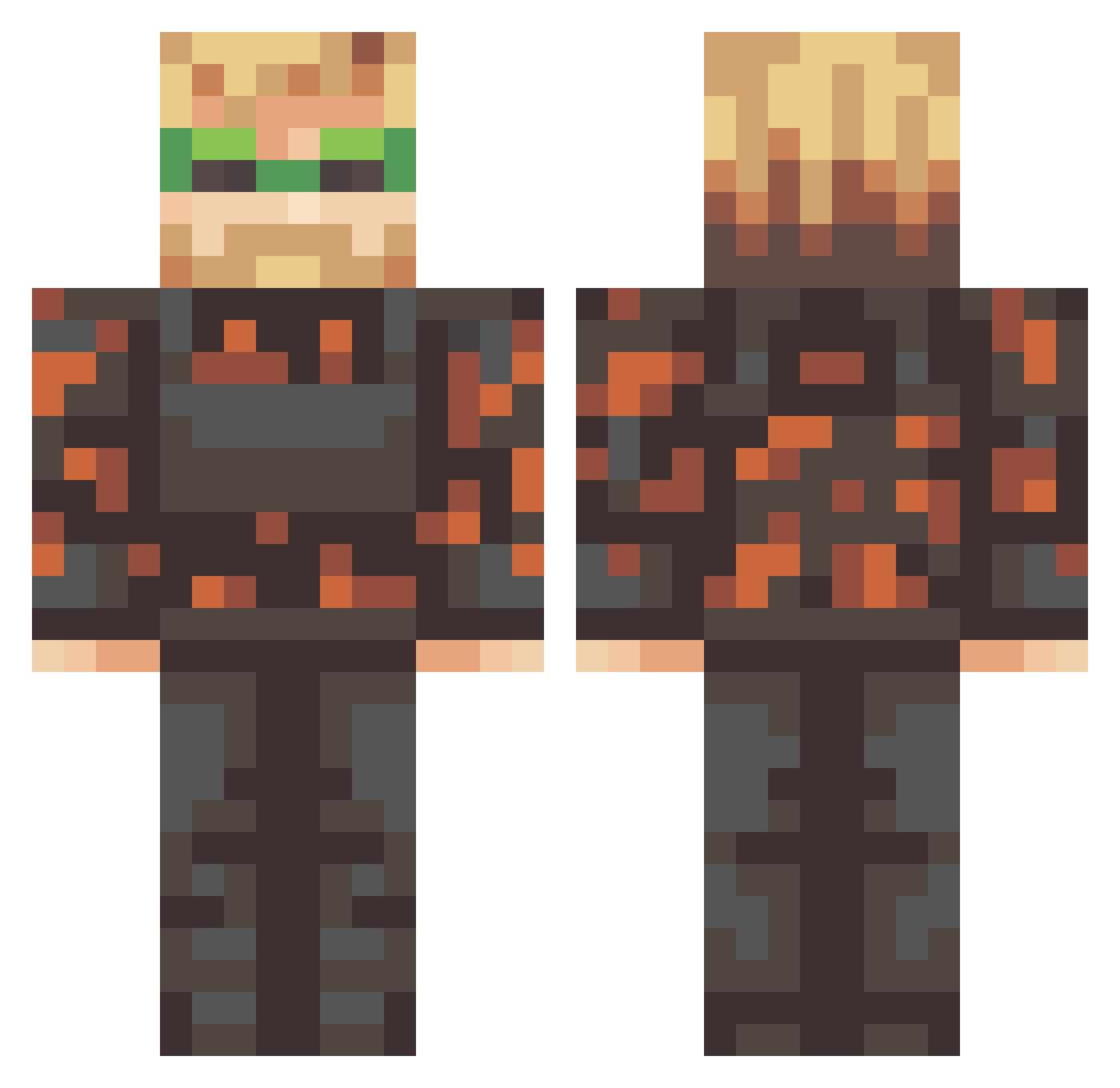
Other players with this skin (333)
willbutler69 was the 67th player we have seen with this skin, first spotted on 10.08.2026. The same skin was seen on these players. Open a nickname to see their current skin and skin history.
 Jacobo204 Facu0409 Mr_Jekaa SAG2102 ryguy_278 Jamesh070506 JewSlayer1418 MEMz19 Tinyu_X Thombas__ golovach_lena RYJ99 roguewolfshadow koko_youn TimBoMimB FancyT_99 DravMan21 OCTEM BLINDSEE profesionalas Any_Random_Playa
 VVikingg Wolfrazer SlimeySimon7 BuzzYogurLight Kungen164 lasertimepewpew Bed_Block PewDiePieFAN2008 Ignition_Atomics zoly144 kibumfs Logjam4017 mangojam802 MRBAKSH Dxgma MumboJumbo_YT S3pticK angryelf93 kkodliodli emzcraft Debella21 Endurowiec mgtp MrDonut000 BANANAANANANA ITSandgren ExodusBloc GavinTheDuck KaspersiusI potato_are_tasty Stiguissimo rtpm AngelDastick robstermeister Syntierio Big_Juicy1312 FATCAT_8002 fnandooo Bak3dPotat0
More Camo Minecraft skins
How to install the willbutler69 skin
- Press the Download button above to save the skin as a PNG file.
- Minecraft: Bedrock Edition (PE): open the Dressing Room from the main menu (or tap your character → Edit Character), go to Classic Skins → Owned, press the + (new skin) button, choose the downloaded PNG and pick the Classic (Steve) model. Works on PC and mobile; consoles cannot import custom skins.
- Minecraft: Java Edition: open the Minecraft Launcher, go to the Skins tab, click New Skin, load the PNG, pick the Classic (Steve) model and press Save & Use. You can also upload it at minecraft.net → Profile → Change Skin.
The skin does not show up after import - what should I do?
Restart Minecraft and open the Dressing Room again - imported skins sometimes appear only after a restart. Also make sure you selected the imported skin and picked the Classic (Steve) model.
Which model should I choose, Classic or Slim?
This skin is designed for the Classic (Steve) model. If you pick the wrong model, the arms of the skin will look stretched or squeezed.
Is the skin of willbutler69 free to download?
Yes. Press Download, save the PNG file and use it in Minecraft: Bedrock Edition or Java Edition - no payment or registration needed. The skin also works on multiplayer servers and Realms.
More skins
Looking for more? Go back to all Minecraft skins and check the top skins of the week, month and all time, or find any player's skin by nickname.