
welsdarte - Minecraft Skins & Skin History
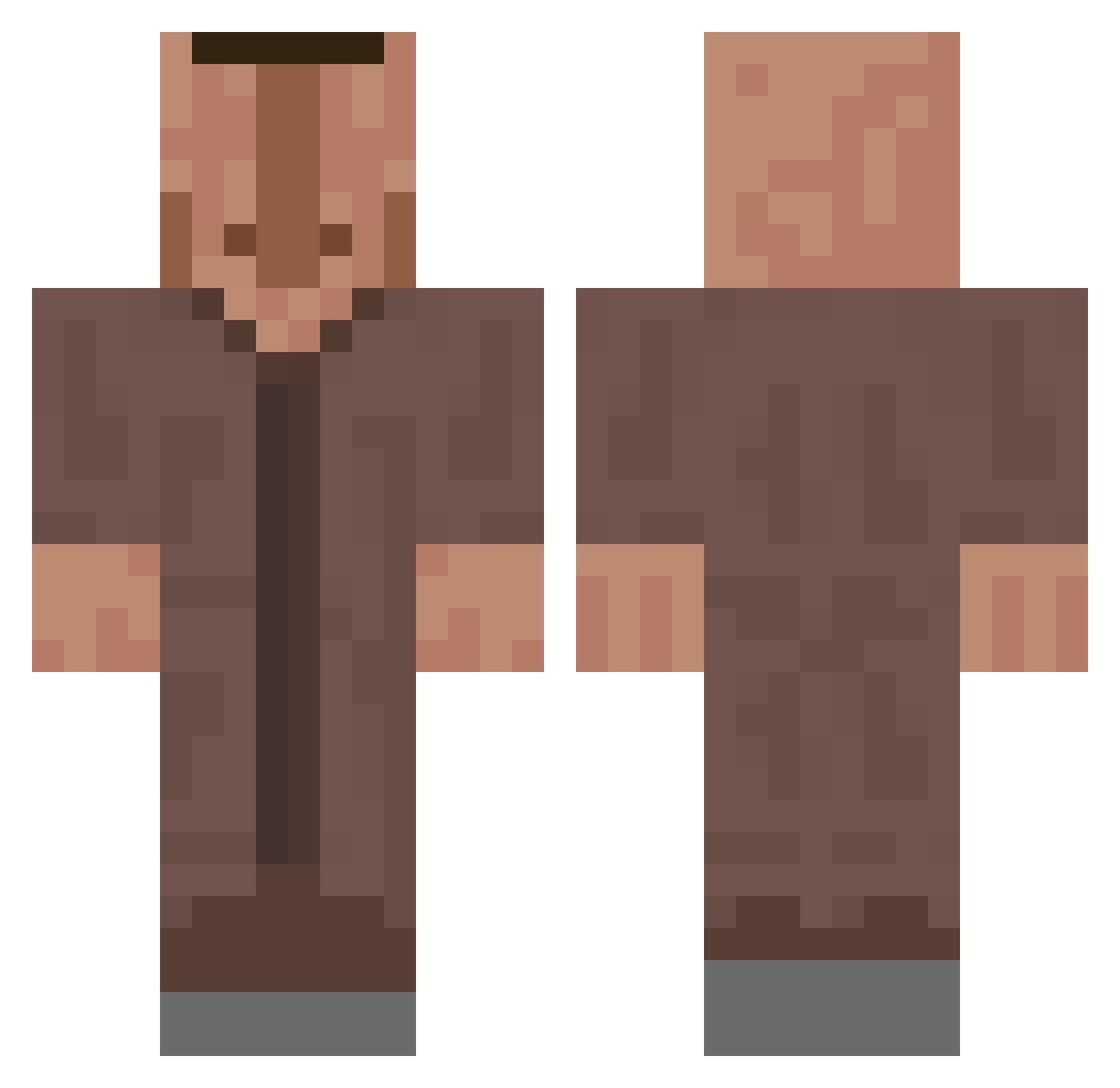
Current Minecraft skin of the player welsdarte, loaded from the official Mojang API. Rotate the 3D model with your mouse or finger, then download the skin as a PNG file and use it in Minecraft: Bedrock Edition or Java Edition for free. When welsdarte changes their skin, this page updates automatically and the old skin stays in the history below.
Other players with this skin (657)
welsdarte was the 616th player we have seen with this skin, first spotted on 28.10.2026. The same skin was seen on these players. Open a nickname to see their current skin and skin history.
 Skaylosk Einfachclemi kentrozom BondePower123 _DD_YT_ Minalba_Prime MxM40 b1uepilot paulvb Dlgdc P1skostrui1337 Inner_Beauty Pizza_Water zamphi__ lathan714 Abedir jam27_ MHHSU JohnPorkThinkHHH D7myoden Gusta51 DINGO558 modalism Olanzapina GedankeJupiter5 manny09 dnrWh Goully Gekoz DemonKasu CastfighterLP YouInnYou Just1nID felipelmp xlattes BlauKatzeee TheLazyCoder_JS parkroa crashcubo LeckEier_187 Flossyban DanilkaM12 0IHEI0 Sjorsiee The_Hedge Oldvan4 Bluefine PROSKIL BongoFM Spongeboy1 qLocal Stevenbadger Kalokedym EssenWirHeuteOma Poepeter123829 oDanyaSosatelb Only_Willem ju_nun0603 HOIIIIIIIL st0myS
More Villager Minecraft skins
How to install the welsdarte skin
- Press the Download button above to save the skin as a PNG file.
- Minecraft: Bedrock Edition (PE): open the Dressing Room from the main menu (or tap your character → Edit Character), go to Classic Skins → Owned, press the + (new skin) button, choose the downloaded PNG and pick the Classic (Steve) model. Works on PC and mobile; consoles cannot import custom skins.
- Minecraft: Java Edition: open the Minecraft Launcher, go to the Skins tab, click New Skin, load the PNG, pick the Classic (Steve) model and press Save & Use. You can also upload it at minecraft.net → Profile → Change Skin.
The skin does not show up after import - what should I do?
Restart Minecraft and open the Dressing Room again - imported skins sometimes appear only after a restart. Also make sure you selected the imported skin and picked the Classic (Steve) model.
Which model should I choose, Classic or Slim?
This skin is designed for the Classic (Steve) model. If you pick the wrong model, the arms of the skin will look stretched or squeezed.
Is the skin of welsdarte free to download?
Yes. Press Download, save the PNG file and use it in Minecraft: Bedrock Edition or Java Edition - no payment or registration needed. The skin also works on multiplayer servers and Realms.
More skins
Looking for more? Go back to all Minecraft skins and check the top skins of the week, month and all time, or find any player's skin by nickname.