
toni0411 - Minecraft Skins & Skin History
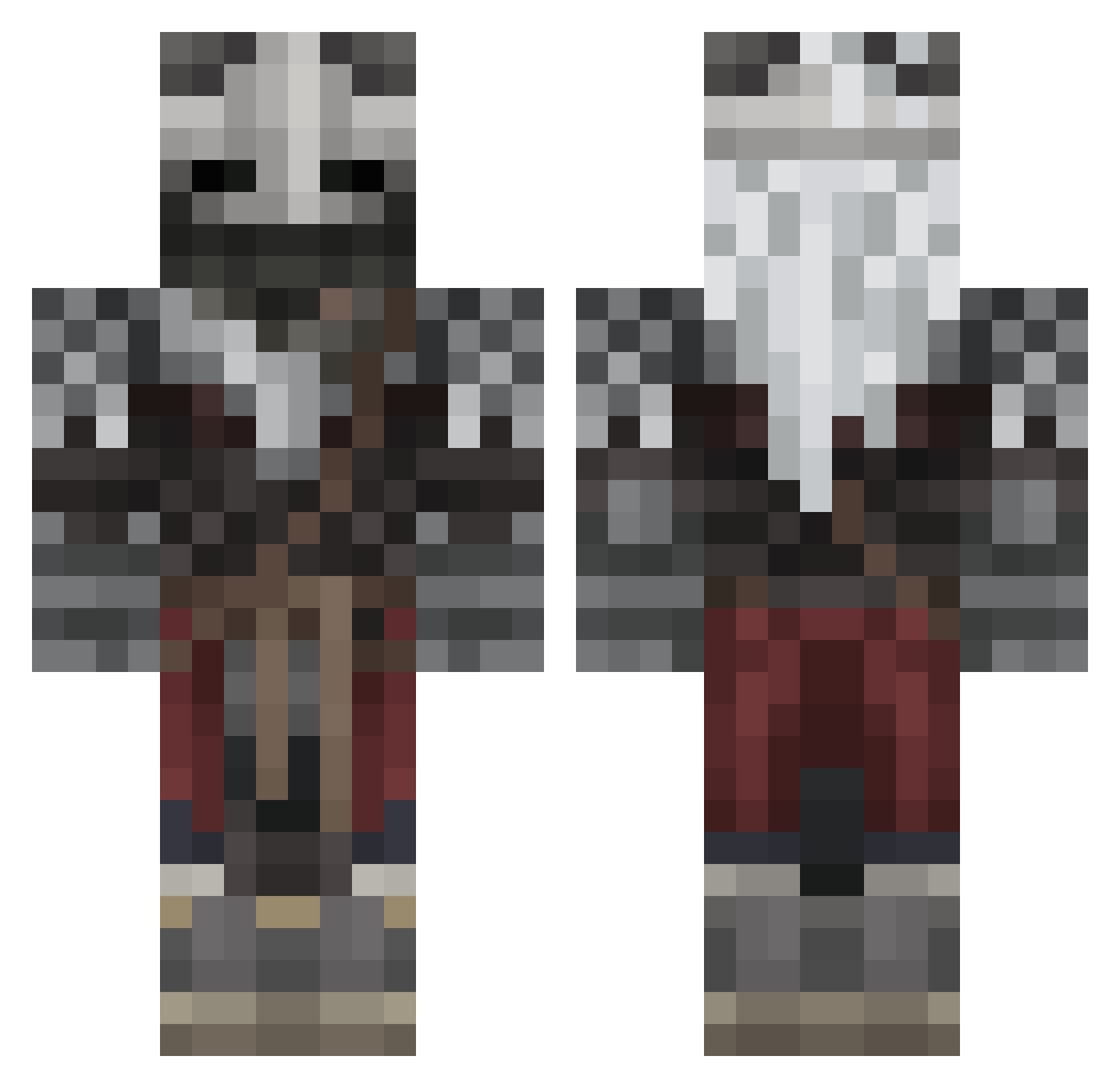
Current Minecraft skin of the player toni0411, loaded from the official Mojang API. Rotate the 3D model with your mouse or finger, then download the skin as a PNG file and use it in Minecraft: Bedrock Edition or Java Edition for free. When toni0411 changes their skin, this page updates automatically and the old skin stays in the history below.
Other players with this skin (602)
toni0411 was the 200th player we have seen with this skin, first spotted on 03.09.2026. The same skin was seen on these players. Open a nickname to see their current skin and skin history.
 Entkf Blue1596 Swe3t__ destroyer25525 SullyxMC Stormsurgeons _Valtiel_ TANKMASTER2023 DuskMars Sneaky_Cheeto6 fresims Nyschke Sxkxb AeroGnome LeaNzuki TELEFON31 AnthonySSK TheBanthaPoodoo BobbyFergerson Titin01 ricktholomew Rannaws Tarnished10 SwaggyBoj24 debolt1 Water_The_People shkaku Tarnished_482 Implicat Pickle_sandwitch RetroRuby Kiva_Dachi Sneasel39 OreoMcBoreo Benanenamin LonelyBoi404 Writemaree100 Felonn NoONeZ1123 sylgrey mccabe_ Labazadeoro YuzuWA04 GEPPI2009 Takitothug Tethra43 IAdoreFemBoys Azranak CD030982 Karu650 Soup_My_Dude CarTomeX BabyJesus8503 ZorritoCraft304 Kodakan_ J03mamma SammieDoo Soup_handsome TTVGregHeffley sebthetomato
More Warrior Minecraft skins
How to install the toni0411 skin
- Press the Download button above to save the skin as a PNG file.
- Minecraft: Bedrock Edition (PE): open the Dressing Room from the main menu (or tap your character → Edit Character), go to Classic Skins → Owned, press the + (new skin) button, choose the downloaded PNG and pick the Classic (Steve) model. Works on PC and mobile; consoles cannot import custom skins.
- Minecraft: Java Edition: open the Minecraft Launcher, go to the Skins tab, click New Skin, load the PNG, pick the Classic (Steve) model and press Save & Use. You can also upload it at minecraft.net → Profile → Change Skin.
The skin does not show up after import - what should I do?
Restart Minecraft and open the Dressing Room again - imported skins sometimes appear only after a restart. Also make sure you selected the imported skin and picked the Classic (Steve) model.
Which model should I choose, Classic or Slim?
This skin is designed for the Classic (Steve) model. If you pick the wrong model, the arms of the skin will look stretched or squeezed.
Is the skin of toni0411 free to download?
Yes. Press Download, save the PNG file and use it in Minecraft: Bedrock Edition or Java Edition - no payment or registration needed. The skin also works on multiplayer servers and Realms.
More skins
Looking for more? Go back to all Minecraft skins and check the top skins of the week, month and all time, or find any player's skin by nickname.