
tobiasleonkoelz - Minecraft Skins & Skin History
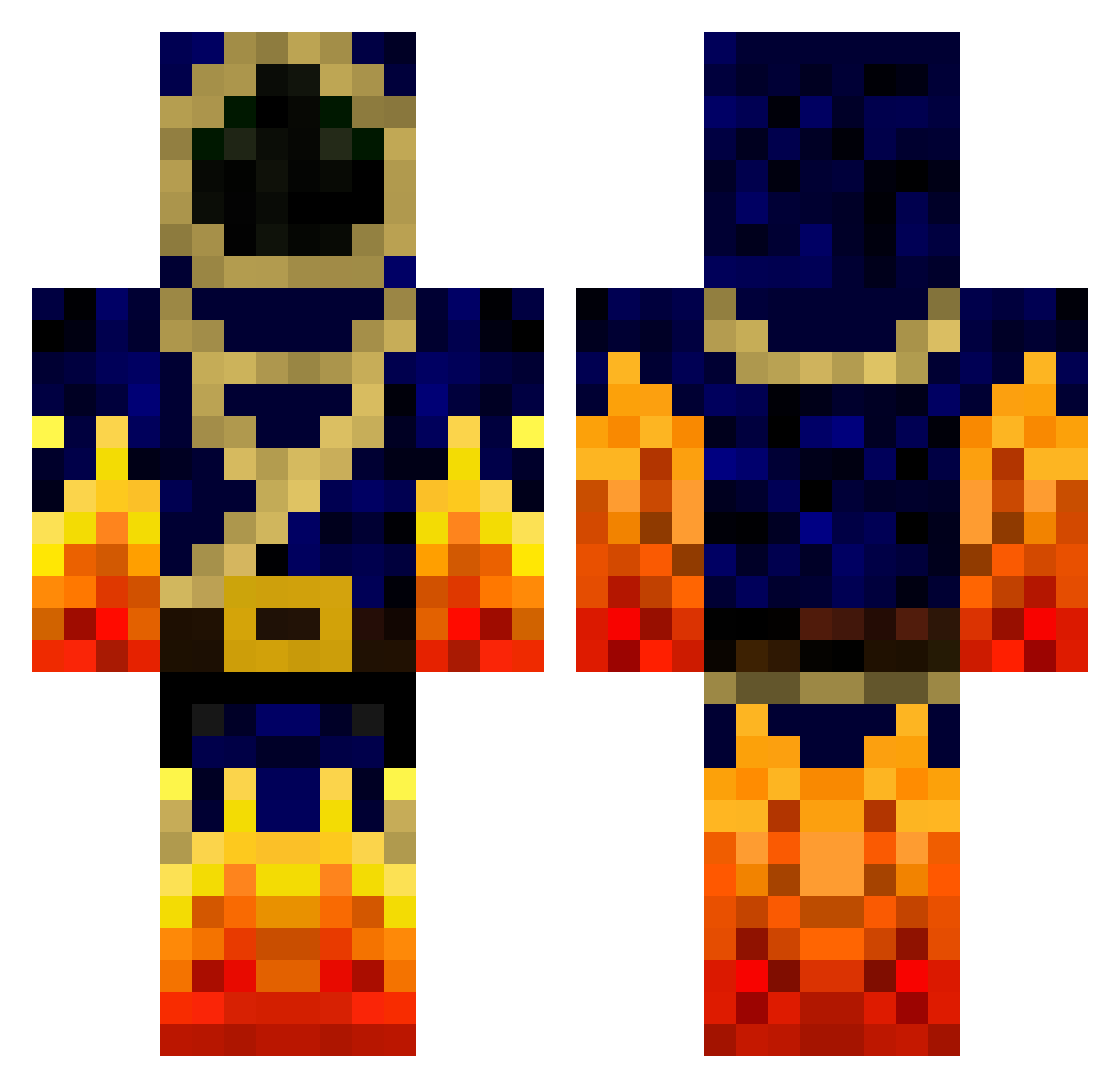
Current Minecraft skin of the player tobiasleonkoelz, loaded from the official Mojang API. Rotate the 3D model with your mouse or finger, then download the skin as a PNG file and use it in Minecraft: Bedrock Edition or Java Edition for free. When tobiasleonkoelz changes their skin, this page updates automatically and the old skin stays in the history below.
Other players with this skin (777)
tobiasleonkoelz was the 265th player we have seen with this skin, first spotted on 02.09.2026. The same skin was seen on these players. Open a nickname to see their current skin and skin history.
 scooter70 coolbug4 10hobo UniqueSoS Kilian_Heisig _StormMage_ maximilien11 PaddyTruck brianguy29 flamingshadow555 Nighthawk5223 Kara31st Filer33 MC_Noah Silverlabel firewolf768 SuayErol Big_ShowPT MincraftHippy MrSuperior38 Hamid12 Harm_003 TheMasterDucker xXKINGPIGXx hammerray Mosu100 billyb04 Norvock FluffyTheCat02 Erongs SpectreMania TaubeN3o Narhoz fire7181 Elrenar kyeel1 Lord_Nan cRaZyMaShMaLlOw linus_gel monsterman4567 Elowan7 TheThijsXD Felion Housni66 Ostten200 Ignishadow The_Creeper_Lord Summerfield1 BlackGoldSoul EmmaJoL 72john72 Tim_du_13 kylec0304 xtFirelord Miithos KingOfAssassin Sulucia MatoiasNe Firemaker18 Dorndar
More Mage Minecraft skins
How to install the tobiasleonkoelz skin
- Press the Download button above to save the skin as a PNG file.
- Minecraft: Bedrock Edition (PE): open the Dressing Room from the main menu (or tap your character → Edit Character), go to Classic Skins → Owned, press the + (new skin) button, choose the downloaded PNG and pick the Classic (Steve) model. Works on PC and mobile; consoles cannot import custom skins.
- Minecraft: Java Edition: open the Minecraft Launcher, go to the Skins tab, click New Skin, load the PNG, pick the Classic (Steve) model and press Save & Use. You can also upload it at minecraft.net → Profile → Change Skin.
The skin does not show up after import - what should I do?
Restart Minecraft and open the Dressing Room again - imported skins sometimes appear only after a restart. Also make sure you selected the imported skin and picked the Classic (Steve) model.
Which model should I choose, Classic or Slim?
This skin is designed for the Classic (Steve) model. If you pick the wrong model, the arms of the skin will look stretched or squeezed.
Is the skin of tobiasleonkoelz free to download?
Yes. Press Download, save the PNG file and use it in Minecraft: Bedrock Edition or Java Edition - no payment or registration needed. The skin also works on multiplayer servers and Realms.
More skins
Looking for more? Go back to all Minecraft skins and check the top skins of the week, month and all time, or find any player's skin by nickname.