
thejocky78 - Minecraft Skins & Skin History
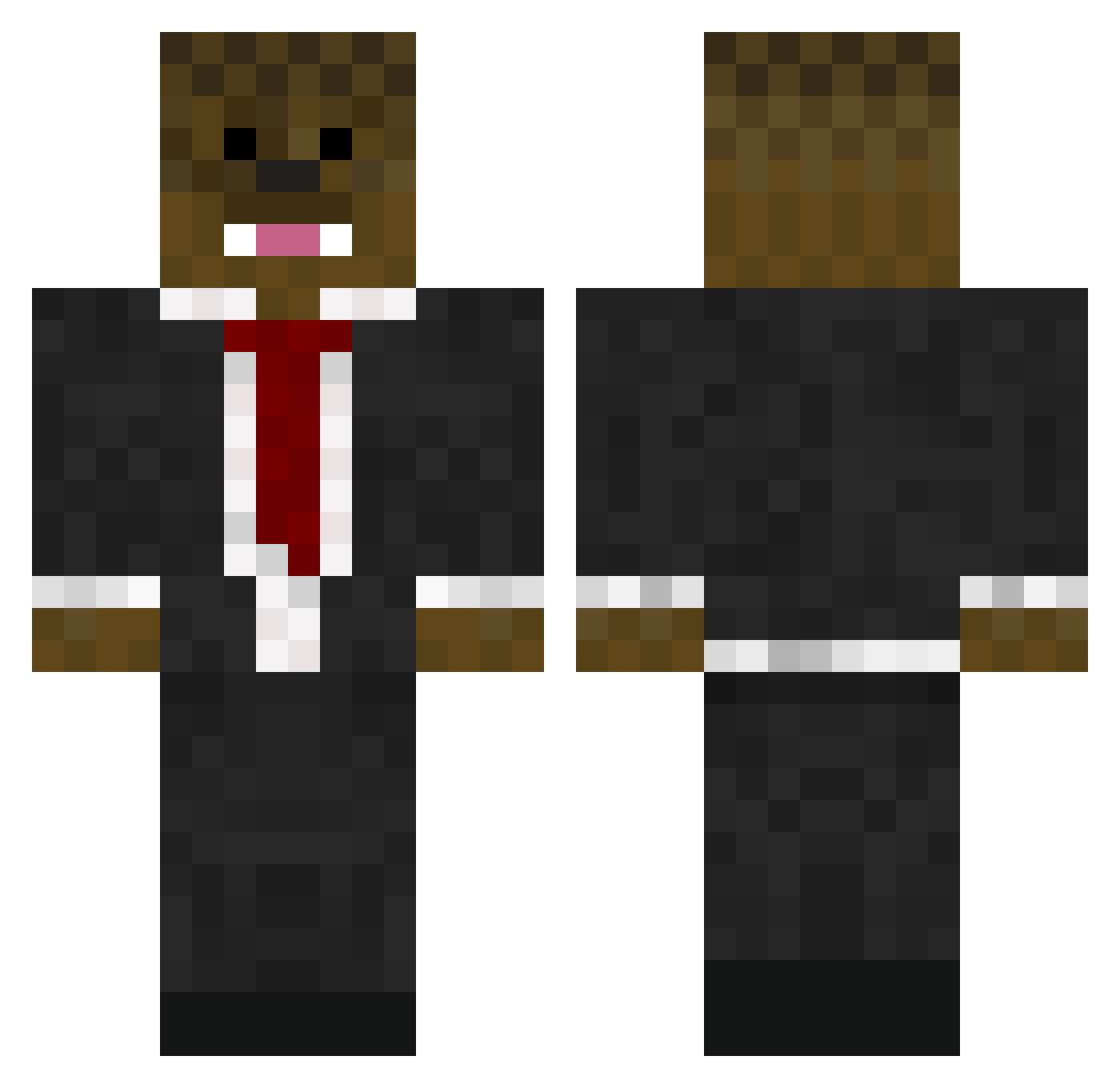
Current Minecraft skin of the player thejocky78, loaded from the official Mojang API. Rotate the 3D model with your mouse or finger, then download the skin as a PNG file and use it in Minecraft: Bedrock Edition or Java Edition for free. When thejocky78 changes their skin, this page updates automatically and the old skin stays in the history below.
Other players with this skin (771)
thejocky78 was the 659th player we have seen with this skin, first spotted on 04.11.2026. The same skin was seen on these players. Open a nickname to see their current skin and skin history.
 LegitSwagMC Ninja_vx The_Cosmose abhymas wis3 SiriusRiddle Hakcsource notraxxx vGlOwZz UDBLOODNGUNNER69 Alexscity shelbyryan damian6789 Dean1295 bunnywolf52 scoobasteve98 mgobluefan4 funkymonk11 Siggystardust StoneMason TheFluffyMaestro crazyjj09 masenyerface 42penguin42 DementorXX jjames69617 foster39 JT10001 Ethanhbest 27SIMON27 hudsoncd Bumbsy minerman07 jjkiller86 skiingryan honeydew4814 fat_bacca15 TLSkills smithy1890 Sapphiregreen223 FatFluffyKitty Davidbrann2001 Derpman2343 Creeperarro voodood7 Baccas_Armesan ja5onco NotCorrupt Dr_Mmundee AmericanSniper19 CrImSoNNBA24 Juno_TH stiky27 TheSlimshadeey zombieglower bobofett13 theOPGamers FurreyFox yagel00542 johntheman66
More Chewbacca Minecraft skins
How to install the thejocky78 skin
- Press the Download button above to save the skin as a PNG file.
- Minecraft: Bedrock Edition (PE): open the Dressing Room from the main menu (or tap your character → Edit Character), go to Classic Skins → Owned, press the + (new skin) button, choose the downloaded PNG and pick the Classic (Steve) model. Works on PC and mobile; consoles cannot import custom skins.
- Minecraft: Java Edition: open the Minecraft Launcher, go to the Skins tab, click New Skin, load the PNG, pick the Classic (Steve) model and press Save & Use. You can also upload it at minecraft.net → Profile → Change Skin.
The skin does not show up after import - what should I do?
Restart Minecraft and open the Dressing Room again - imported skins sometimes appear only after a restart. Also make sure you selected the imported skin and picked the Classic (Steve) model.
Which model should I choose, Classic or Slim?
This skin is designed for the Classic (Steve) model. If you pick the wrong model, the arms of the skin will look stretched or squeezed.
Is the skin of thejocky78 free to download?
Yes. Press Download, save the PNG file and use it in Minecraft: Bedrock Edition or Java Edition - no payment or registration needed. The skin also works on multiplayer servers and Realms.
More skins
Looking for more? Go back to all Minecraft skins and check the top skins of the week, month and all time, or find any player's skin by nickname.