
the_hellie - Minecraft Skins & Skin History
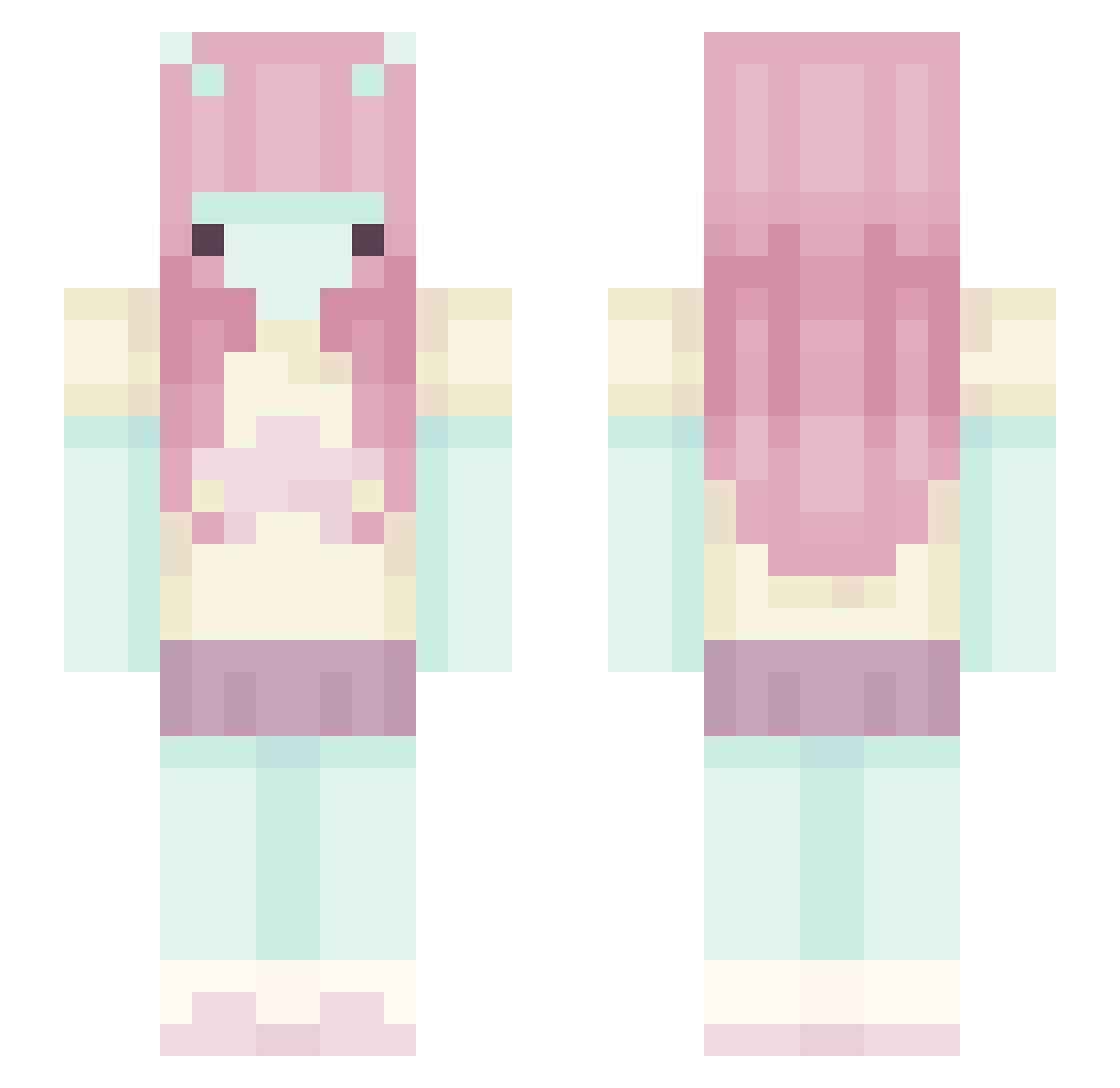
Current Minecraft skin of the player the_hellie, loaded from the official Mojang API. Rotate the 3D model with your mouse or finger, then download the skin as a PNG file and use it in Minecraft: Bedrock Edition or Java Edition for free. When the_hellie changes their skin, this page updates automatically and the old skin stays in the history below.
Other players with this skin (511)
the_hellie was the 478th player we have seen with this skin, first spotted on 09.11.2026. The same skin was seen on these players. Open a nickname to see their current skin and skin history.
 refrigeratorio Rockpan sarXkuna detectivefiercee JoohaMyLuv Ilovestars03 l0uup kiisskii silverlemogballs mayyashf neoplasm9 notafemale__ akiimmii Shanks543 Yuichxi himerin5 Ochyro skalmarsoon jjin55 Temakisu meowiemeowmeowww Starintrusion1 vanillybunny tackyvanilla piscoruivo _Lu_x3 im0genheap Keeerynn anibanii sirenitaa ghostinnit7710 Misb123445 Kaichic MoonVexa Drasur666 RajaTheTiger YoMumXD Farting_Rainbows maypaps Liese_paard TrueFatality llleere Poison_girlx MazapanaA verapoh skullabel _my_melody_ Shrimpity kerashler Privana Xylas7 toemee taykait Rainbowpower32 ilovleebit fortnitepro83646 Luvrosu soapydribble cho2000 bibiiui
More Zero Two Minecraft skins
How to install the the_hellie skin
- Press the Download button above to save the skin as a PNG file.
- Minecraft: Bedrock Edition (PE): open the Dressing Room from the main menu (or tap your character → Edit Character), go to Classic Skins → Owned, press the + (new skin) button, choose the downloaded PNG and pick the Slim (Alex) model. Works on PC and mobile; consoles cannot import custom skins.
- Minecraft: Java Edition: open the Minecraft Launcher, go to the Skins tab, click New Skin, load the PNG, pick the Slim (Alex) model and press Save & Use. You can also upload it at minecraft.net → Profile → Change Skin.
The skin does not show up after import - what should I do?
Restart Minecraft and open the Dressing Room again - imported skins sometimes appear only after a restart. Also make sure you selected the imported skin and picked the Slim (Alex) model.
Which model should I choose, Classic or Slim?
This skin is designed for the Slim (Alex) model. If you pick the wrong model, the arms of the skin will look stretched or squeezed.
Is the skin of the_hellie free to download?
Yes. Press Download, save the PNG file and use it in Minecraft: Bedrock Edition or Java Edition - no payment or registration needed. The skin also works on multiplayer servers and Realms.
More skins
Looking for more? Go back to all Minecraft skins and check the top skins of the week, month and all time, or find any player's skin by nickname.