
taktitreba - Minecraft Skins & Skin History
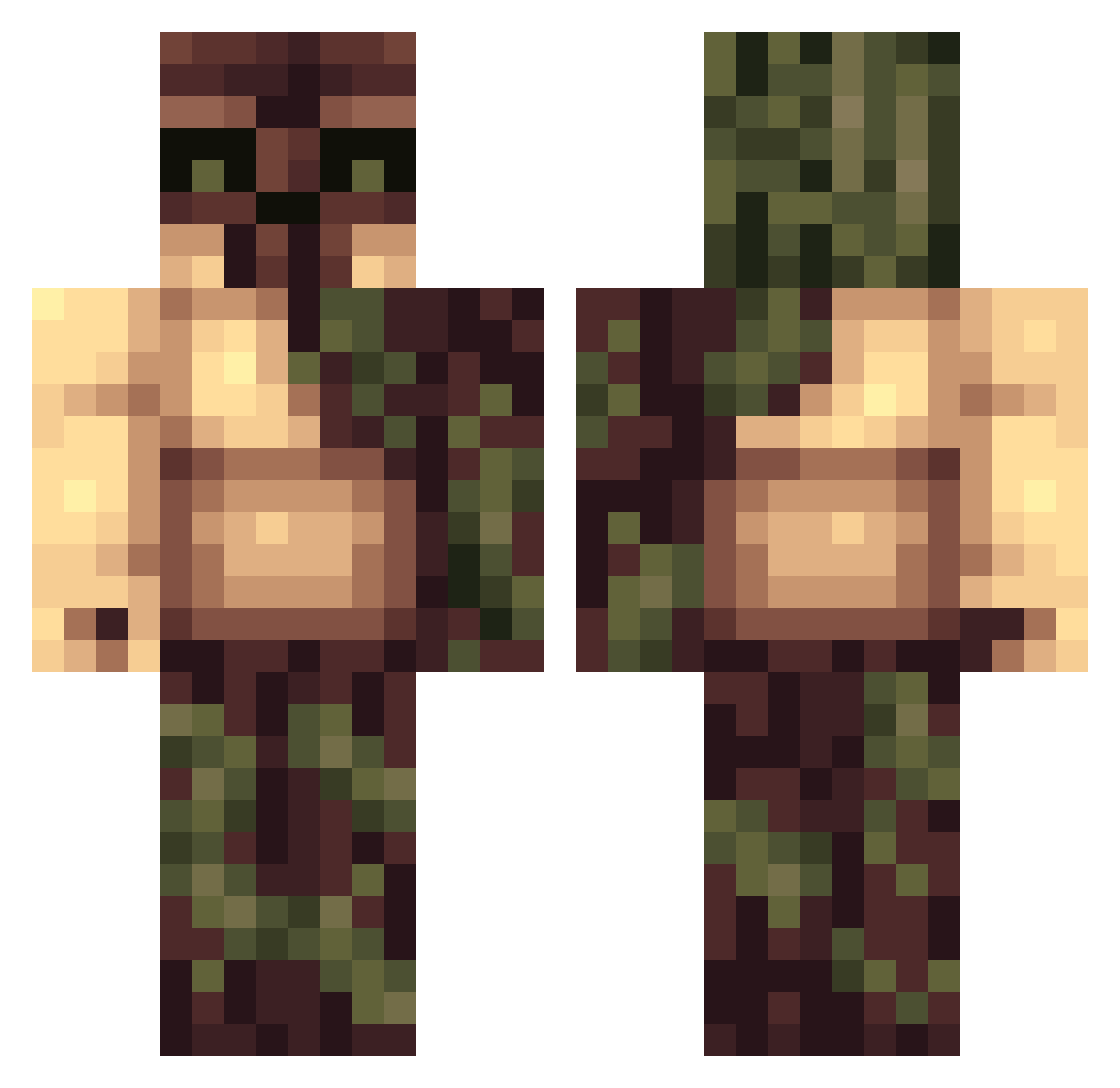
Current Minecraft skin of the player taktitreba, loaded from the official Mojang API. Rotate the 3D model with your mouse or finger, then download the skin as a PNG file and use it in Minecraft: Bedrock Edition or Java Edition for free. When taktitreba changes their skin, this page updates automatically and the old skin stays in the history below.
Other players with this skin (121)
taktitreba was the 42nd player we have seen with this skin, first spotted on 25.08.2026. The same skin was seen on these players. Open a nickname to see their current skin and skin history.
 mocei sparkysalmonfish DonceDonatas rizzyglizzyXD Szamanooo ShineHV Zexxo1 Nimraxx ltxhhz SimpxDaddy ChocolateBones28 YungCapitalist Fzra27 McMintz docteurdestro Lannyak xDeathxZues
 JcProdo Buddahmaster32 CaleighcoO9 Eroparn Zeckron7 OnIGeany LEON_asdf L_eo_n21 49ismysize Wazza_01 BigHotGuy_ qqju Manic_Fluffy Oxek06 p05535510n Wqrex Luc4sMRib3iro Zareion WayDev MintWavy Rhino80 Panoramical
 PiotrJ27 StillTriPPing810 Left4Die wollacola direraven232 xNameNTP MarFey_3
 noobouest MichaelBR Xgron shinso_play fbevione adkorp 7heNut_ HadGaba 1000Tomatoes Hxyz3 krantenbezorgert JanniBunny3727 tkhv YYetyy
More Tree Monster Minecraft skins
How to install the taktitreba skin
- Press the Download button above to save the skin as a PNG file.
- Minecraft: Bedrock Edition (PE): open the Dressing Room from the main menu (or tap your character → Edit Character), go to Classic Skins → Owned, press the + (new skin) button, choose the downloaded PNG and pick the Classic (Steve) model. Works on PC and mobile; consoles cannot import custom skins.
- Minecraft: Java Edition: open the Minecraft Launcher, go to the Skins tab, click New Skin, load the PNG, pick the Classic (Steve) model and press Save & Use. You can also upload it at minecraft.net → Profile → Change Skin.
The skin does not show up after import - what should I do?
Restart Minecraft and open the Dressing Room again - imported skins sometimes appear only after a restart. Also make sure you selected the imported skin and picked the Classic (Steve) model.
Which model should I choose, Classic or Slim?
This skin is designed for the Classic (Steve) model. If you pick the wrong model, the arms of the skin will look stretched or squeezed.
Is the skin of taktitreba free to download?
Yes. Press Download, save the PNG file and use it in Minecraft: Bedrock Edition or Java Edition - no payment or registration needed. The skin also works on multiplayer servers and Realms.
More skins
Looking for more? Go back to all Minecraft skins and check the top skins of the week, month and all time, or find any player's skin by nickname.