
stefano1393 - Minecraft Skins & Skin History
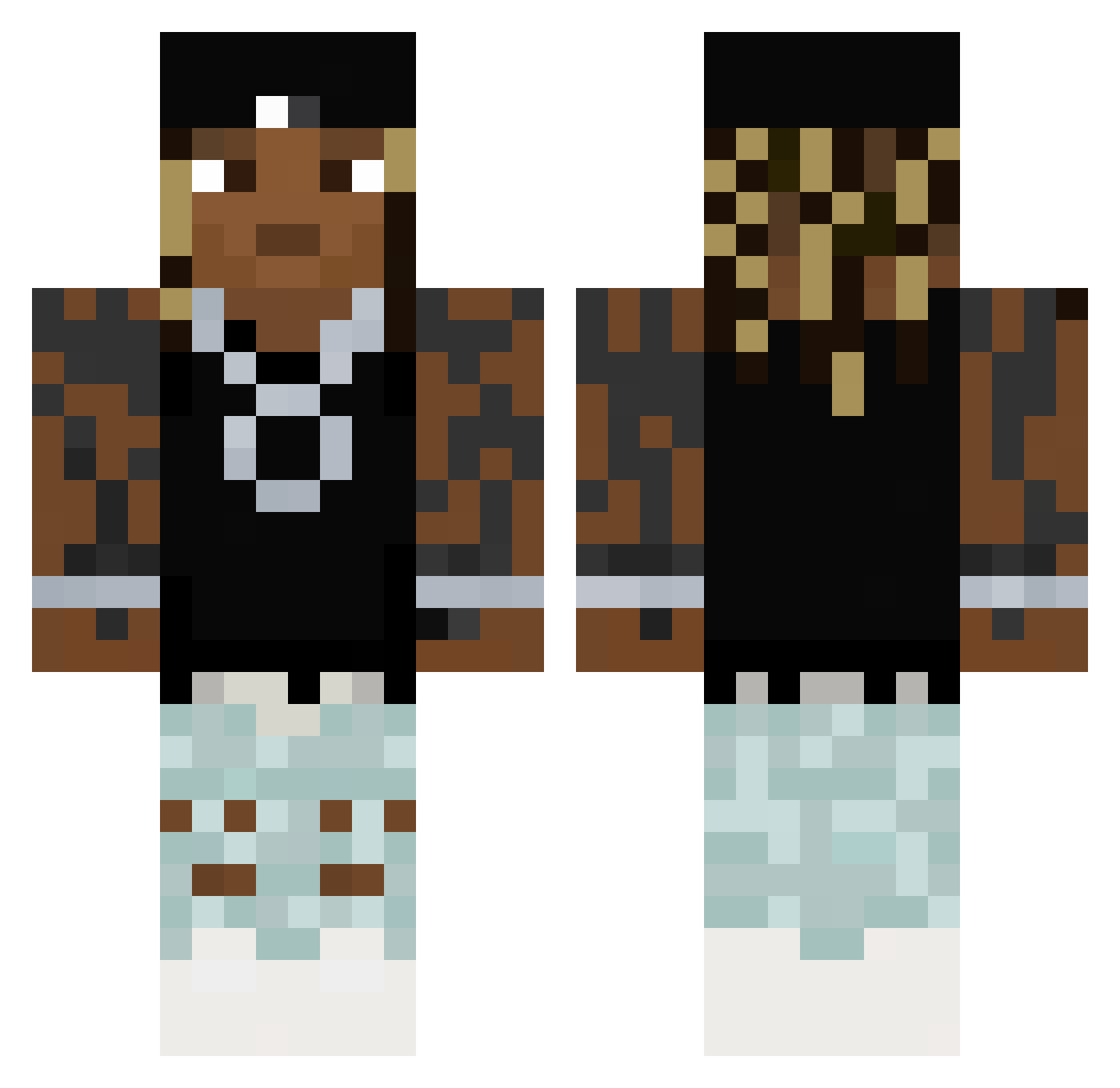
Current Minecraft skin of the player stefano1393, loaded from the official Mojang API. Rotate the 3D model with your mouse or finger, then download the skin as a PNG file and use it in Minecraft: Bedrock Edition or Java Edition for free. When stefano1393 changes their skin, this page updates automatically and the old skin stays in the history below.
Other players with this skin (60)
stefano1393 was the 36th player we have seen with this skin, first spotted on 07.10.2026. The same skin was seen on these players. Open a nickname to see their current skin and skin history.
 Ducu_CMMV ryuuzaki893 Uriarte tooth_paste2 Milkster bigpimpek npeanut KitPvP ABUELASEXY frootie fretsuketsu L1ttleAngel Leetard9 HandSniffer123 EX1T28 Bruhmert31 Vag4bond TobiJudo BlowLongIslandUp Stop_Asian_Hate J_0118 xse0k tajition Frozy76 SanderGlensbo MKtheboat PenShavings kgnv tzimpoukis _Innuendo_ deesnutz9887 clqi PMFALVES Meantimes monkedude55 KlaneK_ GerfinkleSmeller RiverMeteor369 Mamaistcool yang_YCJ Physeecs DODG3D staarsyOMG Adronks Ruepel11 xXPvPK1nGXx18767 Khaosperson Baster1259 SuntAndreii 97m1ltreeW Kizito_Oo Hemfew 5UFIK dangerb5 gloock18 NotFrom63rddd naijavlone Merc2
 mput Mexon_135
More Lil Wayne Minecraft skins
How to install the stefano1393 skin
- Press the Download button above to save the skin as a PNG file.
- Minecraft: Bedrock Edition (PE): open the Dressing Room from the main menu (or tap your character → Edit Character), go to Classic Skins → Owned, press the + (new skin) button, choose the downloaded PNG and pick the Classic (Steve) model. Works on PC and mobile; consoles cannot import custom skins.
- Minecraft: Java Edition: open the Minecraft Launcher, go to the Skins tab, click New Skin, load the PNG, pick the Classic (Steve) model and press Save & Use. You can also upload it at minecraft.net → Profile → Change Skin.
The skin does not show up after import - what should I do?
Restart Minecraft and open the Dressing Room again - imported skins sometimes appear only after a restart. Also make sure you selected the imported skin and picked the Classic (Steve) model.
Which model should I choose, Classic or Slim?
This skin is designed for the Classic (Steve) model. If you pick the wrong model, the arms of the skin will look stretched or squeezed.
Is the skin of stefano1393 free to download?
Yes. Press Download, save the PNG file and use it in Minecraft: Bedrock Edition or Java Edition - no payment or registration needed. The skin also works on multiplayer servers and Realms.
More skins
Looking for more? Go back to all Minecraft skins and check the top skins of the week, month and all time, or find any player's skin by nickname.