
simp4sheep - Minecraft Skins & Skin History
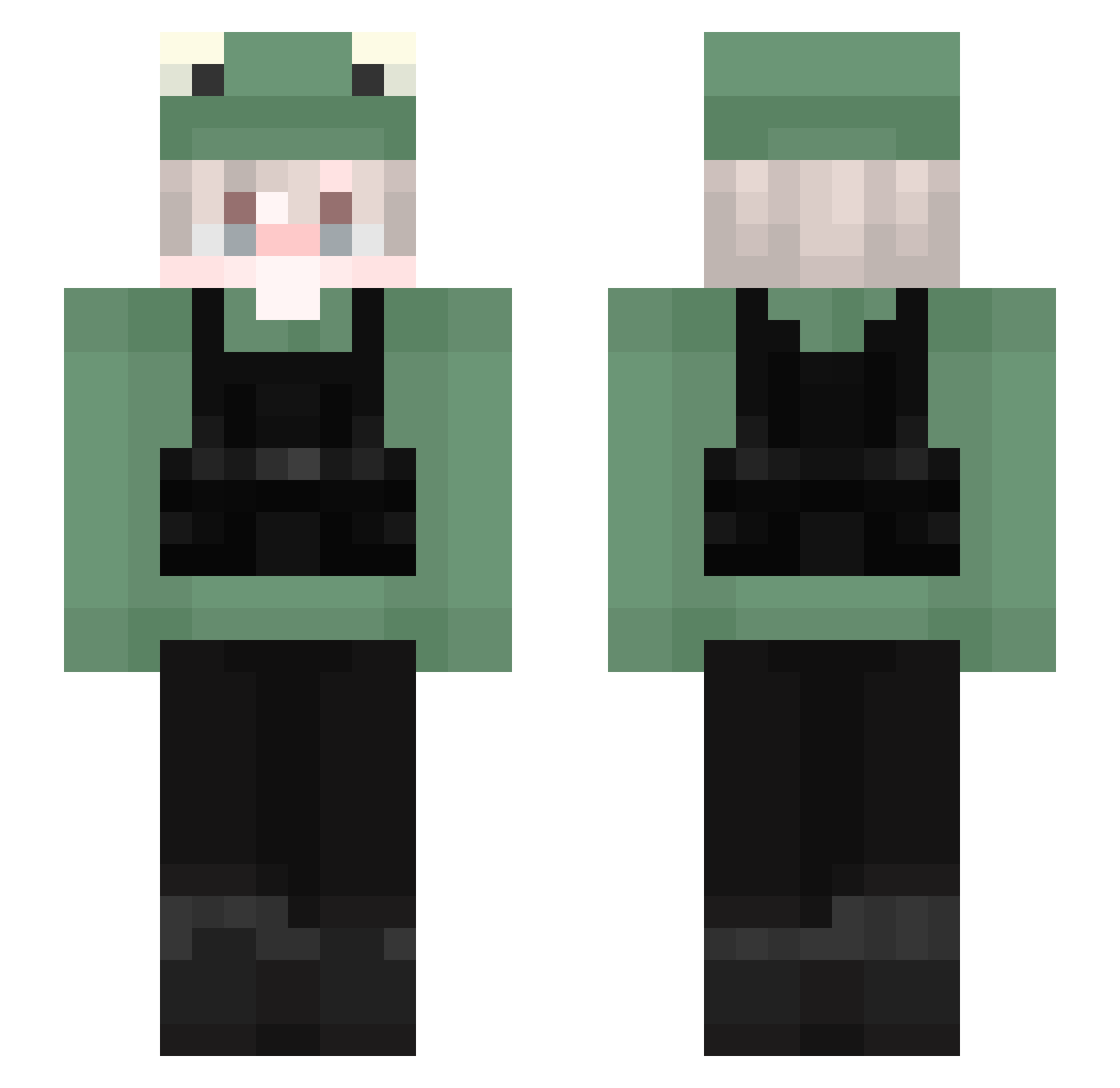
Current Minecraft skin of the player simp4sheep, loaded from the official Mojang API. Rotate the 3D model with your mouse or finger, then download the skin as a PNG file and use it in Minecraft: Bedrock Edition or Java Edition for free. When simp4sheep changes their skin, this page updates automatically and the old skin stays in the history below.
Other players with this skin (149)
simp4sheep was the 103rd player we have seen with this skin, first spotted on 06.10.2026. The same skin was seen on these players. Open a nickname to see their current skin and skin history.
 _Despi_ 1llus10n kIm07_ YuioxD kalmath007 davesnopolis Meowwww_ FBIkermit Aimora Froylan14 sAiIO02 HowToTrap StellarBluu weltyend krawczyken2000 zSakiiD Doughnut2468 el_delta Pingu_NC Ryothan Bakenek0 Pidrox_ seo_m98 EngelbertEA Venefcio IcCCCCCe l0g0n7 wlgns1109 FatQ_ Chiipon Krockskyy KoopJeNogWifi Grumnun yangjs001 Filou4k tanuki19 BurntHope cch0118 MARISH911 Galaxy_1007 shybluebird Newyork875 yDenior_ porgie3821 TheFabDonuts boogermo Banarns V1RUS62 CallMeSemgg TomBulgogi Dracom1te SwayzZ_ _Puchacz_ cryingFrog_ ssspsl _UnleqitDude ilsanson Fluxx1up tomsterhk56 evga40
More Frog Hat Minecraft skins
How to install the simp4sheep skin
- Press the Download button above to save the skin as a PNG file.
- Minecraft: Bedrock Edition (PE): open the Dressing Room from the main menu (or tap your character → Edit Character), go to Classic Skins → Owned, press the + (new skin) button, choose the downloaded PNG and pick the Slim (Alex) model. Works on PC and mobile; consoles cannot import custom skins.
- Minecraft: Java Edition: open the Minecraft Launcher, go to the Skins tab, click New Skin, load the PNG, pick the Slim (Alex) model and press Save & Use. You can also upload it at minecraft.net → Profile → Change Skin.
The skin does not show up after import - what should I do?
Restart Minecraft and open the Dressing Room again - imported skins sometimes appear only after a restart. Also make sure you selected the imported skin and picked the Slim (Alex) model.
Which model should I choose, Classic or Slim?
This skin is designed for the Slim (Alex) model. If you pick the wrong model, the arms of the skin will look stretched or squeezed.
Is the skin of simp4sheep free to download?
Yes. Press Download, save the PNG file and use it in Minecraft: Bedrock Edition or Java Edition - no payment or registration needed. The skin also works on multiplayer servers and Realms.
More skins
Looking for more? Go back to all Minecraft skins and check the top skins of the week, month and all time, or find any player's skin by nickname.