
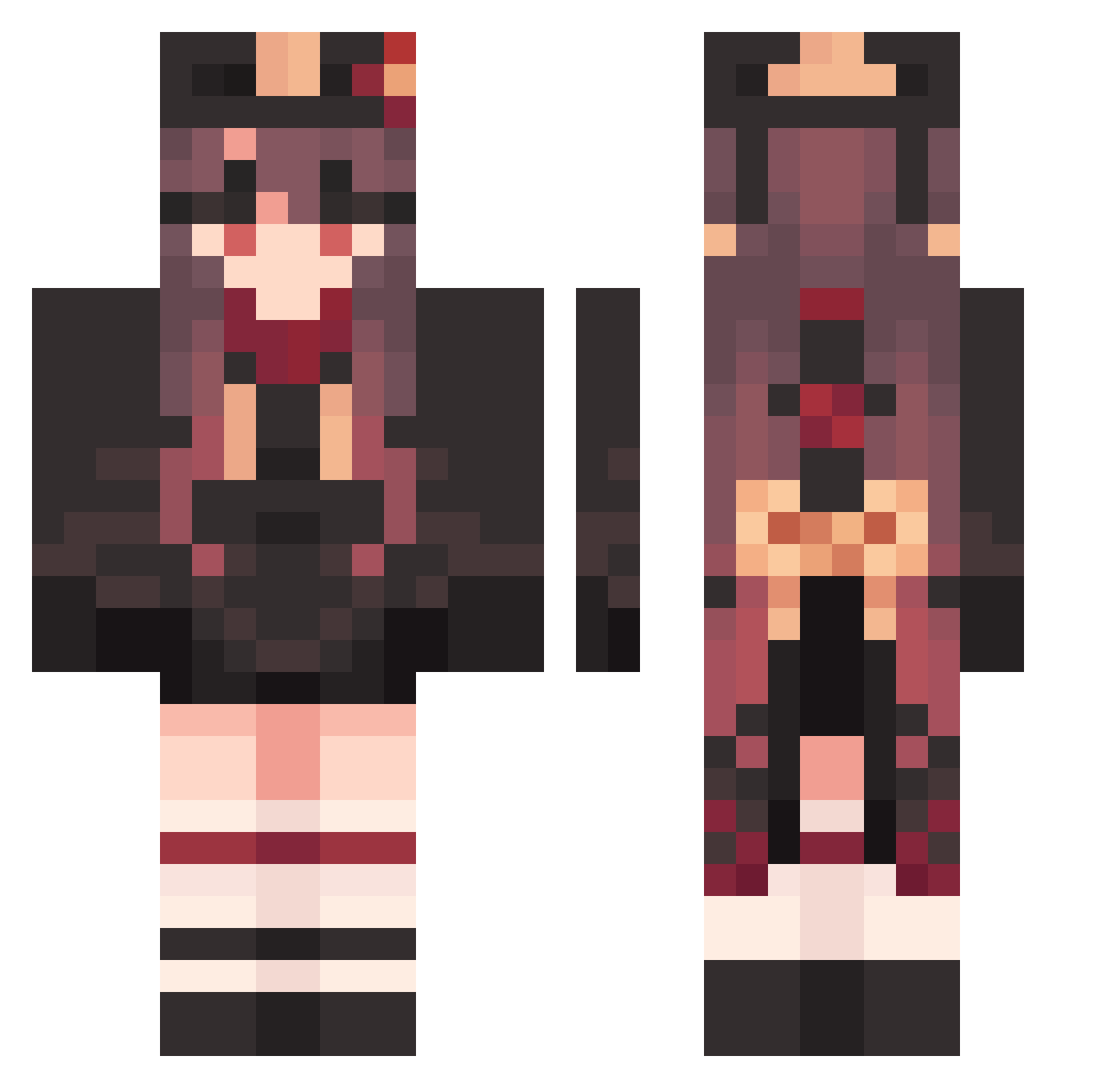
Current Minecraft skin of the player onebalcancerjohn, loaded from the official Mojang API. Rotate the 3D model with your mouse or finger, then download the skin as a PNG file and use it in Minecraft: Bedrock Edition or Java Edition for free. When onebalcancerjohn changes their skin, this page updates automatically and the old skin stays in the history below.
Other players with this skin (1214)
onebalcancerjohn was the 1168th player we have seen with this skin, first spotted on 14.10.2026. The same skin was seen on these players. Open a nickname to see their current skin and skin history.
 ThibautLaurijsse Xiaohuz MuteWhimsical915 DistinctNeedy779 tkm247 JitterySedate555 ItchyTasty25 hetao_0703 DeliriousDeep116 Hutao_qvnMnSV220 UpsetRuthless591 QdP198 Z03918 MistyCowardly859 ChemicalSuper381 HeadyEnormous126 HumorousJuicy122 TakenSiren0 cx1tur3 BlueMiniature357 nyaorite VolatileGreat677 lyc1234567 lwhoop AmazingGratis198 NewFretful444 imtrizzz HomelyDeadpan682 HangingPurple746 Hutao_NWi700 Twinsty_ Hutao_bElNQJY594 jgsoo Hutao_diMkWHm663 VoicelessKind236 Hutao_bRZYUou692 Hutao_vPkUaoP367 TenderAnnoyed222 Hutao_XHthcCx688 cl0cS jzC369 Hutao_ScxoZvD800 vg30_ VacuousPhobic501 hundred429 FretfulFunny138 Hutao_fLwULnp957 GaudyPrecious773 Hutao_hedZLLc848 iSniper27 NieuczesanaTV Hutao_nQHkQQz995 JoyousUneven262 NahIdWin18 WildSteadfast592 PainfulEarthy567 Dawn1004 ALTq03 surisari LivelyAnnoyed855
More Hu Tao Minecraft skins
How to install the onebalcancerjohn skin
- Press the Download button above to save the skin as a PNG file.
- Minecraft: Bedrock Edition (PE): open the Dressing Room from the main menu (or tap your character → Edit Character), go to Classic Skins → Owned, press the + (new skin) button, choose the downloaded PNG and pick the Classic (Steve) model. Works on PC and mobile; consoles cannot import custom skins.
- Minecraft: Java Edition: open the Minecraft Launcher, go to the Skins tab, click New Skin, load the PNG, pick the Classic (Steve) model and press Save & Use. You can also upload it at minecraft.net → Profile → Change Skin.
The skin does not show up after import - what should I do?
Restart Minecraft and open the Dressing Room again - imported skins sometimes appear only after a restart. Also make sure you selected the imported skin and picked the Classic (Steve) model.
Which model should I choose, Classic or Slim?
This skin is designed for the Classic (Steve) model. If you pick the wrong model, the arms of the skin will look stretched or squeezed.
Is the skin of onebalcancerjohn free to download?
Yes. Press Download, save the PNG file and use it in Minecraft: Bedrock Edition or Java Edition - no payment or registration needed. The skin also works on multiplayer servers and Realms.
More skins
Looking for more? Go back to all Minecraft skins and check the top skins of the week, month and all time, or find any player's skin by nickname.