
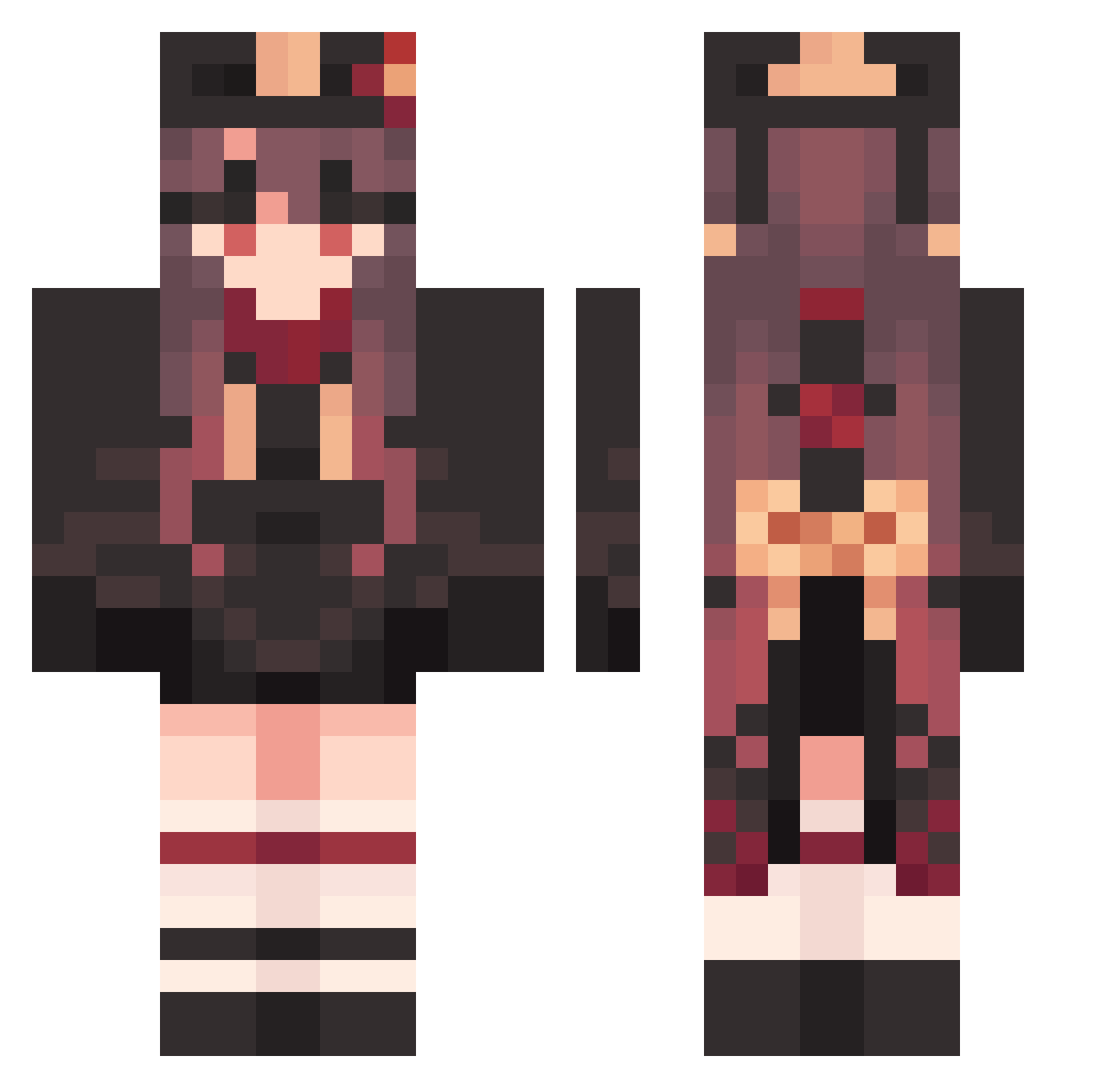
Current Minecraft skin of the player odA454, loaded from the official Mojang API. Rotate the 3D model with your mouse or finger, then download the skin as a PNG file and use it in Minecraft: Bedrock Edition or Java Edition for free. When odA454 changes their skin, this page updates automatically and the old skin stays in the history below.
Other players with this skin (1216)
odA454 was the 907th player we have seen with this skin, first spotted on 30.09.2026. The same skin was seen on these players. Open a nickname to see their current skin and skin history.
 Hutao_xlbKYVC605 LevelCowardly548 Dinhtanmc FlagrantRainy440 jess_also durxch goech FrancoLeyva21 FranticFamous401 reapergod94 ArrogantSpicy689 Hutao_TxEIcwi726 Hutao_UJvzciP745 HandyObeisant906 PanoramicWrong63 Hutao_UoCYvoA539 Guiming BraveGraceful792 PluckyDistinct72 Seirakia_ TenseKnowing851 MercifulMinor749 TBT_Player DarkNaive93 Jsscfry aleggsxu MagicalExciting7 Minecat11 blank_tian Hutao_JMA467 qmyj MachoFlagrant154 sapphire77 woahbude pkq523 JuvenileMilky286 uni3510 Hutao_YOOCbrV447 LowlyCowardly349 bigicebearO_O yuking1101 GlossyEthereal59 ScarceSad25 pockyone LoveuVex hugo_yago WateryDeadpan612 HalfNimble499 Sauron_Sx AwareParallel526 Hutao_mlibQzo133 Irina2016 Hutao_KKtompQ845 WrongDramatic131 mkgg521 neotellar CageyAnimated159 TensePine86407 Hutao_RqKPaXf425 Mewtic
More Hu Tao Minecraft skins
How to install the odA454 skin
- Press the Download button above to save the skin as a PNG file.
- Minecraft: Bedrock Edition (PE): open the Dressing Room from the main menu (or tap your character → Edit Character), go to Classic Skins → Owned, press the + (new skin) button, choose the downloaded PNG and pick the Classic (Steve) model. Works on PC and mobile; consoles cannot import custom skins.
- Minecraft: Java Edition: open the Minecraft Launcher, go to the Skins tab, click New Skin, load the PNG, pick the Classic (Steve) model and press Save & Use. You can also upload it at minecraft.net → Profile → Change Skin.
The skin does not show up after import - what should I do?
Restart Minecraft and open the Dressing Room again - imported skins sometimes appear only after a restart. Also make sure you selected the imported skin and picked the Classic (Steve) model.
Which model should I choose, Classic or Slim?
This skin is designed for the Classic (Steve) model. If you pick the wrong model, the arms of the skin will look stretched or squeezed.
Is the skin of odA454 free to download?
Yes. Press Download, save the PNG file and use it in Minecraft: Bedrock Edition or Java Edition - no payment or registration needed. The skin also works on multiplayer servers and Realms.
More skins
Looking for more? Go back to all Minecraft skins and check the top skins of the week, month and all time, or find any player's skin by nickname.