
naughtyapplejack - Minecraft Skins & Skin History
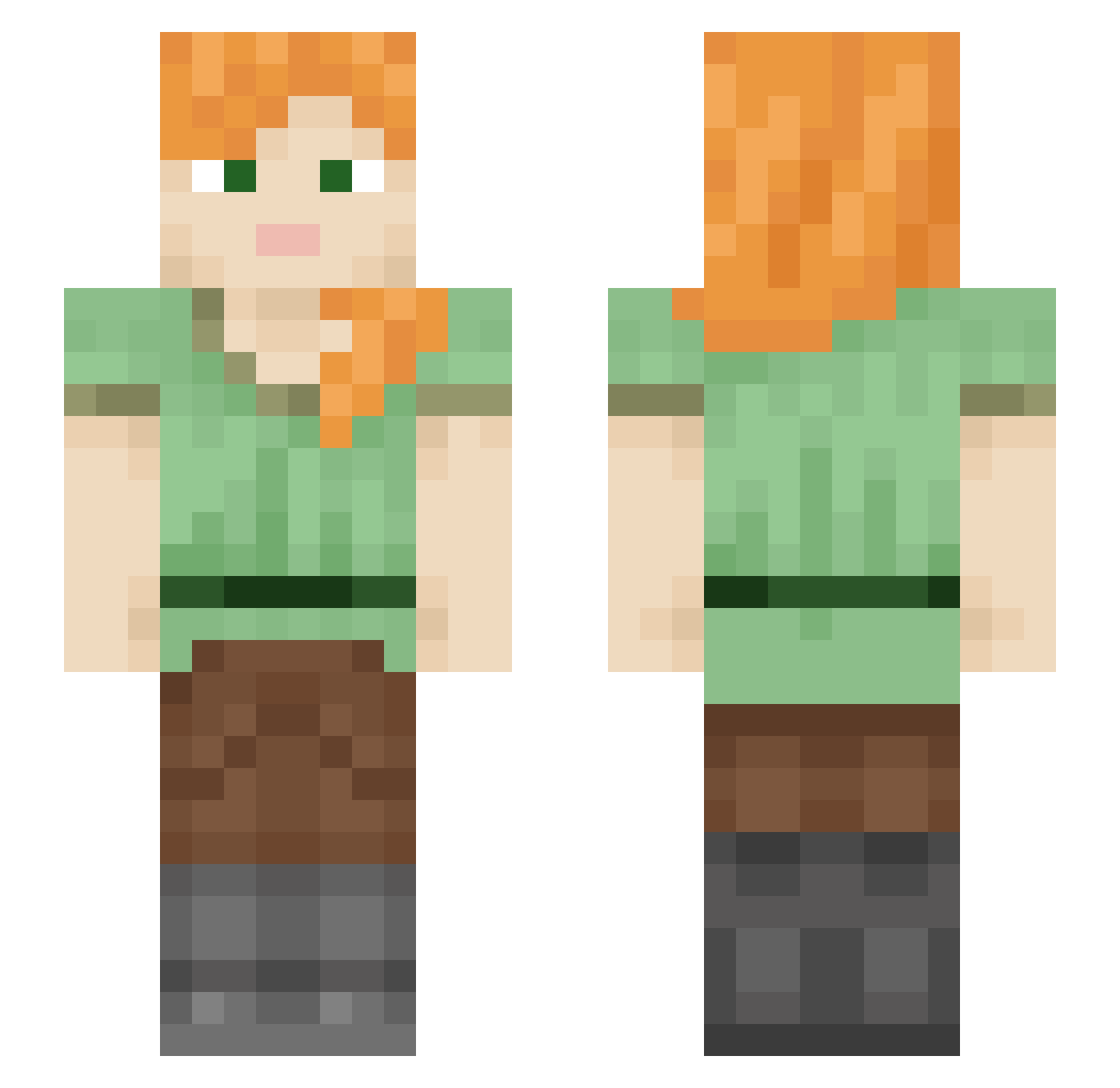
Current Minecraft skin of the player naughtyapplejack, loaded from the official Mojang API. Rotate the 3D model with your mouse or finger, then download the skin as a PNG file and use it in Minecraft: Bedrock Edition or Java Edition for free. When naughtyapplejack changes their skin, this page updates automatically and the old skin stays in the history below.
Other players with this skin (578)
naughtyapplejack was the 218th player we have seen with this skin, first spotted on 12.09.2026. The same skin was seen on these players. Open a nickname to see their current skin and skin history.
 OnlyOneCrit KeiranG19 ambrooks zoomBlocks WanderingFlowmad MatLan03 Raxcyon charlottebaker jaydey1921 Jaypatnic19 Keralkins ykis____ Soldepaz pickleinmybutt69 Lugean Filippo981 decypress xxddrr ariesth0t 4hu Amanda2008_14 gallahop CitrusBell LucanAasi jyreei Edenstheman chro0904 MisterBoddy Cat414 yongxuyu Diabolic20 SOFIABEJAN OakFir123 Pringlesodas Zoookz321 hotpot9282 OverThinkingOG RepeatedAbyss78 MicroBaJiu Killercable03 gingerrose999 TheOldFather RagnarOdin Schoeffli youmiho Rei_Ark BelongBris02 ElsaLouLou tery3803 DegustatorPipis hnshkw itsjanix celmul Wardellfamily picananica LuluDragon15 UIXU Liberterry SoleilWyyy Prumpman
How to install the naughtyapplejack skin
- Press the Download button above to save the skin as a PNG file.
- Minecraft: Bedrock Edition (PE): open the Dressing Room from the main menu (or tap your character → Edit Character), go to Classic Skins → Owned, press the + (new skin) button, choose the downloaded PNG and pick the Slim (Alex) model. Works on PC and mobile; consoles cannot import custom skins.
- Minecraft: Java Edition: open the Minecraft Launcher, go to the Skins tab, click New Skin, load the PNG, pick the Slim (Alex) model and press Save & Use. You can also upload it at minecraft.net → Profile → Change Skin.
The skin does not show up after import - what should I do?
Restart Minecraft and open the Dressing Room again - imported skins sometimes appear only after a restart. Also make sure you selected the imported skin and picked the Slim (Alex) model.
Which model should I choose, Classic or Slim?
This skin is designed for the Slim (Alex) model. If you pick the wrong model, the arms of the skin will look stretched or squeezed.
Is the skin of naughtyapplejack free to download?
Yes. Press Download, save the PNG file and use it in Minecraft: Bedrock Edition or Java Edition - no payment or registration needed. The skin also works on multiplayer servers and Realms.
More skins
Looking for more? Go back to all Minecraft skins and check the top skins of the week, month and all time, or find any player's skin by nickname.