
myscpuma - Minecraft Skins & Skin History
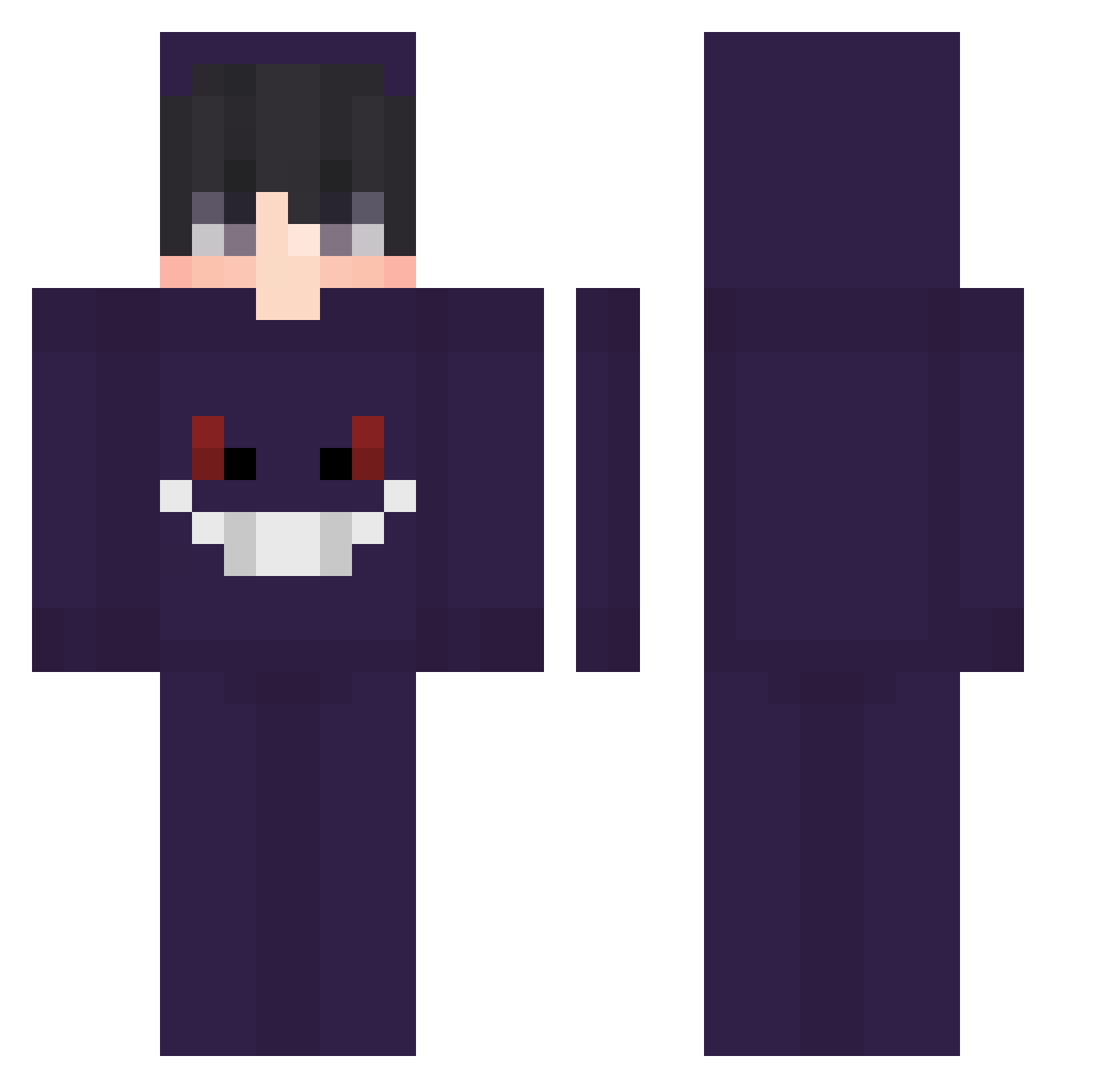
Current Minecraft skin of the player myscpuma, loaded from the official Mojang API. Rotate the 3D model with your mouse or finger, then download the skin as a PNG file and use it in Minecraft: Bedrock Edition or Java Edition for free. When myscpuma changes their skin, this page updates automatically and the old skin stays in the history below.
Other players with this skin (68)
myscpuma was the 12th player we have seen with this skin, first spotted on 16.08.2026. The same skin was seen on these players. Open a nickname to see their current skin and skin history.
 martin_god Hirowana c0nnar fLavqr Karmaa4k DonpisteaMC XAVIEST Kima_hak Brx2610 374_mms _quinncy LG_qp NUMA715
 JnsK_ Wpg_Err_0__R Lewnss curveyy Majriti BarryEkko axcas soulkun18 jaypeeisback trzynasty_powod squiidy_ Freds__
 AkatsukiIlin Maciek9195 Slayeuse Just_Anto Nocturs k4sperskyyMC 0a7 zeluskowy spirakis qtLies 88rushes Taperole zBashs TETEUTHEFATO GabyDeSp ian_XTK RobertCostache Luke_Skywalker__ Nzooo15 Wikatu _iFran YinTonic ivansempayENP AshOG Lunlun7414 Jeffuriii CHiRiSMiS pagnopjlk jysush1 Iancarrillo rafonsky Flexicution Sushieraser098 Loraxiss vina123
More Gengar Minecraft skins
How to install the myscpuma skin
- Press the Download button above to save the skin as a PNG file.
- Minecraft: Bedrock Edition (PE): open the Dressing Room from the main menu (or tap your character → Edit Character), go to Classic Skins → Owned, press the + (new skin) button, choose the downloaded PNG and pick the Classic (Steve) model. Works on PC and mobile; consoles cannot import custom skins.
- Minecraft: Java Edition: open the Minecraft Launcher, go to the Skins tab, click New Skin, load the PNG, pick the Classic (Steve) model and press Save & Use. You can also upload it at minecraft.net → Profile → Change Skin.
The skin does not show up after import - what should I do?
Restart Minecraft and open the Dressing Room again - imported skins sometimes appear only after a restart. Also make sure you selected the imported skin and picked the Classic (Steve) model.
Which model should I choose, Classic or Slim?
This skin is designed for the Classic (Steve) model. If you pick the wrong model, the arms of the skin will look stretched or squeezed.
Is the skin of myscpuma free to download?
Yes. Press Download, save the PNG file and use it in Minecraft: Bedrock Edition or Java Edition - no payment or registration needed. The skin also works on multiplayer servers and Realms.
More skins
Looking for more? Go back to all Minecraft skins and check the top skins of the week, month and all time, or find any player's skin by nickname.