
mikejames14 - Minecraft Skins & Skin History
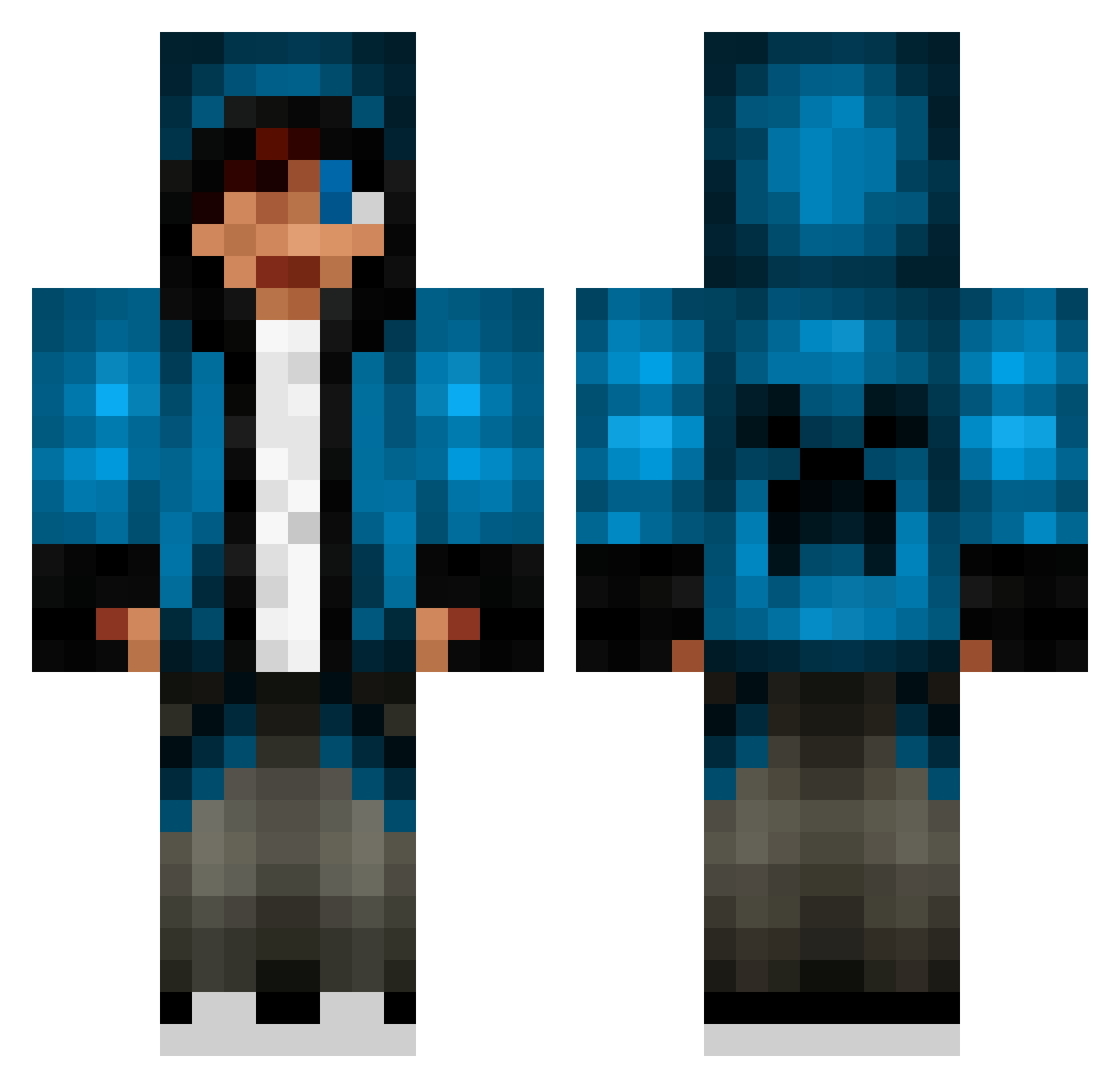
Current Minecraft skin of the player mikejames14, loaded from the official Mojang API. Rotate the 3D model with your mouse or finger, then download the skin as a PNG file and use it in Minecraft: Bedrock Edition or Java Edition for free. When mikejames14 changes their skin, this page updates automatically and the old skin stays in the history below.
Other players with this skin (654)
mikejames14 was the 364th player we have seen with this skin, first spotted on 20.09.2026. The same skin was seen on these players. Open a nickname to see their current skin and skin history.
 lifecok Sharkfin104 ZombieSlayer911 CheekCheeks mincraftnicer ROCKY2272 ZeeNoBe VvNawaf t1465a DylanDestroyer25 BasherBearBoo ImReilly Loxez sebharley loganceltic6 DunkTheSkunk cobra12340 Maro1606 diamond_cry Xil_R4PiDzZ_iiX Kurky_SVK meatwagon362 Robo_Pickle Tar_Ciryatan Nanhama_ ErbseTheUltimate nickyweber iFlashNinjaHD zacherates Wispyfungus mitchwells kenbo2468 daniels31 81jackpot sg_warrior moldyratdotcom MightyMelo mitchy_man 808kalai HenzCheifRS starbucks0522 90Caden AdventurousBros Air0x5 gustavo7825 pyrt PizzaDude8303 MauricioVelez CharlieD243 doublecbeast MRdemsking ConnorAngus raven14v mikeh10288 Abohoos Cristobal_walifr JaffJaff2002 roxala Haydenfinn10 fizzgig2011
More Creeper Minecraft skins
How to install the mikejames14 skin
- Press the Download button above to save the skin as a PNG file.
- Minecraft: Bedrock Edition (PE): open the Dressing Room from the main menu (or tap your character → Edit Character), go to Classic Skins → Owned, press the + (new skin) button, choose the downloaded PNG and pick the Classic (Steve) model. Works on PC and mobile; consoles cannot import custom skins.
- Minecraft: Java Edition: open the Minecraft Launcher, go to the Skins tab, click New Skin, load the PNG, pick the Classic (Steve) model and press Save & Use. You can also upload it at minecraft.net → Profile → Change Skin.
The skin does not show up after import - what should I do?
Restart Minecraft and open the Dressing Room again - imported skins sometimes appear only after a restart. Also make sure you selected the imported skin and picked the Classic (Steve) model.
Which model should I choose, Classic or Slim?
This skin is designed for the Classic (Steve) model. If you pick the wrong model, the arms of the skin will look stretched or squeezed.
Is the skin of mikejames14 free to download?
Yes. Press Download, save the PNG file and use it in Minecraft: Bedrock Edition or Java Edition - no payment or registration needed. The skin also works on multiplayer servers and Realms.
More skins
Looking for more? Go back to all Minecraft skins and check the top skins of the week, month and all time, or find any player's skin by nickname.