
mcakbas - Minecraft Skins & Skin History
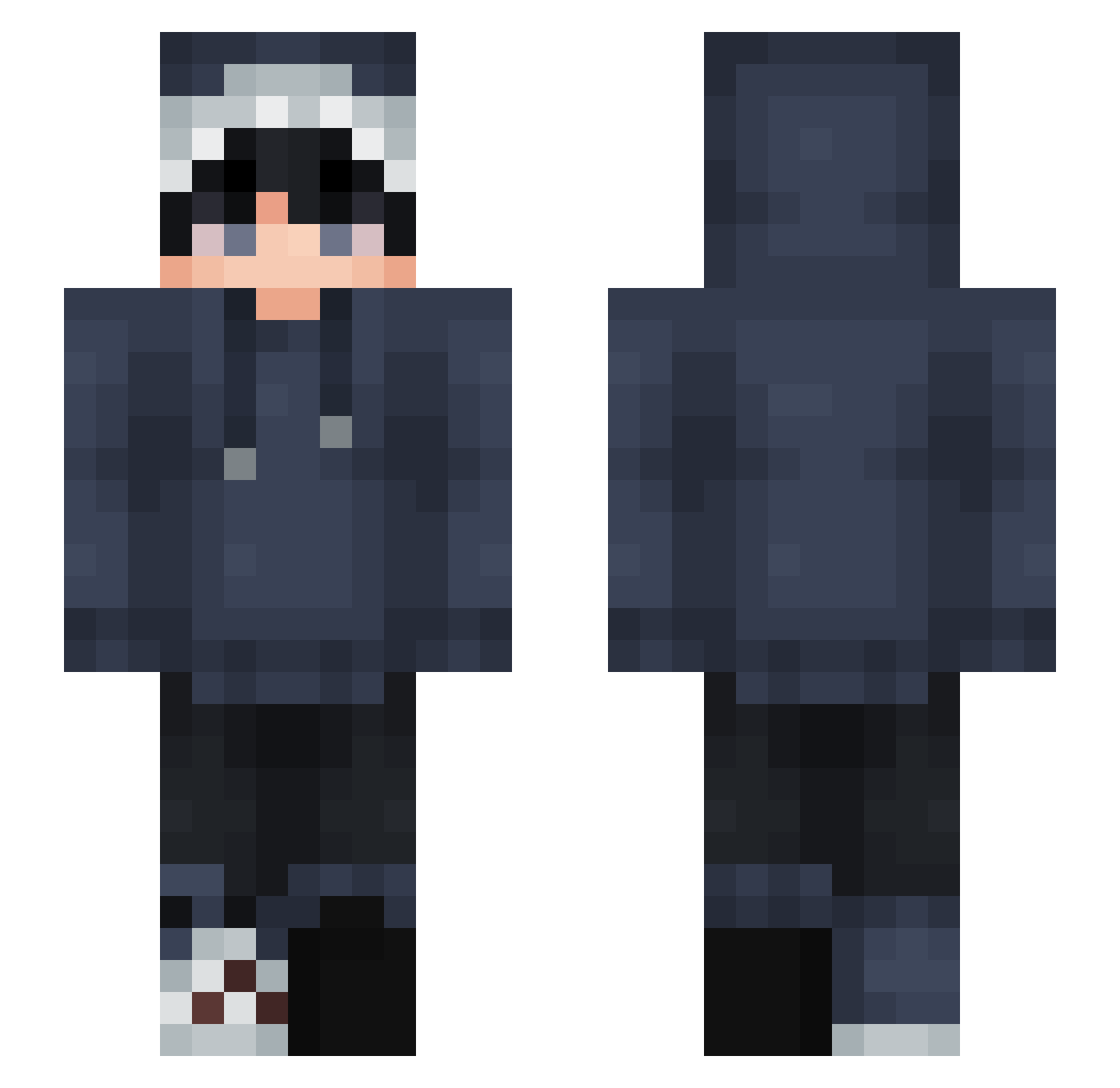
Current Minecraft skin of the player mcakbas, loaded from the official Mojang API. Rotate the 3D model with your mouse or finger, then download the skin as a PNG file and use it in Minecraft: Bedrock Edition or Java Edition for free. When mcakbas changes their skin, this page updates automatically and the old skin stays in the history below.
Other players with this skin (877)
mcakbas was the 450th player we have seen with this skin, first spotted on 26.09.2026. The same skin was seen on these players. Open a nickname to see their current skin and skin history.
 Dark_Creeper88 Litodess mmathiee Gonzowo RealHierarch BeetleWiZzard kaigger0101 Auroracym JadeLady14 ThatLoserJosh Zircan BundanNugget Mr_Tide LiamC7 Ghostskiller12 UsrContainsDairy FunMaister Aercor IkFear Byakko__ podo0322 kubxzx F_Bond Fatrixio Babis18 SmigiNaMigi GI_UK LiamChampions M3IKA trovy5 Shadow12177 ThePlantSorrel Whdts maparam Julian16_ TsuFujii M4reczek numeruuu plvrs ItsCart3 henkos Hofmaa24 ConorsCorner Seyeler charlesfr_ GreenGhoul08 GreenFatGG kira009_ rizqdramon TTVCammandTTV Loirox66 white__dolphin MrJarieN Jajecznicaaa_ yuzhoucw Mimmoow Aedinovic Salen_1337 insane12312 kawaiicat333
How to install the mcakbas skin
- Press the Download button above to save the skin as a PNG file.
- Minecraft: Bedrock Edition (PE): open the Dressing Room from the main menu (or tap your character → Edit Character), go to Classic Skins → Owned, press the + (new skin) button, choose the downloaded PNG and pick the Slim (Alex) model. Works on PC and mobile; consoles cannot import custom skins.
- Minecraft: Java Edition: open the Minecraft Launcher, go to the Skins tab, click New Skin, load the PNG, pick the Slim (Alex) model and press Save & Use. You can also upload it at minecraft.net → Profile → Change Skin.
The skin does not show up after import - what should I do?
Restart Minecraft and open the Dressing Room again - imported skins sometimes appear only after a restart. Also make sure you selected the imported skin and picked the Slim (Alex) model.
Which model should I choose, Classic or Slim?
This skin is designed for the Slim (Alex) model. If you pick the wrong model, the arms of the skin will look stretched or squeezed.
Is the skin of mcakbas free to download?
Yes. Press Download, save the PNG file and use it in Minecraft: Bedrock Edition or Java Edition - no payment or registration needed. The skin also works on multiplayer servers and Realms.
More skins
Looking for more? Go back to all Minecraft skins and check the top skins of the week, month and all time, or find any player's skin by nickname.