
maybe_mai - Minecraft Skins & Skin History
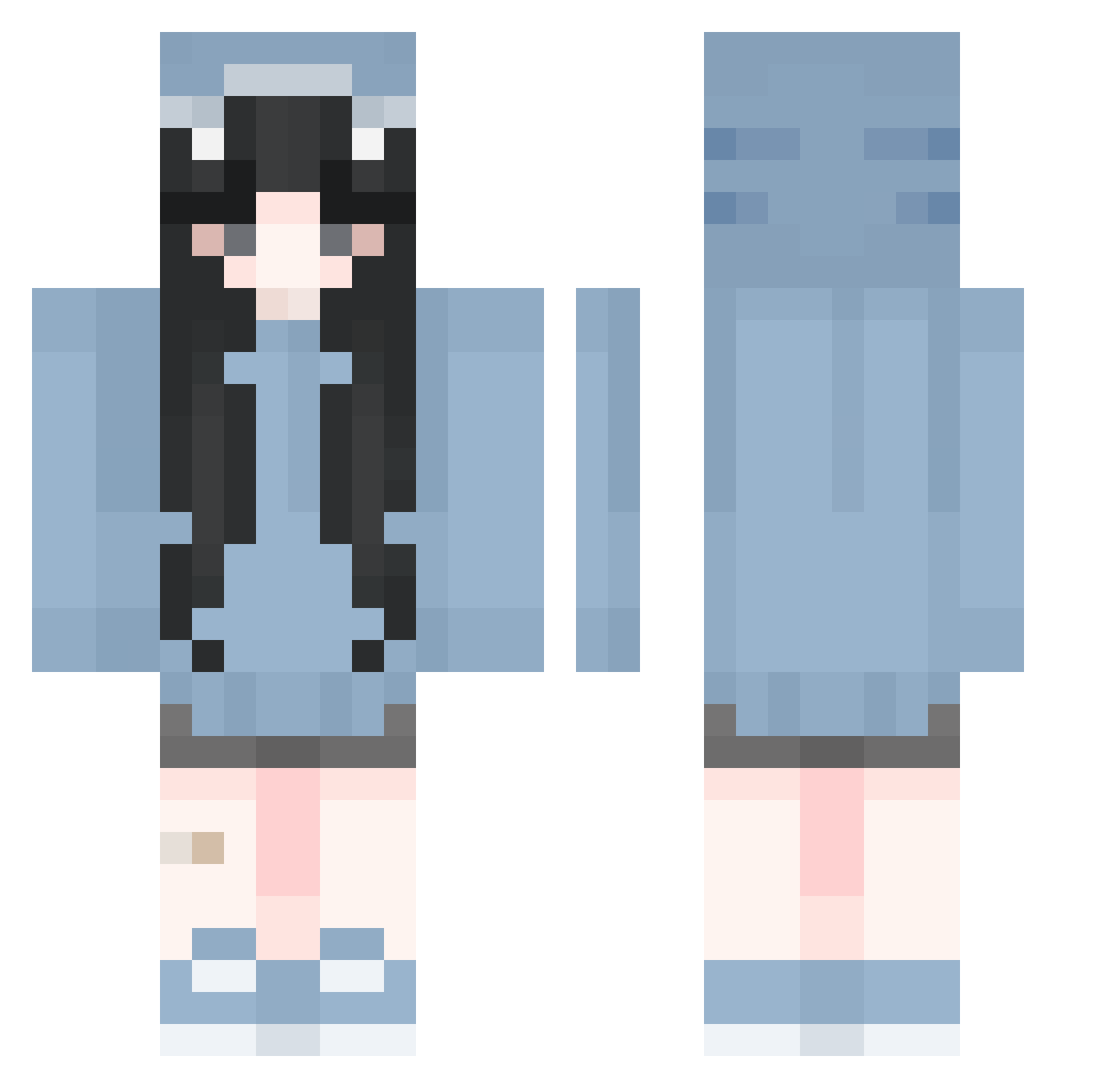
Current Minecraft skin of the player maybe_mai, loaded from the official Mojang API. Rotate the 3D model with your mouse or finger, then download the skin as a PNG file and use it in Minecraft: Bedrock Edition or Java Edition for free. When maybe_mai changes their skin, this page updates automatically and the old skin stays in the history below.
Other players with this skin (295)
maybe_mai was the 227th player we have seen with this skin, first spotted on 15.10.2026. The same skin was seen on these players. Open a nickname to see their current skin and skin history.
 FastenBomber VaafuFanBoy nodokoooo TropiFrutty yizhimei _Danha_ MVPuzzled TrollOngII zhaocaimao yakuzababy Kostochka_10 1yum_ ognetherworld Valentyn4 ticket_j Bigmann112 merequetenguexd Lieom Heavexns day_som moonstar0918 Shawnk HongruXDD Lillyxwg JILA Kinocrp ussingg CT0507 angeliczzzz papaoursfr cheong06 AnastasiaMoon youth23 minun4384 AnimalLover3709 JJWONIE PinqPonq mocha0310 adele8626 Bailey_Verst zhangcx_04 Blumepanda heeyoning GodChinaALT12 hxwaa joeyang861020 annabwah NexTZ0829 kittykatty9872 Piratenbraut666 Sayri Leejaemyeong_ MalMalPrecious zzs777 Jeehuji EricaClare C_Side28 AnelaStar princessix pricklypear23
More Shark Onesie Minecraft skins
See all 191 Shark Onesie skins
How to install the maybe_mai skin
- Press the Download button above to save the skin as a PNG file.
- Minecraft: Bedrock Edition (PE): open the Dressing Room from the main menu (or tap your character → Edit Character), go to Classic Skins → Owned, press the + (new skin) button, choose the downloaded PNG and pick the Classic (Steve) model. Works on PC and mobile; consoles cannot import custom skins.
- Minecraft: Java Edition: open the Minecraft Launcher, go to the Skins tab, click New Skin, load the PNG, pick the Classic (Steve) model and press Save & Use. You can also upload it at minecraft.net → Profile → Change Skin.
The skin does not show up after import - what should I do?
Restart Minecraft and open the Dressing Room again - imported skins sometimes appear only after a restart. Also make sure you selected the imported skin and picked the Classic (Steve) model.
Which model should I choose, Classic or Slim?
This skin is designed for the Classic (Steve) model. If you pick the wrong model, the arms of the skin will look stretched or squeezed.
Is the skin of maybe_mai free to download?
Yes. Press Download, save the PNG file and use it in Minecraft: Bedrock Edition or Java Edition - no payment or registration needed. The skin also works on multiplayer servers and Realms.
More skins
Looking for more? Go back to all Minecraft skins and check the top skins of the week, month and all time, or find any player's skin by nickname.