
mamgozaza - Minecraft Skins & Skin History
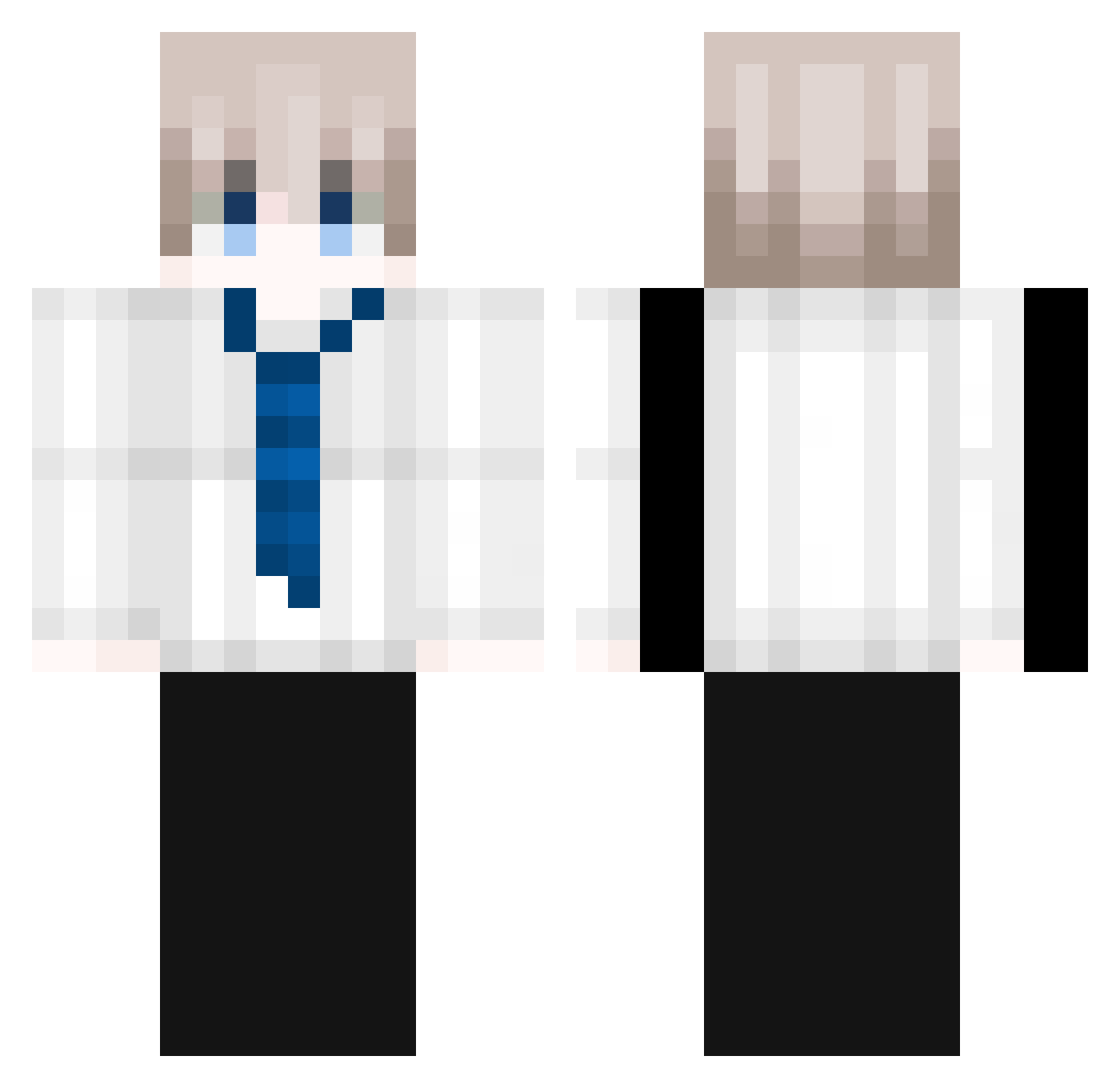
Current Minecraft skin of the player mamgozaza, loaded from the official Mojang API. Rotate the 3D model with your mouse or finger, then download the skin as a PNG file and use it in Minecraft: Bedrock Edition or Java Edition for free. When mamgozaza changes their skin, this page updates automatically and the old skin stays in the history below.
Other players with this skin (133)
mamgozaza was the 98th player we have seen with this skin, first spotted on 06.10.2026. The same skin was seen on these players. Open a nickname to see their current skin and skin history.
 azerbolt Kauanzin7 OneTapMonster Turo_V1 Shinoko77 KERO13 _Seoki Espnel Tutorior_ LucKKass Sunstar72 Dalimine ChenYu_221 sonicnoogi Delta_541 Choco_9012 JjungAS2 LIorange _ronnytwh_ uazn agres1vo Itzjaru_ nickk342 Zhongji_DE A_yi886 My_Master_Kyoouh garfieljr TG_polo elohtchu ImEstouHappy TajharFuad Chickenn_Wingss Dave83gamerT WuHuiZ mulyu7 EoBruniiin Arbuz102 Kqrta_ BryanArq ItsPopNoCap Stepmercurry sakiiiii Alternativeodd ylzks0212356 Menaajung PandaPonchik moyaTsuki Varsityy VersaceXz PremiumXD CanUfeelmyworld JeskoMC Olekbabole_2014 Kdw6100 mustard179 Ceku25 GreenDean420 Wisdom_12 Caffeine_CF Laaaarpch
More Businessman Minecraft skins
See all 6316 Businessman skins
How to install the mamgozaza skin
- Press the Download button above to save the skin as a PNG file.
- Minecraft: Bedrock Edition (PE): open the Dressing Room from the main menu (or tap your character → Edit Character), go to Classic Skins → Owned, press the + (new skin) button, choose the downloaded PNG and pick the Classic (Steve) model. Works on PC and mobile; consoles cannot import custom skins.
- Minecraft: Java Edition: open the Minecraft Launcher, go to the Skins tab, click New Skin, load the PNG, pick the Classic (Steve) model and press Save & Use. You can also upload it at minecraft.net → Profile → Change Skin.
The skin does not show up after import - what should I do?
Restart Minecraft and open the Dressing Room again - imported skins sometimes appear only after a restart. Also make sure you selected the imported skin and picked the Classic (Steve) model.
Which model should I choose, Classic or Slim?
This skin is designed for the Classic (Steve) model. If you pick the wrong model, the arms of the skin will look stretched or squeezed.
Is the skin of mamgozaza free to download?
Yes. Press Download, save the PNG file and use it in Minecraft: Bedrock Edition or Java Edition - no payment or registration needed. The skin also works on multiplayer servers and Realms.
More skins
Looking for more? Go back to all Minecraft skins and check the top skins of the week, month and all time, or find any player's skin by nickname.