
malwinkanoo - Minecraft Skins & Skin History
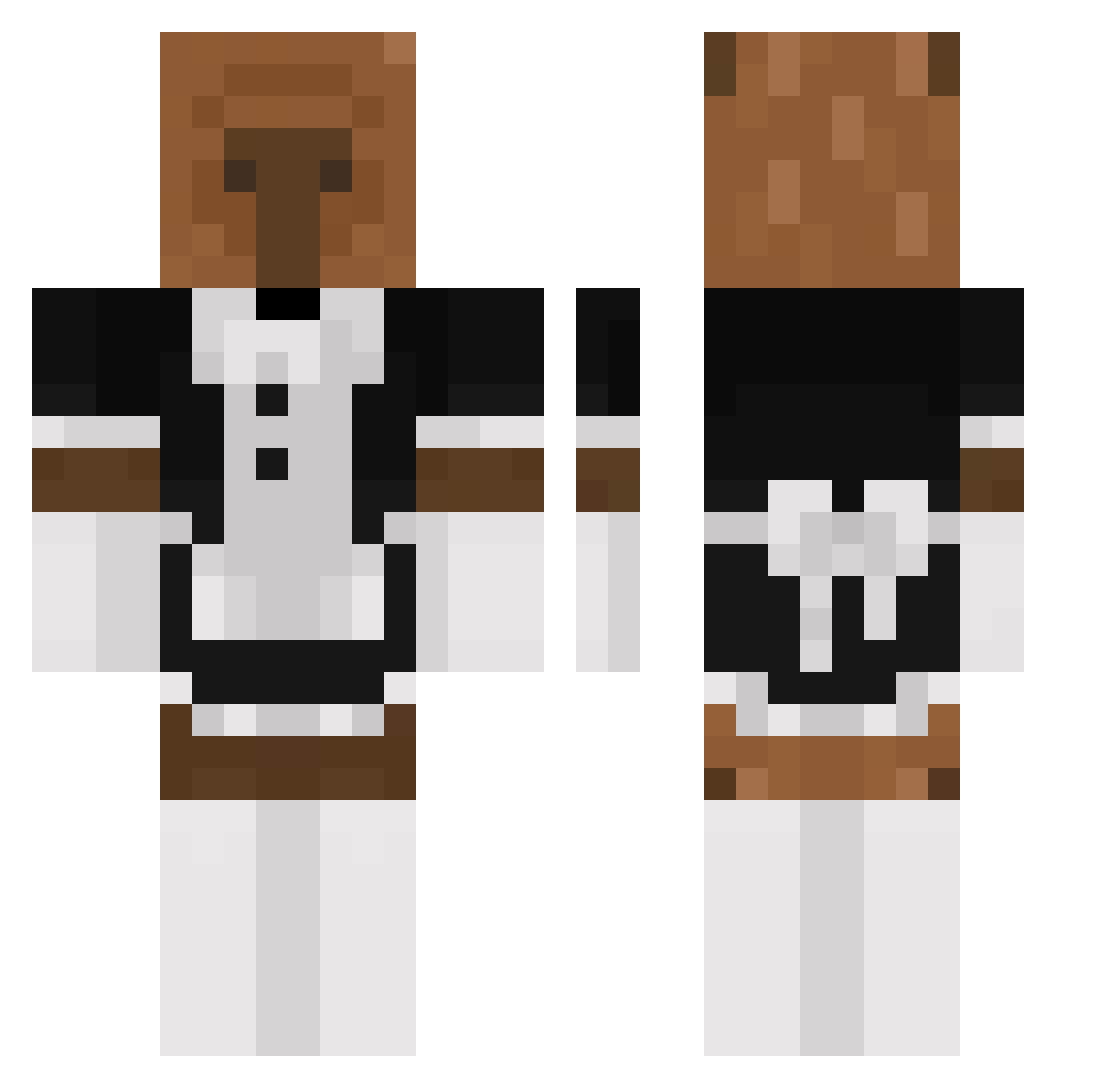
Current Minecraft skin of the player malwinkanoo, loaded from the official Mojang API. Rotate the 3D model with your mouse or finger, then download the skin as a PNG file and use it in Minecraft: Bedrock Edition or Java Edition for free. When malwinkanoo changes their skin, this page updates automatically and the old skin stays in the history below.
Other players with this skin (240)
malwinkanoo was the 76th player we have seen with this skin, first spotted on 24.08.2026. The same skin was seen on these players. Open a nickname to see their current skin and skin history.
 omgtomi SasquatchTBLS ShibiShLam discordmeowmeow capibar_ zGoosH_ Rene6ade HelloBPM KyCat kapibalka_ TreKer_ chiiaom GlassTV OliAF ilhan2207 DaddyShaun Syriusz13 1MagicFox1 iotablade V1LACCA H3raX jose2143 SimpDeSimp Flacraft riendos Capybari Klara97 whalerun Asstaa Suffocateee SamNub beetlebeatt MiniWiniWiener OppaiLoverr Exp1ze beymax73 sincuptv MCS_DK untolqse Fuurieki BIOGRAFADO1 2dre6an TochoMX GoofyGoober27 Weak_Tea_903 JenValentine Xanthen0 Oliver2042 minji1017 FishingStud Topa_ guayabita23 Ajuao huklajak itsamedionel c0astyy capybara02 seitrii jonooooooo InjectPLUG
More Bear Minecraft skins
How to install the malwinkanoo skin
- Press the Download button above to save the skin as a PNG file.
- Minecraft: Bedrock Edition (PE): open the Dressing Room from the main menu (or tap your character → Edit Character), go to Classic Skins → Owned, press the + (new skin) button, choose the downloaded PNG and pick the Classic (Steve) model. Works on PC and mobile; consoles cannot import custom skins.
- Minecraft: Java Edition: open the Minecraft Launcher, go to the Skins tab, click New Skin, load the PNG, pick the Classic (Steve) model and press Save & Use. You can also upload it at minecraft.net → Profile → Change Skin.
The skin does not show up after import - what should I do?
Restart Minecraft and open the Dressing Room again - imported skins sometimes appear only after a restart. Also make sure you selected the imported skin and picked the Classic (Steve) model.
Which model should I choose, Classic or Slim?
This skin is designed for the Classic (Steve) model. If you pick the wrong model, the arms of the skin will look stretched or squeezed.
Is the skin of malwinkanoo free to download?
Yes. Press Download, save the PNG file and use it in Minecraft: Bedrock Edition or Java Edition - no payment or registration needed. The skin also works on multiplayer servers and Realms.
More skins
Looking for more? Go back to all Minecraft skins and check the top skins of the week, month and all time, or find any player's skin by nickname.