
levascou - Minecraft Skins & Skin History
Current Minecraft skin of the player levascou, loaded from the official Mojang API. Rotate the 3D model with your mouse or finger, then download the skin as a PNG file and use it in Minecraft: Bedrock Edition or Java Edition for free. When levascou changes their skin, this page updates automatically and the old skin stays in the history below.
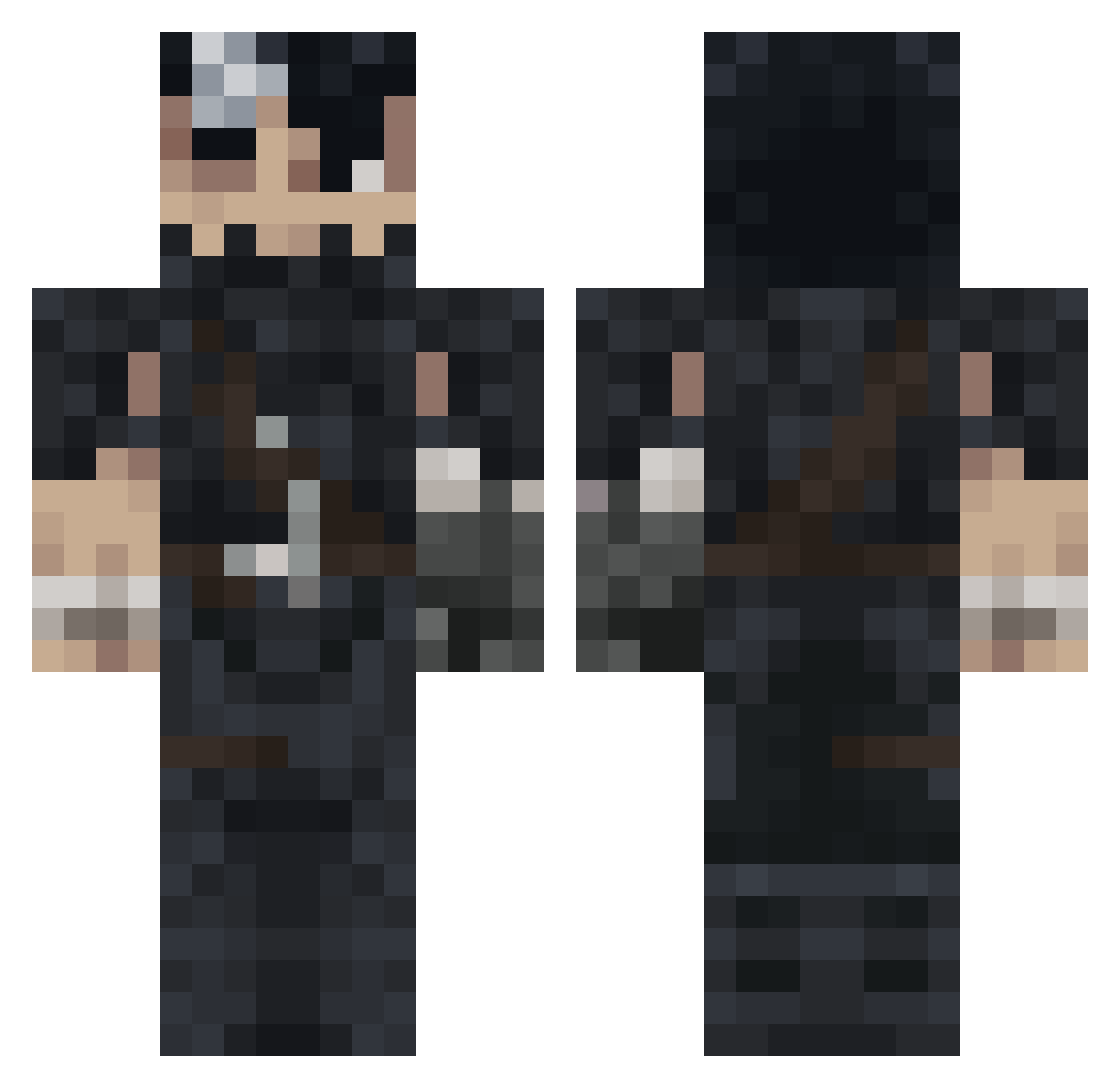
Other players with this skin (993)
levascou was the 323rd player we have seen with this skin, first spotted on 29.08.2026. The same skin was seen on these players. Open a nickname to see their current skin and skin history.
 Ethiee lucenabo Gia_429 misicapa TatoSalada nokxy RipRoaq Eljugosito girolamwette NPGHOST2 zizonjunhun SN0PY69
 Aksodus OBRbIGAN GusEhrmantraut luiscota ERROR_USER_INFO Zeldennial HASCEMC Dippsa Aloyzer peridotpala AlexRux kizaru21 Jomagi Devin2282 VictorMCraft staubsauger300 airqqq ehabmuhammed Hoklat01 jusilver67 FdeFolio armyarmyarmy NilsHolgg Amsizzle v0rtwx SavageSang sixtyblessings BlueGauloises7 Neithan_w TITI7267 HurricanePollo Booker986 bavisbra beefcaptain2519 Rqvky BaysangurBorz Fozzu Marlques Roklm_ F0malhautt Gonza_sas FeelDiPump KanocBerserk Jacko3005 DanielLarsen leodublaje Enasteb Dautzi
More Guts Minecraft skins
How to install the levascou skin
- Press the Download button above to save the skin as a PNG file.
- Minecraft: Bedrock Edition (PE): open the Dressing Room from the main menu (or tap your character → Edit Character), go to Classic Skins → Owned, press the + (new skin) button, choose the downloaded PNG and pick the Classic (Steve) model. Works on PC and mobile; consoles cannot import custom skins.
- Minecraft: Java Edition: open the Minecraft Launcher, go to the Skins tab, click New Skin, load the PNG, pick the Classic (Steve) model and press Save & Use. You can also upload it at minecraft.net → Profile → Change Skin.
The skin does not show up after import - what should I do?
Restart Minecraft and open the Dressing Room again - imported skins sometimes appear only after a restart. Also make sure you selected the imported skin and picked the Classic (Steve) model.
Which model should I choose, Classic or Slim?
This skin is designed for the Classic (Steve) model. If you pick the wrong model, the arms of the skin will look stretched or squeezed.
Is the skin of levascou free to download?
Yes. Press Download, save the PNG file and use it in Minecraft: Bedrock Edition or Java Edition - no payment or registration needed. The skin also works on multiplayer servers and Realms.
More skins
Looking for more? Go back to all Minecraft skins and check the top skins of the week, month and all time, or find any player's skin by nickname.