
beefcaptain2519 - Minecraft Skins & Skin History
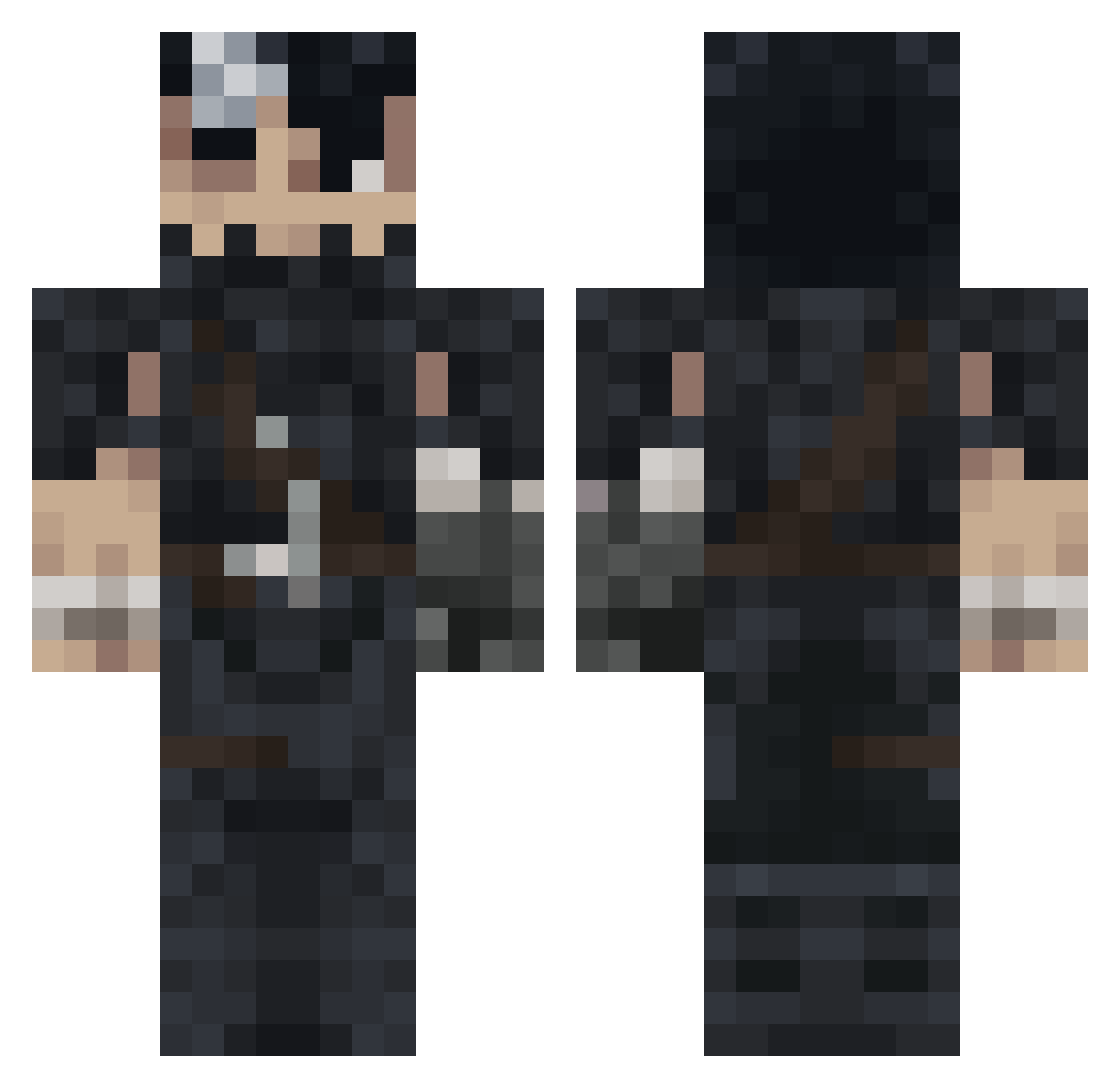
Current Minecraft skin of the player beefcaptain2519, loaded from the official Mojang API. Rotate the 3D model with your mouse or finger, then download the skin as a PNG file and use it in Minecraft: Bedrock Edition or Java Edition for free. When beefcaptain2519 changes their skin, this page updates automatically and the old skin stays in the history below.
Other players with this skin (992)
beefcaptain2519 was the 306th player we have seen with this skin, first spotted on 26.08.2026. The same skin was seen on these players. Open a nickname to see their current skin and skin history.
 Rqvky BlueGauloises7 Roklm_ SavageSang v0rtwx Gonza_sas Jacko3005 DanielLarsen Enasteb Dautzi FdeFolio dracometeor31 Monroe_mk1 ZSU_00 Wabion rashoodex Reaxxx AlexRux
 Pirusus33 ERROR_USER_INFO HannibalLec117 luiscota GusEhrmantraut
 RacloChomeur d07gd Yeetus694201 ZellisPower OBRbIGAN
 Aksodus ceaga7 Sta7ion WATERDROIID girolamwette Eljugosito TatoSalada misicapa Sokrrr69 Takeda_1571 lucenabo FreshBOB Xaiser Ethiee levascou 0d4ndy0 Nyx_LL Gia_429 OKIRONA nokxy Diegoadj23 RipRoaq RaphLeFat UnknownUNSC LooZux_ NPGHOST2 gabipoeta triplley windygo ametsssaa Azazel003 zizonjunhun
More Guts Minecraft skins
How to install the beefcaptain2519 skin
- Press the Download button above to save the skin as a PNG file.
- Minecraft: Bedrock Edition (PE): open the Dressing Room from the main menu (or tap your character → Edit Character), go to Classic Skins → Owned, press the + (new skin) button, choose the downloaded PNG and pick the Classic (Steve) model. Works on PC and mobile; consoles cannot import custom skins.
- Minecraft: Java Edition: open the Minecraft Launcher, go to the Skins tab, click New Skin, load the PNG, pick the Classic (Steve) model and press Save & Use. You can also upload it at minecraft.net → Profile → Change Skin.
The skin does not show up after import - what should I do?
Restart Minecraft and open the Dressing Room again - imported skins sometimes appear only after a restart. Also make sure you selected the imported skin and picked the Classic (Steve) model.
Which model should I choose, Classic or Slim?
This skin is designed for the Classic (Steve) model. If you pick the wrong model, the arms of the skin will look stretched or squeezed.
Is the skin of beefcaptain2519 free to download?
Yes. Press Download, save the PNG file and use it in Minecraft: Bedrock Edition or Java Edition - no payment or registration needed. The skin also works on multiplayer servers and Realms.
More skins
Looking for more? Go back to all Minecraft skins and check the top skins of the week, month and all time, or find any player's skin by nickname.