
kz4_schizo_add - Minecraft Skins & Skin History
Current Minecraft skin of the player kz4_schizo_add, loaded from the official Mojang API. Rotate the 3D model with your mouse or finger, then download the skin as a PNG file and use it in Minecraft: Bedrock Edition or Java Edition for free. When kz4_schizo_add changes their skin, this page updates automatically and the old skin stays in the history below.
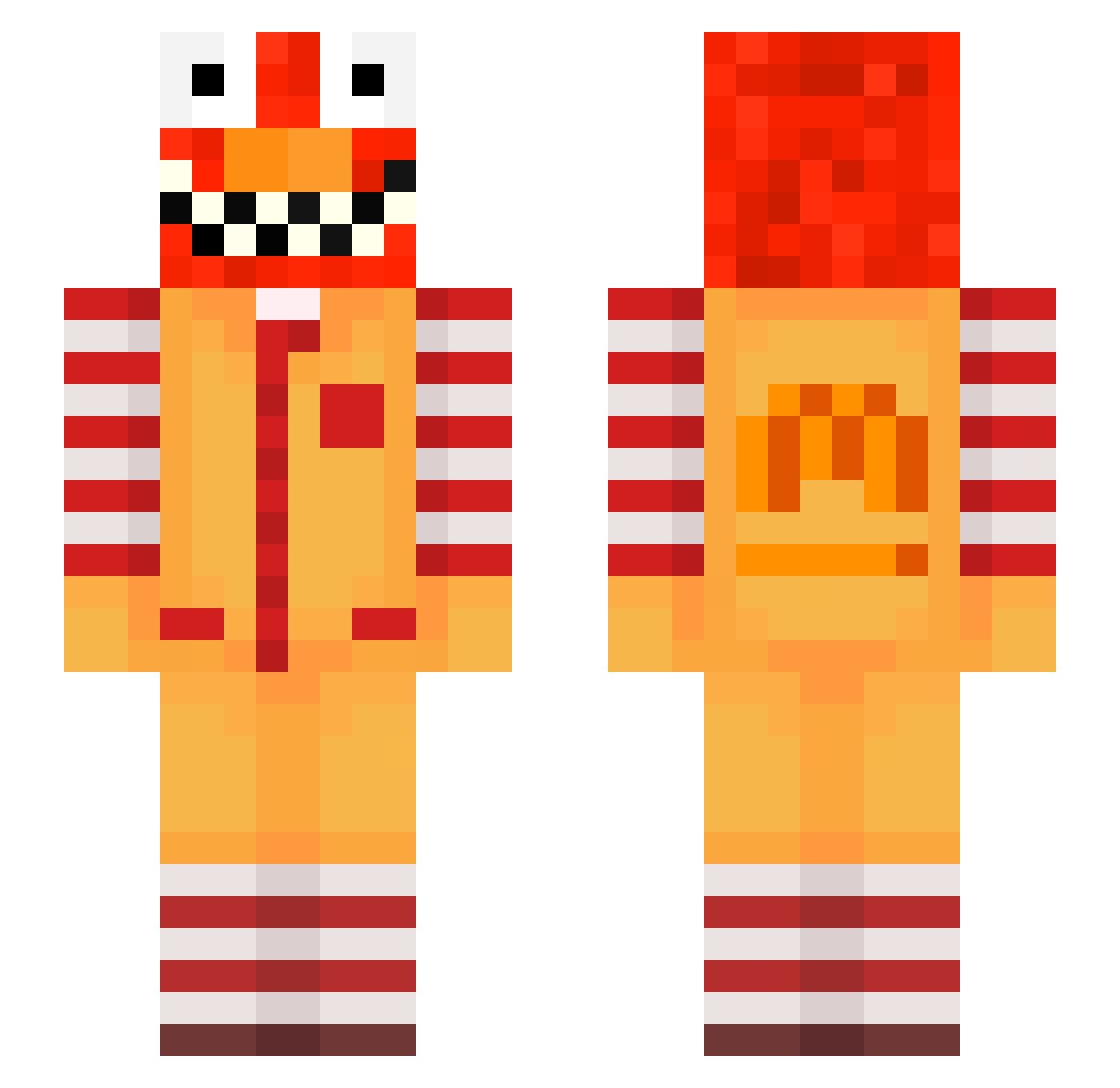
Other players with this skin (565)
kz4_schizo_add was the 121st player we have seen with this skin, first spotted on 14.08.2026. The same skin was seen on these players. Open a nickname to see their current skin and skin history.
 codet_p_0 crxzy1234 cagdasaktas94 Calmoorderly4 provisionalpoli uzi_n19f1_11_24 bz_wSj8Y_11_04
 raveTEIwk8XL Ask_Cheeves tzi_Ni7tT_11_06 ptaltsDSvMn DaxelinOnDcLEWOF meowalt_pmHhV_07 Sv2WKkHMcmWl0Sv2 LinhBoldr6eUwU skycron_ybcpk_10 cerealmilk147125 tsohg__ EpeakFake ellinger_cute764 RusticWarrior sakunohLVLVLVD SaborLuvsDihn92 zbr_msmc_yaq Sv2PV9y2VScfOSv2 Sv2A9EpkKj8rTSv2 9mv_shadow_nmf tzi_k1xGk_10_02 PASIRot54le3311k brotherrvo PASIRvvut6rorvda xln_shadow_s4h ANTIVIRUS_I LinhVexet2UwU Luciw34past9 iskulingenerous3 Fran1977 erts6absolute827 raveyNNMuGsy LinhedgZK0219 mto_msmc_42n LinhHawke0dUwU LinhTybLN0107 91_XysZx_01_08 LinhDtOPT0116 PASIRqke6bxflips ravejiec1brT byz_4inTL_10_22 Max409222 zz_ZUPmr_26 uchowski_serene3 Ask_Mmyfw_05_03 ailton_kosher677 Swegan_narrow177 Skycron_Hawk_7i5 zzerlvv Sv2_Core_q9g
 facuU13
 GuzzlingOnAllat FL9WZY
More Ronald Mcdonald Minecraft skins
See all 125 Ronald Mcdonald skins
How to install the kz4_schizo_add skin
- Press the Download button above to save the skin as a PNG file.
- Minecraft: Bedrock Edition (PE): open the Dressing Room from the main menu (or tap your character → Edit Character), go to Classic Skins → Owned, press the + (new skin) button, choose the downloaded PNG and pick the Slim (Alex) model. Works on PC and mobile; consoles cannot import custom skins.
- Minecraft: Java Edition: open the Minecraft Launcher, go to the Skins tab, click New Skin, load the PNG, pick the Slim (Alex) model and press Save & Use. You can also upload it at minecraft.net → Profile → Change Skin.
The skin does not show up after import - what should I do?
Restart Minecraft and open the Dressing Room again - imported skins sometimes appear only after a restart. Also make sure you selected the imported skin and picked the Slim (Alex) model.
Which model should I choose, Classic or Slim?
This skin is designed for the Slim (Alex) model. If you pick the wrong model, the arms of the skin will look stretched or squeezed.
Is the skin of kz4_schizo_add free to download?
Yes. Press Download, save the PNG file and use it in Minecraft: Bedrock Edition or Java Edition - no payment or registration needed. The skin also works on multiplayer servers and Realms.
More skins
Looking for more? Go back to all Minecraft skins and check the top skins of the week, month and all time, or find any player's skin by nickname.