
kwoongs - Minecraft Skins & Skin History
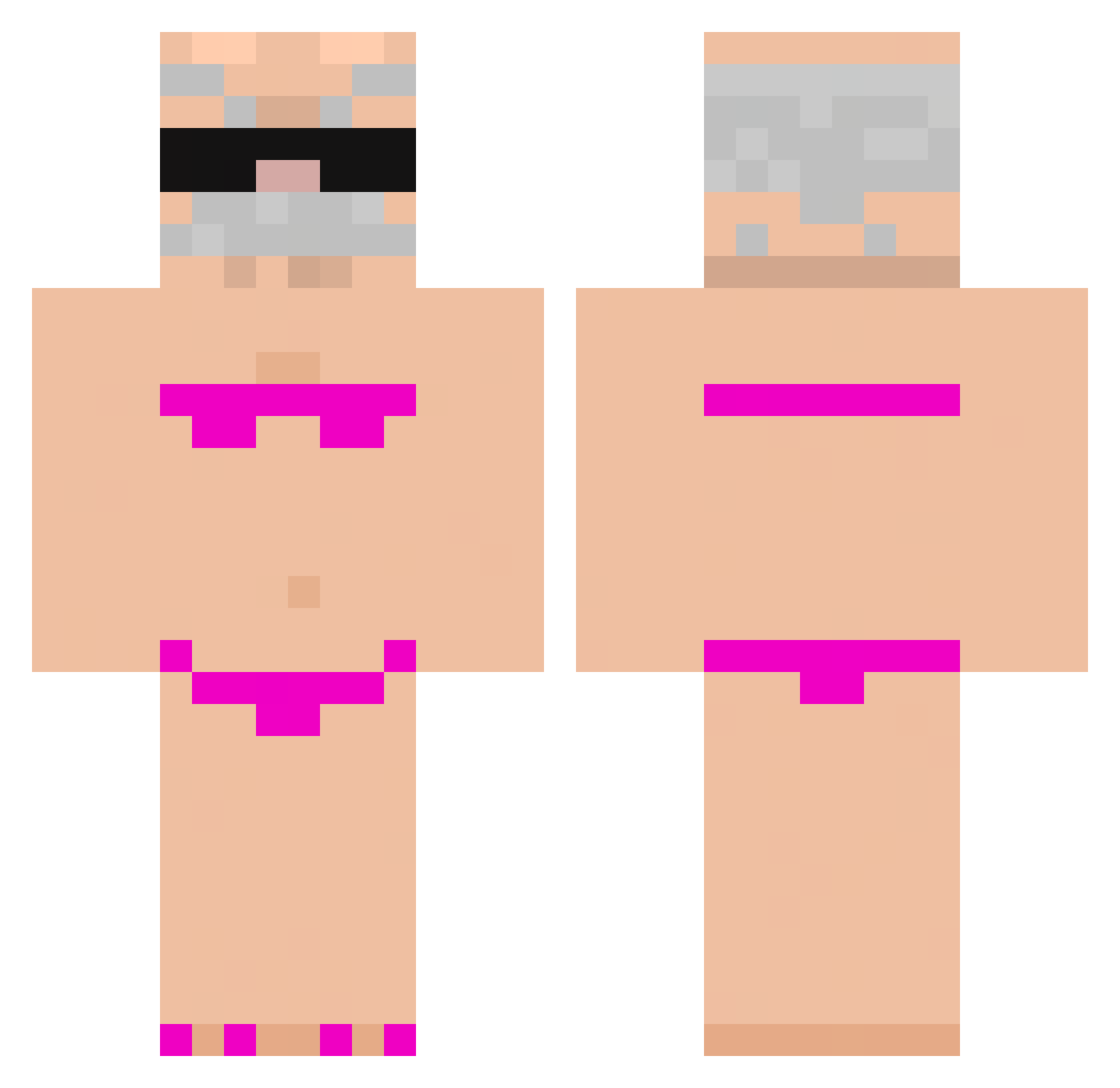
Current Minecraft skin of the player kwoongs, loaded from the official Mojang API. Rotate the 3D model with your mouse or finger, then download the skin as a PNG file and use it in Minecraft: Bedrock Edition or Java Edition for free. When kwoongs changes their skin, this page updates automatically and the old skin stays in the history below.
Other players with this skin (919)
kwoongs was the 353rd player we have seen with this skin, first spotted on 06.09.2026. The same skin was seen on these players. Open a nickname to see their current skin and skin history.
 BlackBro01 frank1117909 iromot Joalkm Not_Your_Ramen31 Valentinoez Decoxox nick201000 ZekromTmax YOYY1 xXxNikitaPro992x Dziadek_z_Knaga Beechstone wz762 oCarukia c_ma ElGasty29 McLovin_au romidudu Arceuz739 sudzix VOLMIK Midroid RichHomelessMann Br0keAndHomeless EmooBey Ineez13 Jepo8ans triigrz wusipu Kubvsieker WavingYeti04183 Rooieeovo aobaking myradoesthingz plsspeedineedts thomassie08 Negrison Italianjeff01 toj1215 wakotis foll4tron69 doudou2038 cloriks sexyJW2 Punaney northkin yuubou0328 SH4RM0T4 Crzfam4 Zozo13340 Anguuii WaffleWave_ Grzdyka_ popeyson Recherd_hua chester122111 Kerixxx jeffreybezos707 Feddy158
More Karl Marx Minecraft skins
How to install the kwoongs skin
- Press the Download button above to save the skin as a PNG file.
- Minecraft: Bedrock Edition (PE): open the Dressing Room from the main menu (or tap your character → Edit Character), go to Classic Skins → Owned, press the + (new skin) button, choose the downloaded PNG and pick the Classic (Steve) model. Works on PC and mobile; consoles cannot import custom skins.
- Minecraft: Java Edition: open the Minecraft Launcher, go to the Skins tab, click New Skin, load the PNG, pick the Classic (Steve) model and press Save & Use. You can also upload it at minecraft.net → Profile → Change Skin.
The skin does not show up after import - what should I do?
Restart Minecraft and open the Dressing Room again - imported skins sometimes appear only after a restart. Also make sure you selected the imported skin and picked the Classic (Steve) model.
Which model should I choose, Classic or Slim?
This skin is designed for the Classic (Steve) model. If you pick the wrong model, the arms of the skin will look stretched or squeezed.
Is the skin of kwoongs free to download?
Yes. Press Download, save the PNG file and use it in Minecraft: Bedrock Edition or Java Edition - no payment or registration needed. The skin also works on multiplayer servers and Realms.
More skins
Looking for more? Go back to all Minecraft skins and check the top skins of the week, month and all time, or find any player's skin by nickname.