
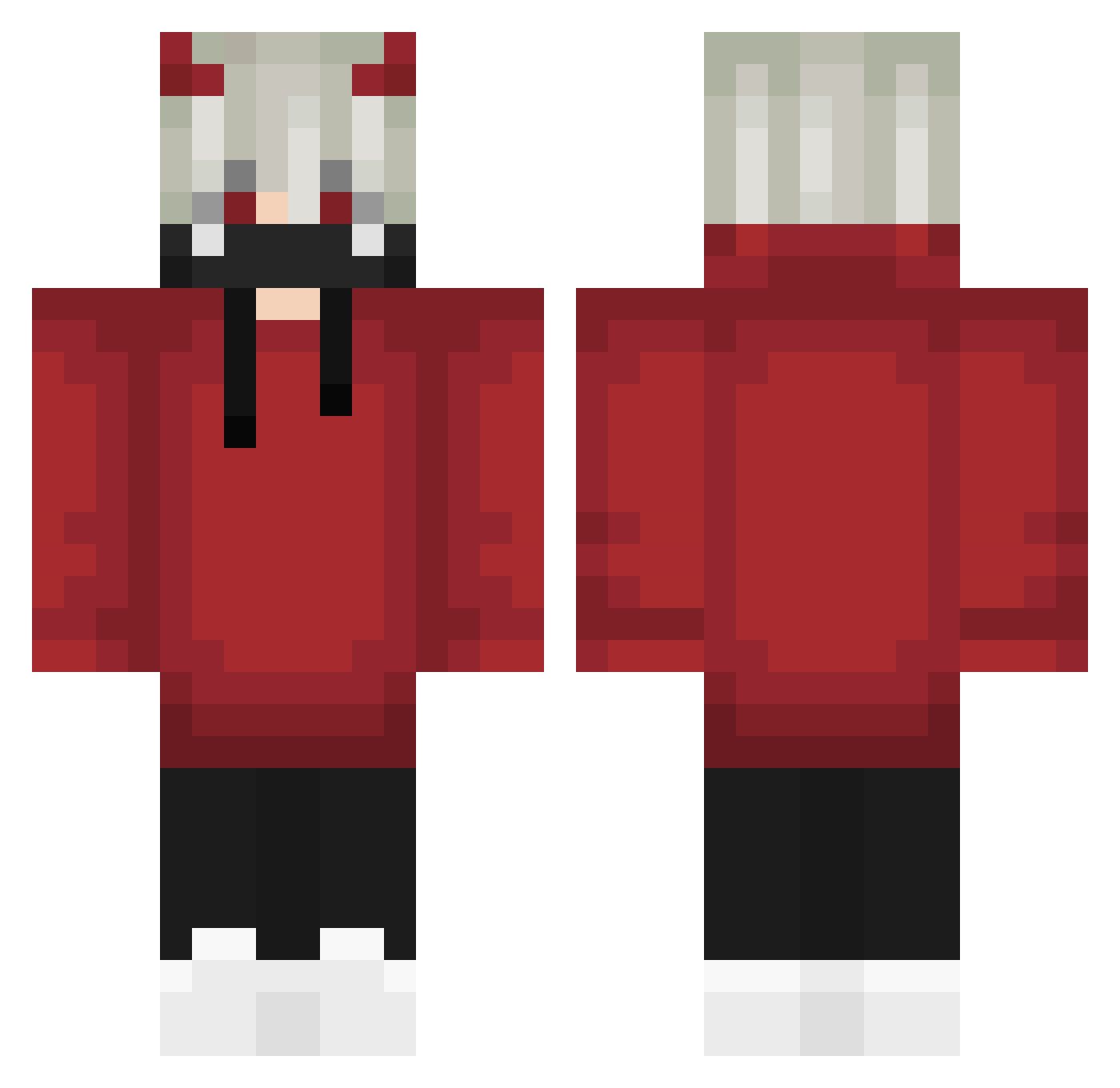
Current Minecraft skin of the player killskeletons, loaded from the official Mojang API. Rotate the 3D model with your mouse or finger, then download the skin as a PNG file and use it in Minecraft: Bedrock Edition or Java Edition for free. When killskeletons changes their skin, this page updates automatically and the old skin stays in the history below.
Other players with this skin (572)
killskeletons was the 37th player we have seen with this skin, first spotted on 29.07.2026. The same skin was seen on these players. Open a nickname to see their current skin and skin history.
 masyu_ IGNEEL1206 Szymix1324 Gaabzz sol9614 Nairuko MilkyInquisitor Ab_z3b DonovanPokemon gai12 ROFLMAO974 ForgerOfWorldz Lambi_09 Frooth Drecepo09 MIAkofifa ywaxsima Trusteur_75 Mistterred Reaper31571
 ElFrankaster132 Letsplay_Realist Froiz_ Call_me_kira__ MikkoAdv D4NK9 BAR1SS Demon_Dagger Elenberg TheRealDeaaal Warchieffa Anthony2435 ClassyClassJ Nightmar3TR GroMoSee D1vinity01 ryuuu0420 NoVaTarGet Sham_bts Cinco5WRLD beausimmons MrXGamerMAx YussefCvxl Ling157 bidoubaz Slugger49 Kvng_Thunder DarkFatih
 Black92 sonekazz ys800 Miroinwan NuouYT onexianyu DrPaid JasonleePascal Zer0Times HUZIYYDS Luzario31 Racx25
More Demon Horns Minecraft skins
How to install the killskeletons skin
- Press the Download button above to save the skin as a PNG file.
- Minecraft: Bedrock Edition (PE): open the Dressing Room from the main menu (or tap your character → Edit Character), go to Classic Skins → Owned, press the + (new skin) button, choose the downloaded PNG and pick the Classic (Steve) model. Works on PC and mobile; consoles cannot import custom skins.
- Minecraft: Java Edition: open the Minecraft Launcher, go to the Skins tab, click New Skin, load the PNG, pick the Classic (Steve) model and press Save & Use. You can also upload it at minecraft.net → Profile → Change Skin.
The skin does not show up after import - what should I do?
Restart Minecraft and open the Dressing Room again - imported skins sometimes appear only after a restart. Also make sure you selected the imported skin and picked the Classic (Steve) model.
Which model should I choose, Classic or Slim?
This skin is designed for the Classic (Steve) model. If you pick the wrong model, the arms of the skin will look stretched or squeezed.
Is the skin of killskeletons free to download?
Yes. Press Download, save the PNG file and use it in Minecraft: Bedrock Edition or Java Edition - no payment or registration needed. The skin also works on multiplayer servers and Realms.
More skins
Looking for more? Go back to all Minecraft skins and check the top skins of the week, month and all time, or find any player's skin by nickname.