
kekny - Minecraft Skins & Skin History
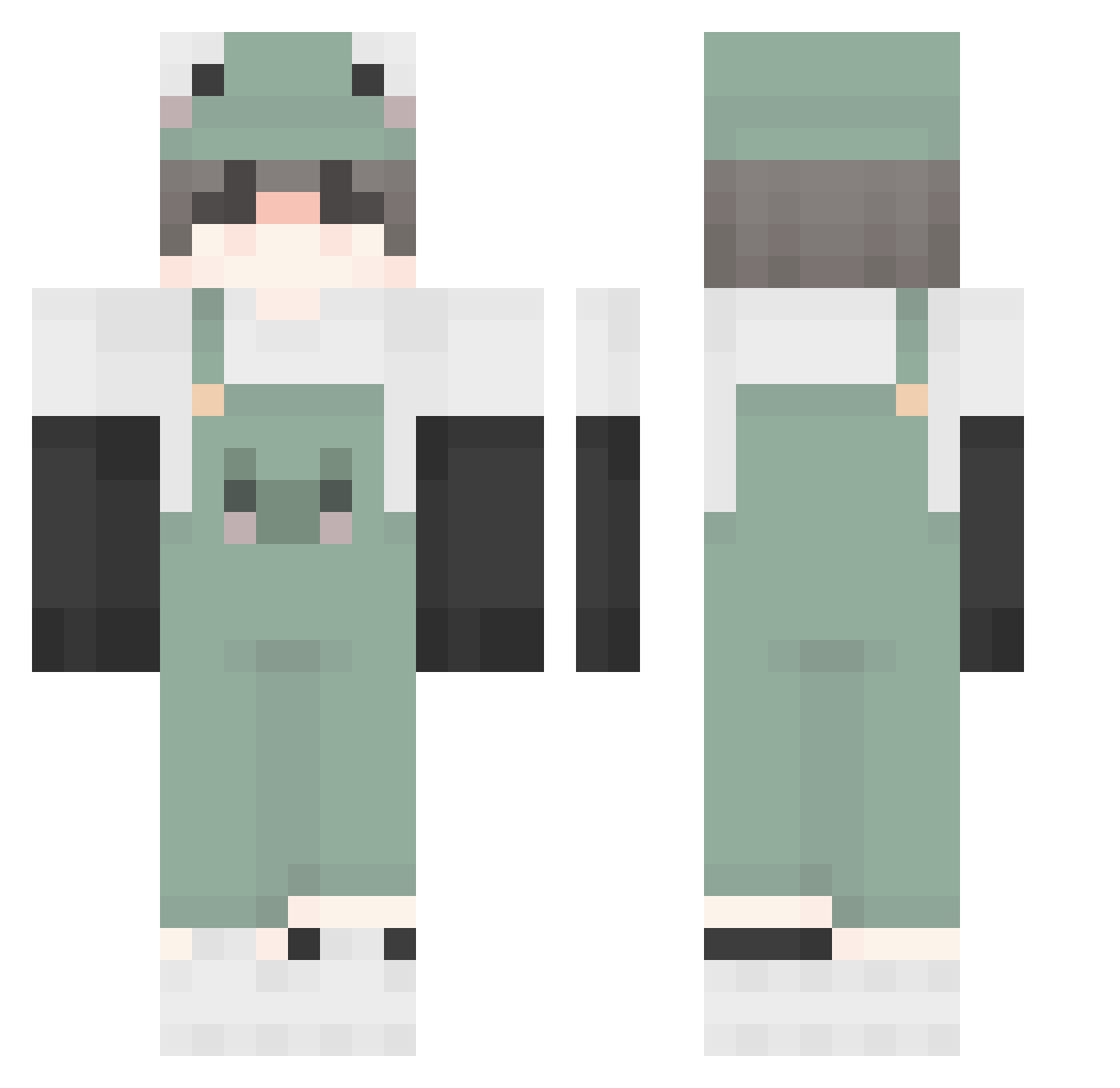
Current Minecraft skin of the player kekny, loaded from the official Mojang API. Rotate the 3D model with your mouse or finger, then download the skin as a PNG file and use it in Minecraft: Bedrock Edition or Java Edition for free. When kekny changes their skin, this page updates automatically and the old skin stays in the history below.
Other players with this skin (390)
kekny was the 299th player we have seen with this skin, first spotted on 03.10.2026. The same skin was seen on these players. Open a nickname to see their current skin and skin history.
 I_am_Gecko wisteria123 Natlehibou Needzbattreez13 Nixont Kim9158 ConnorTheNub kjh050511 rynbaii ahzenrei Larsieyboy Kissisu wq_123456 BearLeeSane IonSparks d14t SleepyEnby Exod4a HEAN0215 hhymxjj luquitas_toguapo chowderpuff One_Shot_ minotor2020 gryffindor233 Luumi_ sleeplesslilweeb wfitz BlankTie LY__01 ChungJaki axash11 OliverRose Not_Campy K3ua Lyndzellas sdaze Elisnt StewyCartoon RockyGirl21 SpaceJukebox dumb0p pineappledubu __Unknown255__ Lu_ziyi chengwol1919 H4ruhiro IchSpielNackt eungyul0803 CarefreeAura718 Crusader9699 Yulmoo__ Giady_ Reekid420 Rammusu Walter_Lloyd sleepydiego Unnamed125 gab0201 AlenOaks
More Frog Minecraft skins
How to install the kekny skin
- Press the Download button above to save the skin as a PNG file.
- Minecraft: Bedrock Edition (PE): open the Dressing Room from the main menu (or tap your character → Edit Character), go to Classic Skins → Owned, press the + (new skin) button, choose the downloaded PNG and pick the Classic (Steve) model. Works on PC and mobile; consoles cannot import custom skins.
- Minecraft: Java Edition: open the Minecraft Launcher, go to the Skins tab, click New Skin, load the PNG, pick the Classic (Steve) model and press Save & Use. You can also upload it at minecraft.net → Profile → Change Skin.
The skin does not show up after import - what should I do?
Restart Minecraft and open the Dressing Room again - imported skins sometimes appear only after a restart. Also make sure you selected the imported skin and picked the Classic (Steve) model.
Which model should I choose, Classic or Slim?
This skin is designed for the Classic (Steve) model. If you pick the wrong model, the arms of the skin will look stretched or squeezed.
Is the skin of kekny free to download?
Yes. Press Download, save the PNG file and use it in Minecraft: Bedrock Edition or Java Edition - no payment or registration needed. The skin also works on multiplayer servers and Realms.
More skins
Looking for more? Go back to all Minecraft skins and check the top skins of the week, month and all time, or find any player's skin by nickname.