
jackinaB0X - Minecraft Skins & Skin History
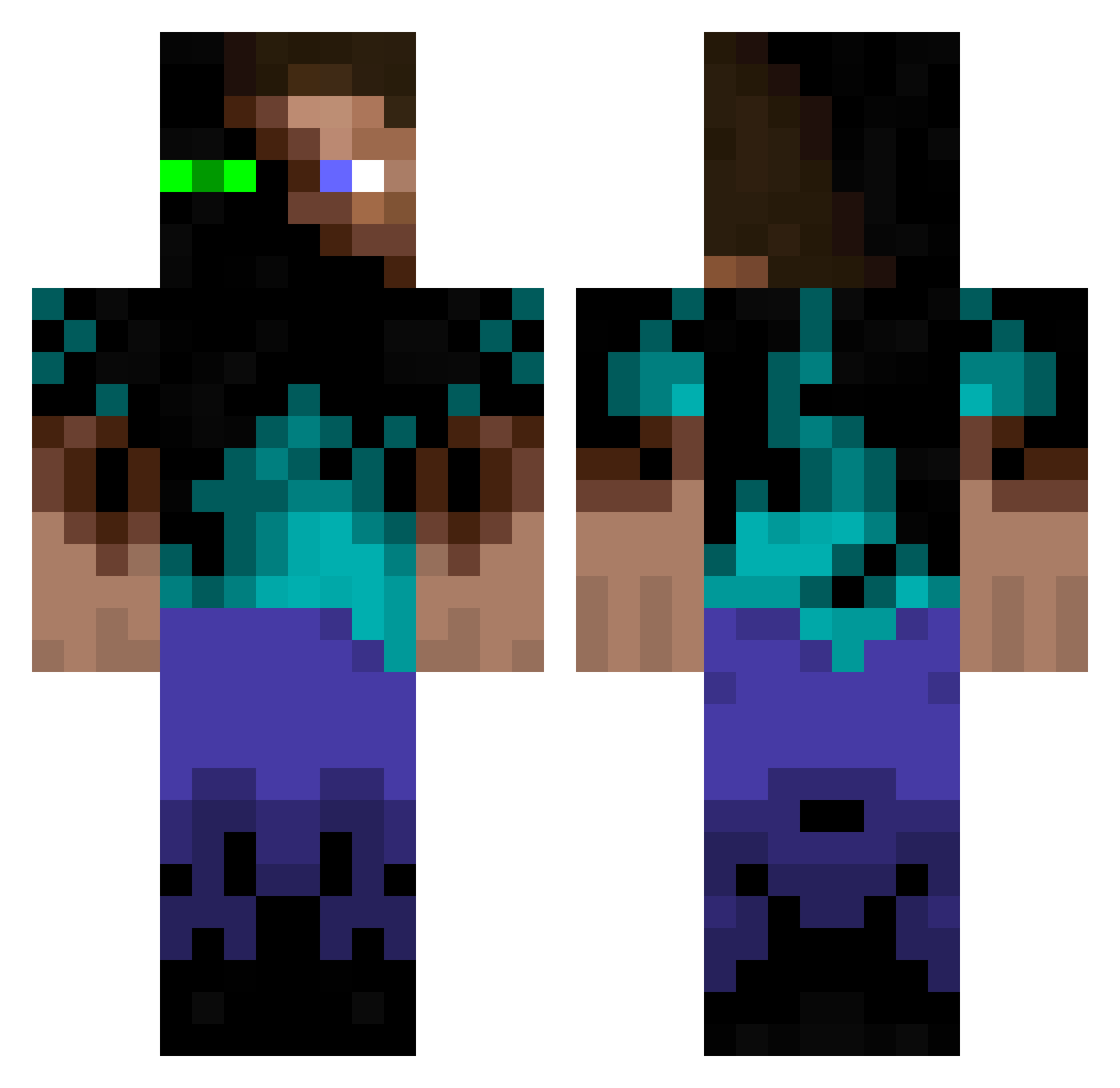
Current Minecraft skin of the player jackinaB0X, loaded from the official Mojang API. Rotate the 3D model with your mouse or finger, then download the skin as a PNG file and use it in Minecraft: Bedrock Edition or Java Edition for free. When jackinaB0X changes their skin, this page updates automatically and the old skin stays in the history below.
Other players with this skin (1202)
jackinaB0X was the 1088th player we have seen with this skin, first spotted on 29.10.2026. The same skin was seen on these players. Open a nickname to see their current skin and skin history.
 matman746 elmander111 MrAdrian65150 DreamOrNightmare barnowlking Araquasiki Narkwam Erponic Sundsoy123 Shigatsu45 mopo150 matteroflife NMO13 cl2013 RubricalHail34 JulesOConner 1mmaculateVibes afrocookie TheWalkers249 BishyBoi Norskeren Byte_64 TEAM_OSJK dodge235 Anders_Grylls broodijzer FilipSkold MrTokke boardfreak98 carloscotta sawot Ryagaru BlueBatman712 Y__R Riavan drewthomas110 atlvimahi XenonVolt XxC0MMANDERxX1 Crispy_J112 jjenjr albawilliam blackfurry Sabouca beado1 Fivea55 N0ctem alexchong Joshwaaah Quantum_Aether soultemper Cytosa Macaldo Eskimo_Man01 iksibrew Coeleste Stukk iD4rk3s exoticplayer Garlan
More Glowing Eyes Minecraft skins
See all 2815 Glowing Eyes skins
How to install the jackinaB0X skin
- Press the Download button above to save the skin as a PNG file.
- Minecraft: Bedrock Edition (PE): open the Dressing Room from the main menu (or tap your character → Edit Character), go to Classic Skins → Owned, press the + (new skin) button, choose the downloaded PNG and pick the Classic (Steve) model. Works on PC and mobile; consoles cannot import custom skins.
- Minecraft: Java Edition: open the Minecraft Launcher, go to the Skins tab, click New Skin, load the PNG, pick the Classic (Steve) model and press Save & Use. You can also upload it at minecraft.net → Profile → Change Skin.
The skin does not show up after import - what should I do?
Restart Minecraft and open the Dressing Room again - imported skins sometimes appear only after a restart. Also make sure you selected the imported skin and picked the Classic (Steve) model.
Which model should I choose, Classic or Slim?
This skin is designed for the Classic (Steve) model. If you pick the wrong model, the arms of the skin will look stretched or squeezed.
Is the skin of jackinaB0X free to download?
Yes. Press Download, save the PNG file and use it in Minecraft: Bedrock Edition or Java Edition - no payment or registration needed. The skin also works on multiplayer servers and Realms.
More skins
Looking for more? Go back to all Minecraft skins and check the top skins of the week, month and all time, or find any player's skin by nickname.