
itzrealmor5y - Minecraft Skins & Skin History
Current Minecraft skin of the player itzrealmor5y, loaded from the official Mojang API. Rotate the 3D model with your mouse or finger, then download the skin as a PNG file and use it in Minecraft: Bedrock Edition or Java Edition for free. When itzrealmor5y changes their skin, this page updates automatically and the old skin stays in the history below.
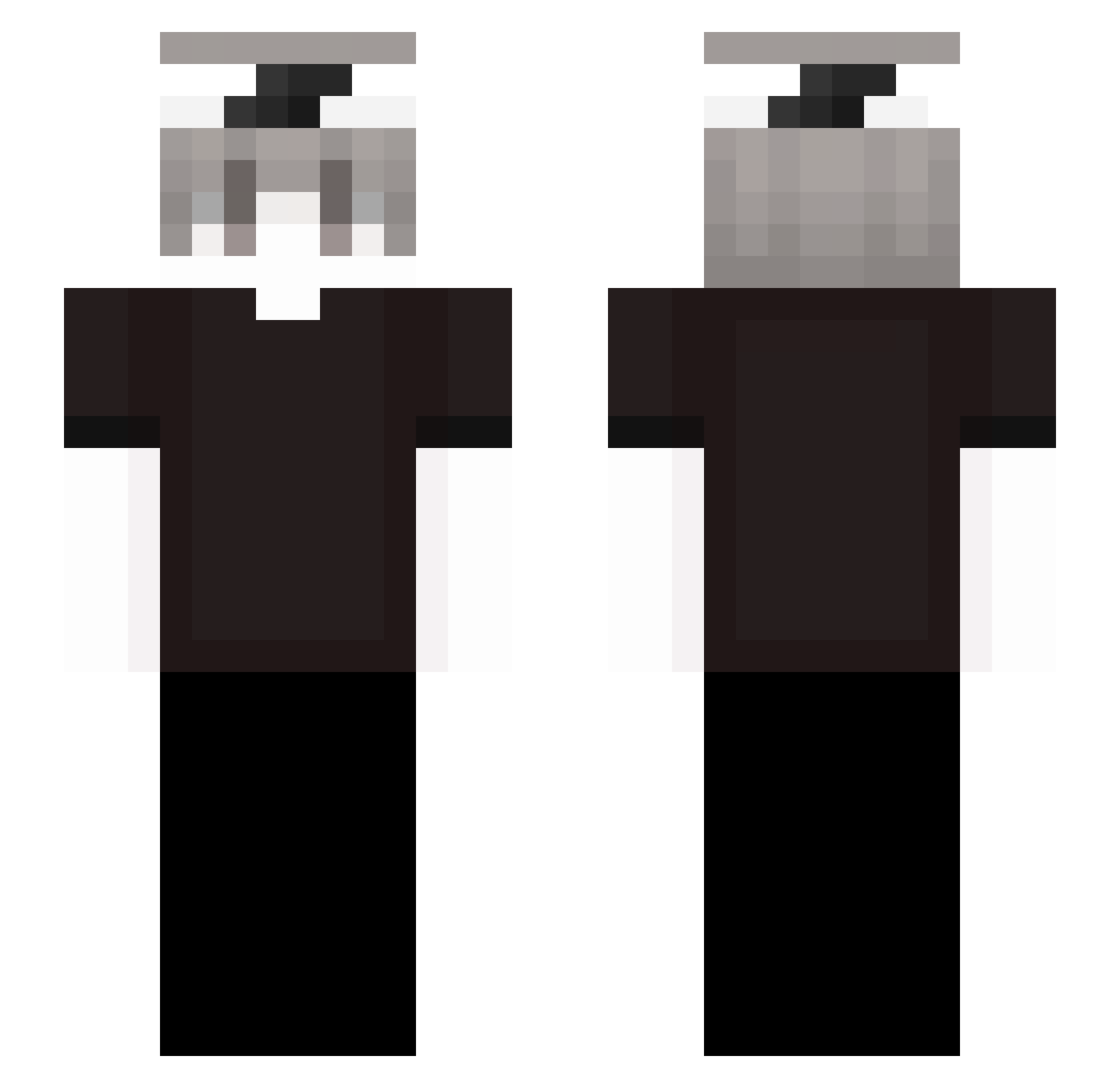
Other players with this skin (237)
itzrealmor5y was the 26th player we have seen with this skin, first spotted on 31.07.2026. The same skin was seen on these players. Open a nickname to see their current skin and skin history.
 protchi
 ooz1e Gaarrrr Exylll santosz151 stanislawwww
 brunookessler minzed khoatrannmc
 SmpLoverr
 ITZ_Alexandaa jhonylometo departt
 Amoebinha44 J1mmyFPS _wZennox_YOK0W
 sacred_zzzz GiyuWasTaken shharpustoboss eden0300
 Pepi220515 Lil_Curite28 parsa1623 BeLarped Mesiak_MC kadio108 Ovalflame57767 TheGamerBOIZ_YT xzvy17
 calmst
 Dragonnight8286 Georges_Valorant AkQ6 Andreoi Daniel5678 ssagr7717 1229yys
 Thelofabred WelcomeToMyCribs NexoMVP xJkxpl Odor_Odor
 PobpNeo
 SteveJobb_VN zPhaTran Sv2Wingx8g Isma18 kalto_kt RitualGood yZenx_ Mentos12K ldskfj DamonClark oliMC2014 Theriejan xmontacik_1337
 EchoMinds
 GodRei Xyroo_7 s1demen
How to install the itzrealmor5y skin
- Press the Download button above to save the skin as a PNG file.
- Minecraft: Bedrock Edition (PE): open the Dressing Room from the main menu (or tap your character → Edit Character), go to Classic Skins → Owned, press the + (new skin) button, choose the downloaded PNG and pick the Slim (Alex) model. Works on PC and mobile; consoles cannot import custom skins.
- Minecraft: Java Edition: open the Minecraft Launcher, go to the Skins tab, click New Skin, load the PNG, pick the Slim (Alex) model and press Save & Use. You can also upload it at minecraft.net → Profile → Change Skin.
The skin does not show up after import - what should I do?
Restart Minecraft and open the Dressing Room again - imported skins sometimes appear only after a restart. Also make sure you selected the imported skin and picked the Slim (Alex) model.
Which model should I choose, Classic or Slim?
This skin is designed for the Slim (Alex) model. If you pick the wrong model, the arms of the skin will look stretched or squeezed.
Is the skin of itzrealmor5y free to download?
Yes. Press Download, save the PNG file and use it in Minecraft: Bedrock Edition or Java Edition - no payment or registration needed. The skin also works on multiplayer servers and Realms.
More skins
Looking for more? Go back to all Minecraft skins and check the top skins of the week, month and all time, or find any player's skin by nickname.