
iisax - Minecraft Skins & Skin History
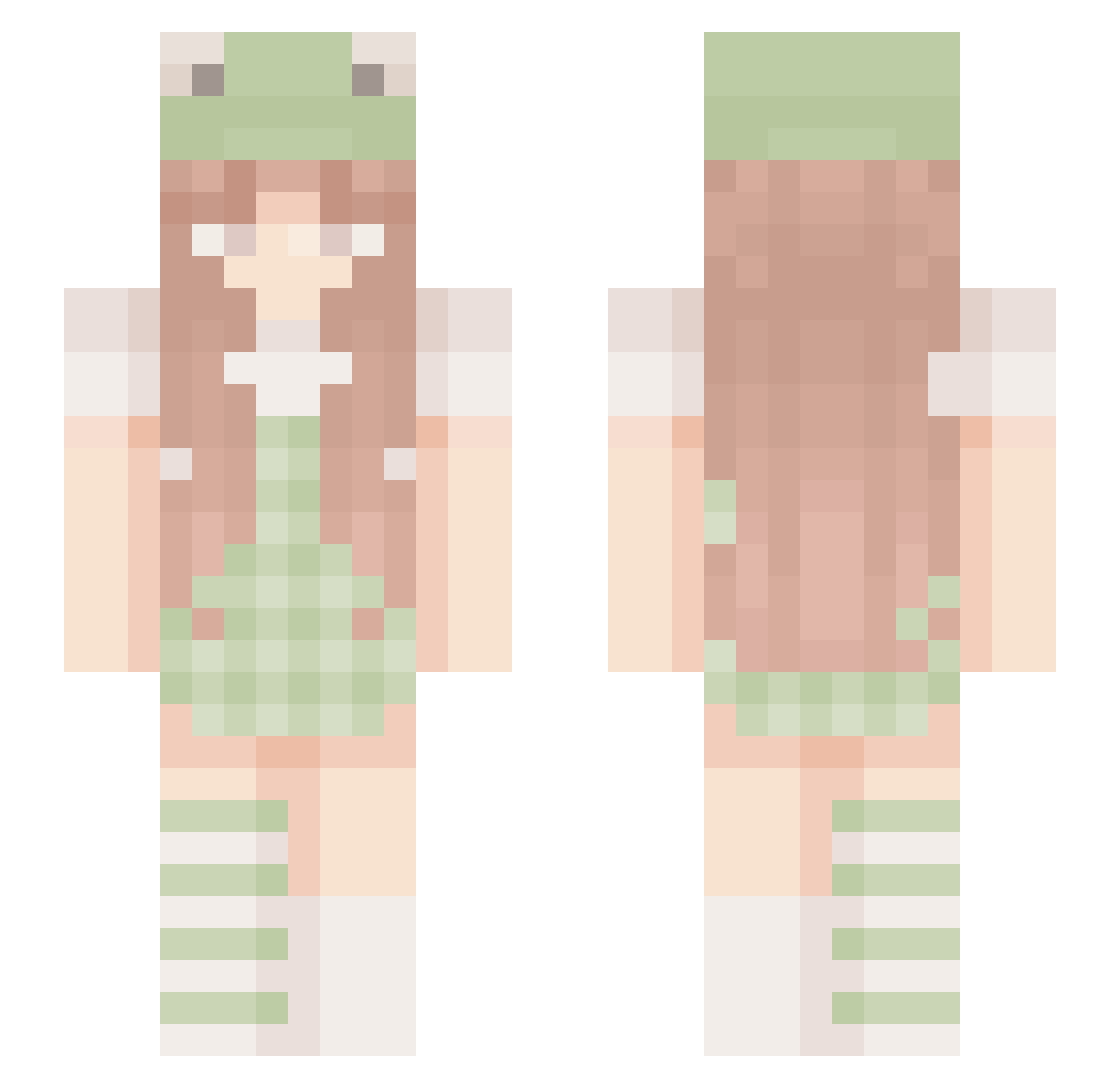
Current Minecraft skin of the player iisax, loaded from the official Mojang API. Rotate the 3D model with your mouse or finger, then download the skin as a PNG file and use it in Minecraft: Bedrock Edition or Java Edition for free. When iisax changes their skin, this page updates automatically and the old skin stays in the history below.
Other players with this skin (202)
iisax was the 31st player we have seen with this skin, first spotted on 13.08.2026. The same skin was seen on these players. Open a nickname to see their current skin and skin history.
 LeapFrogHops Qi_jiu_jiu LazeeDreamer AshlynnRose C0mett izzysokhbu AvacornSparkles forgs_ Beniweni45 ratduchess Vea1nx duperbubble Mafesita ji_y0_0n Pinguineczka Lady_ellen_ julszon individualised AliceLolita Margaux0223 red_star11 Aiyana_Star stup5809 CaesartheSalads Jules8800 nodab siomusuP snowyzoe Pappsen_ bigchaque DaintyCrown5860 angeljade23 Ya_Sonic Slater0 trivlove MintSkies Octoppler AleineCat Ha_Eun1 liad672004 flufficorn Frqggy
 Anyamoo MISFITGHOULS Shivafan01 CandiedCoyote11 _Jujulia_ czarvnaa Viaylo Trippitytrapp CookiesNCreamz mariluou gabyamanaki yeyueww RosaBoon m3gan_ emovq catee3 CupidGrace Bentil
More Frog Hat Minecraft skins
How to install the iisax skin
- Press the Download button above to save the skin as a PNG file.
- Minecraft: Bedrock Edition (PE): open the Dressing Room from the main menu (or tap your character → Edit Character), go to Classic Skins → Owned, press the + (new skin) button, choose the downloaded PNG and pick the Slim (Alex) model. Works on PC and mobile; consoles cannot import custom skins.
- Minecraft: Java Edition: open the Minecraft Launcher, go to the Skins tab, click New Skin, load the PNG, pick the Slim (Alex) model and press Save & Use. You can also upload it at minecraft.net → Profile → Change Skin.
The skin does not show up after import - what should I do?
Restart Minecraft and open the Dressing Room again - imported skins sometimes appear only after a restart. Also make sure you selected the imported skin and picked the Slim (Alex) model.
Which model should I choose, Classic or Slim?
This skin is designed for the Slim (Alex) model. If you pick the wrong model, the arms of the skin will look stretched or squeezed.
Is the skin of iisax free to download?
Yes. Press Download, save the PNG file and use it in Minecraft: Bedrock Edition or Java Edition - no payment or registration needed. The skin also works on multiplayer servers and Realms.
More skins
Looking for more? Go back to all Minecraft skins and check the top skins of the week, month and all time, or find any player's skin by nickname.