
hirotttonn - Minecraft Skins & Skin History
Current Minecraft skin of the player hirotttonn, loaded from the official Mojang API. Rotate the 3D model with your mouse or finger, then download the skin as a PNG file and use it in Minecraft: Bedrock Edition or Java Edition for free. When hirotttonn changes their skin, this page updates automatically and the old skin stays in the history below.
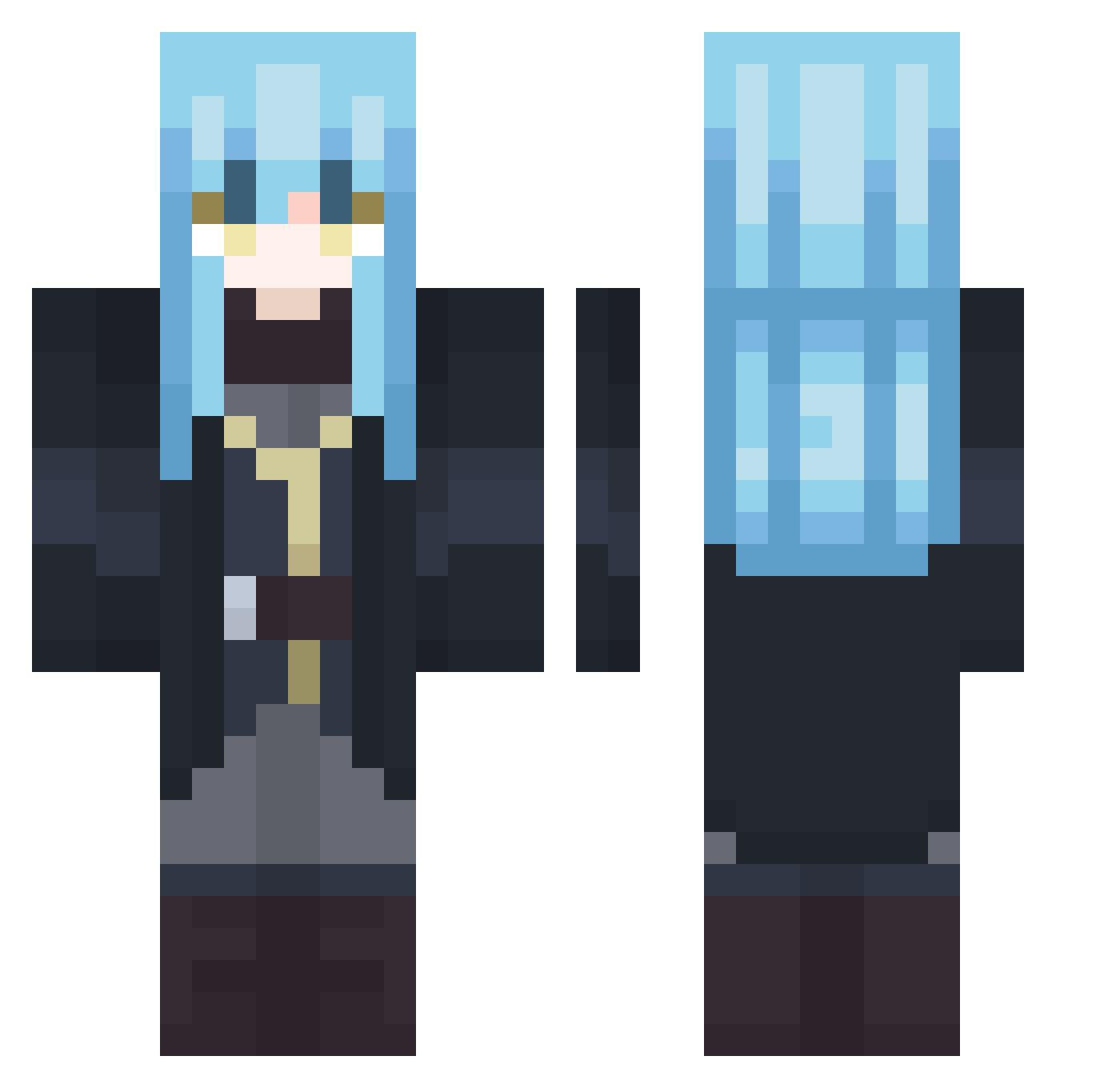
Other players with this skin (407)
hirotttonn was the 61st player we have seen with this skin, first spotted on 13.08.2026. The same skin was seen on these players. Open a nickname to see their current skin and skin history.
 qlstn JPGn18 RIN5_10 FriendlySlimee iWhiteAvery Kentheblackcat Itasch1209 OtakuCrypt Cipher22 Matthew200346
 dixn_ 999Jxff
 Chickenman544 ChangJia
 THE_TEMPEST02 beh0 Gettsz Gary12340000 oba4 Spectre_Assasin_ Hasoku Pz0y RHJassassin minpak05 Skyfoxius KMan1908 BeelKaiser LeXeleur Muso126 hehvyvlol MoDRun Miraakss XSoLunasX TheTempest_7 Shy_Benja shioril_YT lythor60 PunkFromH3ll mhpetroli Rimuru_Tempest_9 ChinaBeiJing RizuGabri VITo_Beaxt rainhow Hildarion Cr4shR3d wolfangel6781 Ishilly OriginDavid Crui25
 Fritzzs HypeOzzie2947 tanzaff123 yoyomj sotaro47 Veldnava2 xIZer0Ix AurildeusTempest skellingtonv sogonfire
More Rimuru Tempest Minecraft skins
See all 249 Rimuru Tempest skins
How to install the hirotttonn skin
- Press the Download button above to save the skin as a PNG file.
- Minecraft: Bedrock Edition (PE): open the Dressing Room from the main menu (or tap your character → Edit Character), go to Classic Skins → Owned, press the + (new skin) button, choose the downloaded PNG and pick the Classic (Steve) model. Works on PC and mobile; consoles cannot import custom skins.
- Minecraft: Java Edition: open the Minecraft Launcher, go to the Skins tab, click New Skin, load the PNG, pick the Classic (Steve) model and press Save & Use. You can also upload it at minecraft.net → Profile → Change Skin.
The skin does not show up after import - what should I do?
Restart Minecraft and open the Dressing Room again - imported skins sometimes appear only after a restart. Also make sure you selected the imported skin and picked the Classic (Steve) model.
Which model should I choose, Classic or Slim?
This skin is designed for the Classic (Steve) model. If you pick the wrong model, the arms of the skin will look stretched or squeezed.
Is the skin of hirotttonn free to download?
Yes. Press Download, save the PNG file and use it in Minecraft: Bedrock Edition or Java Edition - no payment or registration needed. The skin also works on multiplayer servers and Realms.
More skins
Looking for more? Go back to all Minecraft skins and check the top skins of the week, month and all time, or find any player's skin by nickname.