
sogonfire - Minecraft Skins & Skin History
Current Minecraft skin of the player sogonfire, loaded from the official Mojang API. Rotate the 3D model with your mouse or finger, then download the skin as a PNG file and use it in Minecraft: Bedrock Edition or Java Edition for free. When sogonfire changes their skin, this page updates automatically and the old skin stays in the history below.
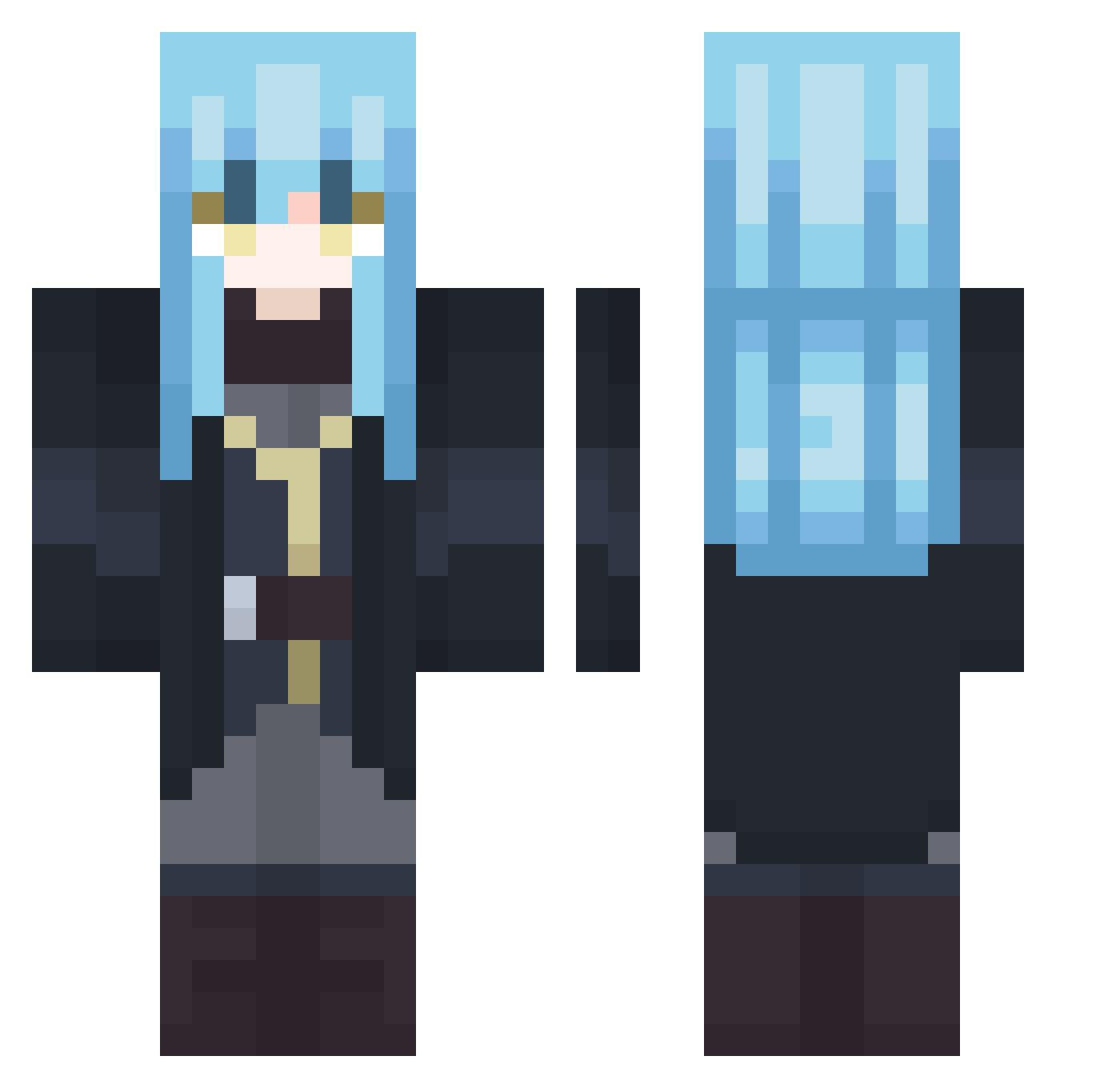
Other players with this skin (407)
sogonfire was the 96th player we have seen with this skin, first spotted on 24.08.2026. The same skin was seen on these players. Open a nickname to see their current skin and skin history.
 skellingtonv Late_Knights lny2006 AurildeusTempest xIZer0Ix chinobling15 Veldnava2 sotaro47 yoyomj Kukaja tanzaff123 HypeOzzie2947 Corrinn_
 Fritzzs OriginDavid itsuki0801 Hildarion VITo_Beaxt RizuGabri chesiip pr_rimuru RUNKSMUNKS Rimuru_Tempest_9 AkitoTPST mhpetroli __RiMuRu_ PunkFromH3ll RimuTempesto BeamishTheGamer0 shioril_YT Sanctitude TheTempest_7
 nofski5 PotatoGerald Au_ToxicLizard7 XSoLunasX Chamberlian Kal2013 hehvyvlol Corathe1 Nlmm2 Muso126 Hugh4504 Bellasaurr Lapinouu_u LoranSama RHJassassin CrayCraySpace steelslime69 flauschiiiiiiiii DistantArc01 Lil_baconplays Dogskin00 Spectre_Assasin_ oba4 Gary12340000 beh0 OMGFirestriker Aryura
 THE_TEMPEST02
More Rimuru Tempest Minecraft skins
See all 250 Rimuru Tempest skins
How to install the sogonfire skin
- Press the Download button above to save the skin as a PNG file.
- Minecraft: Bedrock Edition (PE): open the Dressing Room from the main menu (or tap your character → Edit Character), go to Classic Skins → Owned, press the + (new skin) button, choose the downloaded PNG and pick the Classic (Steve) model. Works on PC and mobile; consoles cannot import custom skins.
- Minecraft: Java Edition: open the Minecraft Launcher, go to the Skins tab, click New Skin, load the PNG, pick the Classic (Steve) model and press Save & Use. You can also upload it at minecraft.net → Profile → Change Skin.
The skin does not show up after import - what should I do?
Restart Minecraft and open the Dressing Room again - imported skins sometimes appear only after a restart. Also make sure you selected the imported skin and picked the Classic (Steve) model.
Which model should I choose, Classic or Slim?
This skin is designed for the Classic (Steve) model. If you pick the wrong model, the arms of the skin will look stretched or squeezed.
Is the skin of sogonfire free to download?
Yes. Press Download, save the PNG file and use it in Minecraft: Bedrock Edition or Java Edition - no payment or registration needed. The skin also works on multiplayer servers and Realms.
More skins
Looking for more? Go back to all Minecraft skins and check the top skins of the week, month and all time, or find any player's skin by nickname.