
henrys1 - Minecraft Skins & Skin History
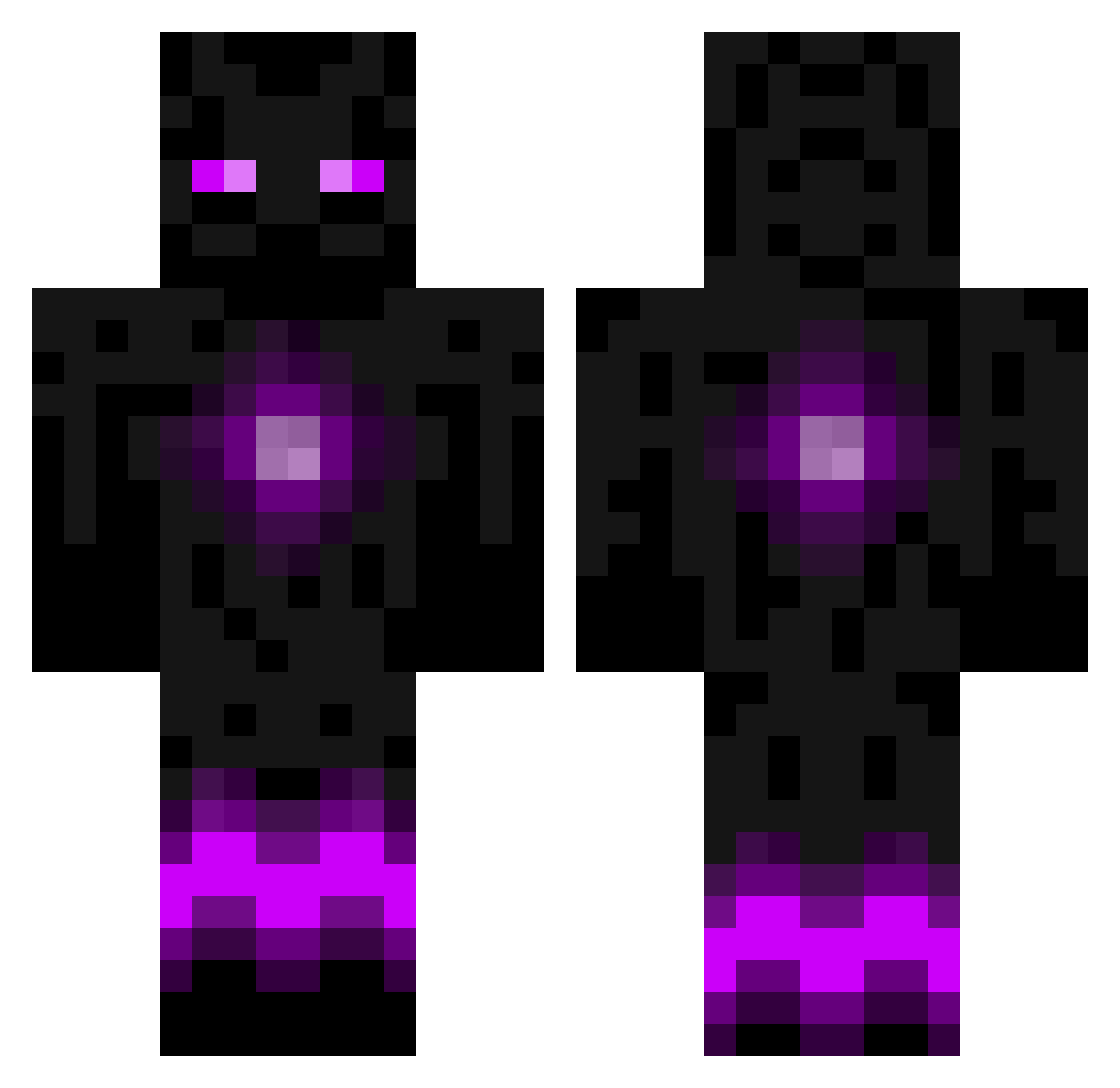
Current Minecraft skin of the player henrys1, loaded from the official Mojang API. Rotate the 3D model with your mouse or finger, then download the skin as a PNG file and use it in Minecraft: Bedrock Edition or Java Edition for free. When henrys1 changes their skin, this page updates automatically and the old skin stays in the history below.
Other players with this skin (949)
henrys1 was the 907th player we have seen with this skin, first spotted on 14.11.2026. The same skin was seen on these players. Open a nickname to see their current skin and skin history.
 Kylecatcher Dutch_Hunter Haydensky SunYeeOn mrfred12 flam1n nerfguy178 ManOfSteel195 Mir954 Egophobic_ makenzyjoby sanhenry210 JuliJuice_ frecklemania wade_meister Zerfani Maemps Androktasie superseb10 GunHan98 LordSaturna innebadykingen SnowShira Yanci26 kitso95 Soul_Dexer Zankary Floow1337 Kingsizes SammadoXII jack020112 jammybobo123 Nickcraft30 LeprechaunJohnny hannesedin99 MegaNuke11 EnderNachos chiefsunmonkey MegaAntek wingmanB17 Inator2k Clifford4492 MHittle00 External_Ender KAIZX5992 Desentje Xibadog DJ_Boom Sverd123 ProNatey Ygree Dannylax22 Tezza2515 jesusM6969 avatar_7001 Georg1603 Lenny_05 snkkk AlasTimoris leature
More Enderman Minecraft skins
How to install the henrys1 skin
- Press the Download button above to save the skin as a PNG file.
- Minecraft: Bedrock Edition (PE): open the Dressing Room from the main menu (or tap your character → Edit Character), go to Classic Skins → Owned, press the + (new skin) button, choose the downloaded PNG and pick the Classic (Steve) model. Works on PC and mobile; consoles cannot import custom skins.
- Minecraft: Java Edition: open the Minecraft Launcher, go to the Skins tab, click New Skin, load the PNG, pick the Classic (Steve) model and press Save & Use. You can also upload it at minecraft.net → Profile → Change Skin.
The skin does not show up after import - what should I do?
Restart Minecraft and open the Dressing Room again - imported skins sometimes appear only after a restart. Also make sure you selected the imported skin and picked the Classic (Steve) model.
Which model should I choose, Classic or Slim?
This skin is designed for the Classic (Steve) model. If you pick the wrong model, the arms of the skin will look stretched or squeezed.
Is the skin of henrys1 free to download?
Yes. Press Download, save the PNG file and use it in Minecraft: Bedrock Edition or Java Edition - no payment or registration needed. The skin also works on multiplayer servers and Realms.
More skins
Looking for more? Go back to all Minecraft skins and check the top skins of the week, month and all time, or find any player's skin by nickname.