
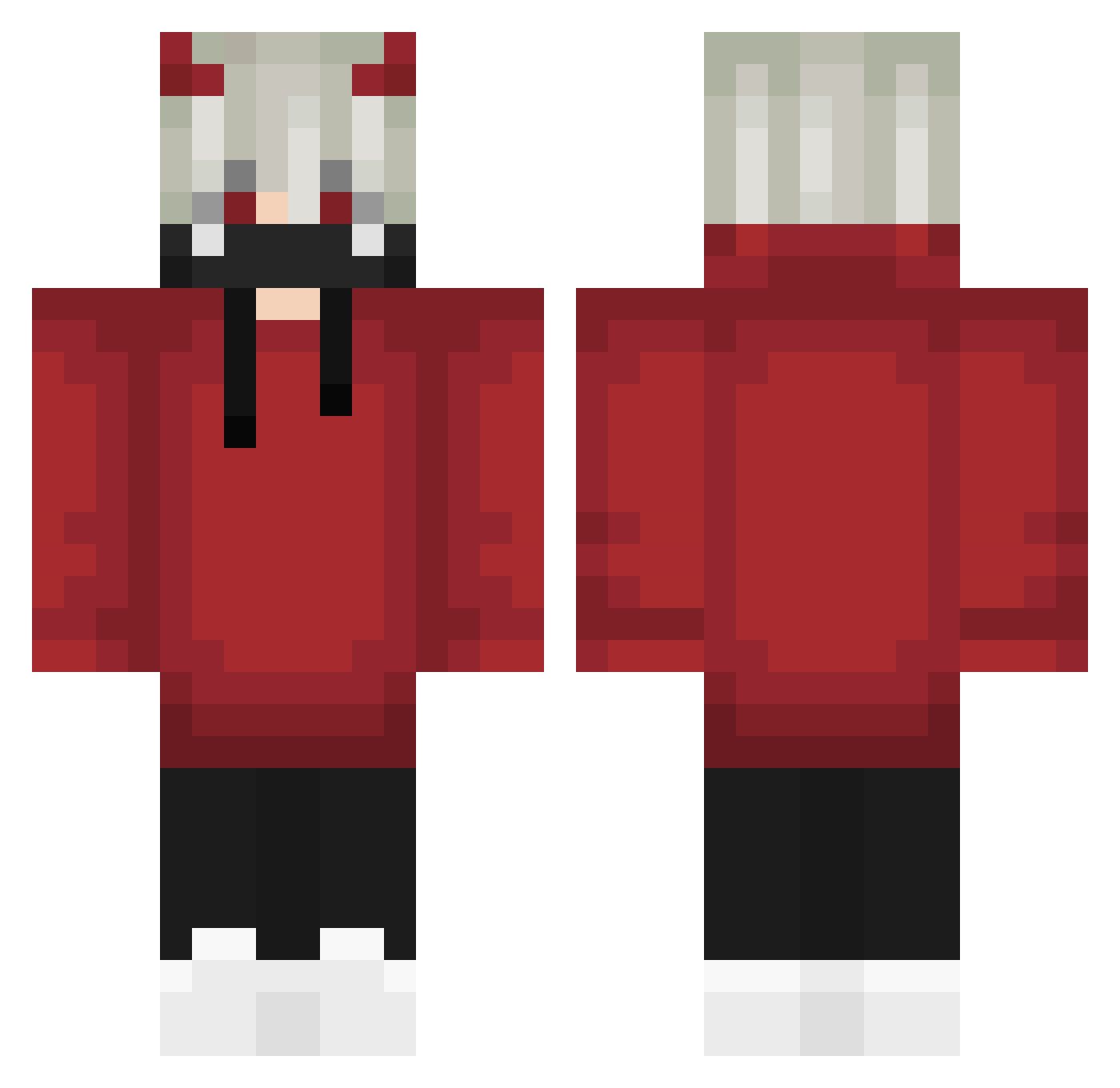
Current Minecraft skin of the player grumphywump, loaded from the official Mojang API. Rotate the 3D model with your mouse or finger, then download the skin as a PNG file and use it in Minecraft: Bedrock Edition or Java Edition for free. When grumphywump changes their skin, this page updates automatically and the old skin stays in the history below.
Other players with this skin (571)
grumphywump was the 256th player we have seen with this skin, first spotted on 01.09.2026. The same skin was seen on these players. Open a nickname to see their current skin and skin history.
 CXIX_KENNY Nesty994 General132 pansito_panita cici100412 DALLL747 PooHLiRyZE Nawaf1430 RGLD3MON DDENISS1 Accelerator_KP FpsShadow Wiirdi Ghosthunter9856 Bakus2 Herix_ Sapphomet Alinko_Neko Zack4U Manikandan OA21 KeresPL yunodark w1ldbtw NeoSkaz63 Vituuuuuu Deydora Dracarys124 alusbombaa too_emo_to_live Melbourne_U MiTSuKi_Dx xHowls weizichen shadowfoxy569 DereNess D6R6CK6 Josema662 uzi20085 SzataN22 SoyZombiee AstraIG Blackua1234 edward_gold Jnwc bdorsultan Midjounrey ByArslan Viciiuzz Light56888 Vigarista777 RedDragenGaming InfernalSamy RiseClientOnTop4 dydoux2 b3soeb xtrem_99 Hik3s CreatureCrew HeinzAce
More Demon Horns Minecraft skins
How to install the grumphywump skin
- Press the Download button above to save the skin as a PNG file.
- Minecraft: Bedrock Edition (PE): open the Dressing Room from the main menu (or tap your character → Edit Character), go to Classic Skins → Owned, press the + (new skin) button, choose the downloaded PNG and pick the Classic (Steve) model. Works on PC and mobile; consoles cannot import custom skins.
- Minecraft: Java Edition: open the Minecraft Launcher, go to the Skins tab, click New Skin, load the PNG, pick the Classic (Steve) model and press Save & Use. You can also upload it at minecraft.net → Profile → Change Skin.
The skin does not show up after import - what should I do?
Restart Minecraft and open the Dressing Room again - imported skins sometimes appear only after a restart. Also make sure you selected the imported skin and picked the Classic (Steve) model.
Which model should I choose, Classic or Slim?
This skin is designed for the Classic (Steve) model. If you pick the wrong model, the arms of the skin will look stretched or squeezed.
Is the skin of grumphywump free to download?
Yes. Press Download, save the PNG file and use it in Minecraft: Bedrock Edition or Java Edition - no payment or registration needed. The skin also works on multiplayer servers and Realms.
More skins
Looking for more? Go back to all Minecraft skins and check the top skins of the week, month and all time, or find any player's skin by nickname.