
ghostxs_777 - Minecraft Skins & Skin History
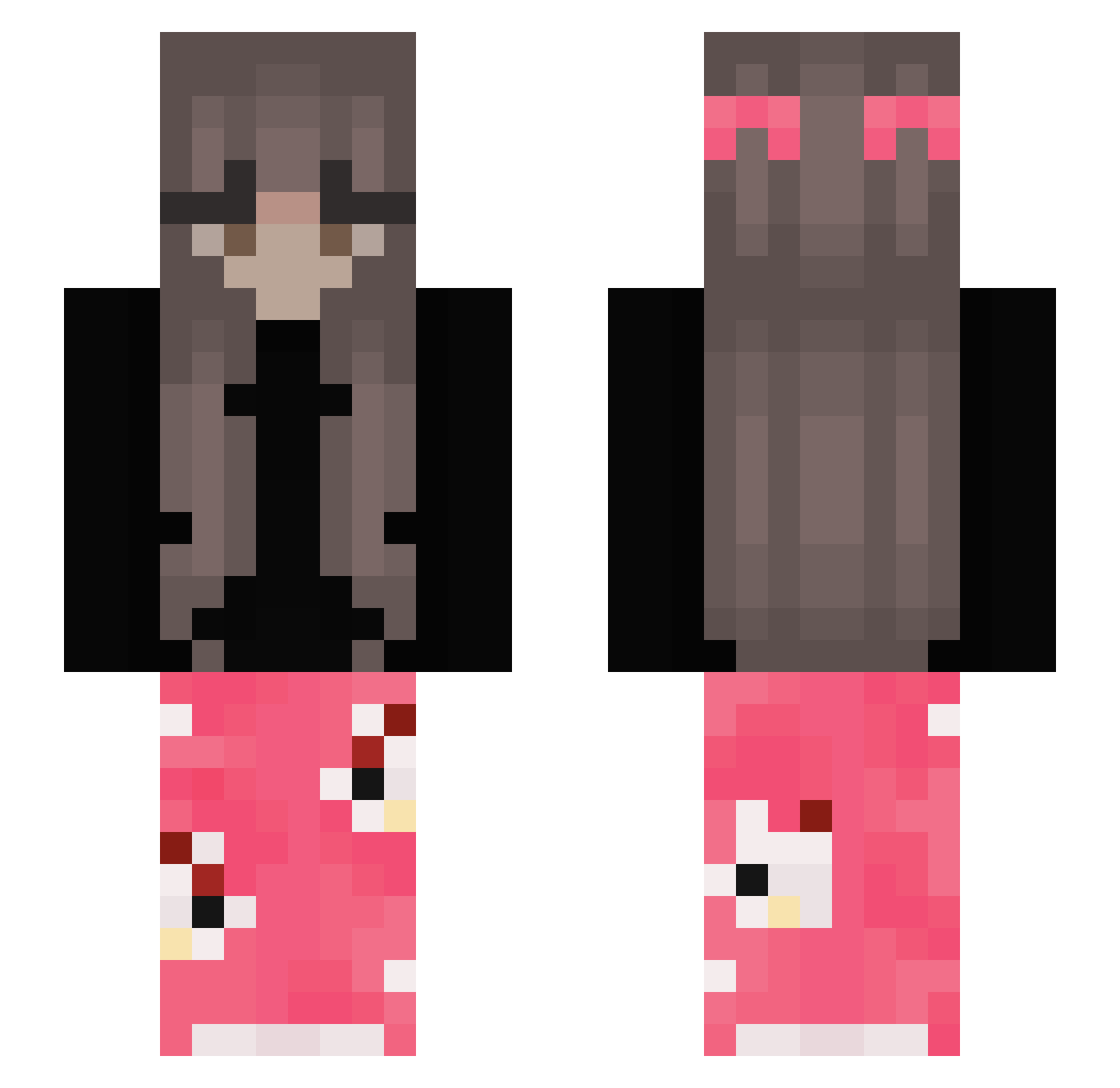
Current Minecraft skin of the player ghostxs_777, loaded from the official Mojang API. Rotate the 3D model with your mouse or finger, then download the skin as a PNG file and use it in Minecraft: Bedrock Edition or Java Edition for free. When ghostxs_777 changes their skin, this page updates automatically and the old skin stays in the history below.
Other players with this skin (457)
ghostxs_777 was the 450th player we have seen with this skin, first spotted on 18.11.2026. The same skin was seen on these players. Open a nickname to see their current skin and skin history.
 danlin2015 FluffyRaeRae Saartje_ontop Marbella_ Zazuage Yolds_ _L0ck 44_ares P1ngu11_ rayanou95 wxcisk elyfatya Mysia__ zuzuxoxo wyc1314 Dori_TV LeNaan bbylara erinkaaa AmberGamerYT szabiinaa TowarzyszKobas MissGaby24 Csenge66 chocolatemlk437 anamxd lolaschulze Weirdo003 xRaybs mazarati_1 BMOANISKY_BON Keipaso xlottevdb Kamyqqgames SweetLilies Seliiaa TanniBR zkft EMOTION_GIRL KaedeLucy BTUMelo emboo2 187ForLive japanesefeces JustL1nds SophiaPan alu233 ash1949 joloveya1lnXSJ3 patusia_ Igbartvvsss Wolfgirlfight nslq mojaa_ bieniuu0 KochamJanka123 PvP_Domestos julcia0808 MeybH jjaz_
More Pyjamas Minecraft skins
How to install the ghostxs_777 skin
- Press the Download button above to save the skin as a PNG file.
- Minecraft: Bedrock Edition (PE): open the Dressing Room from the main menu (or tap your character → Edit Character), go to Classic Skins → Owned, press the + (new skin) button, choose the downloaded PNG and pick the Slim (Alex) model. Works on PC and mobile; consoles cannot import custom skins.
- Minecraft: Java Edition: open the Minecraft Launcher, go to the Skins tab, click New Skin, load the PNG, pick the Slim (Alex) model and press Save & Use. You can also upload it at minecraft.net → Profile → Change Skin.
The skin does not show up after import - what should I do?
Restart Minecraft and open the Dressing Room again - imported skins sometimes appear only after a restart. Also make sure you selected the imported skin and picked the Slim (Alex) model.
Which model should I choose, Classic or Slim?
This skin is designed for the Slim (Alex) model. If you pick the wrong model, the arms of the skin will look stretched or squeezed.
Is the skin of ghostxs_777 free to download?
Yes. Press Download, save the PNG file and use it in Minecraft: Bedrock Edition or Java Edition - no payment or registration needed. The skin also works on multiplayer servers and Realms.
More skins
Looking for more? Go back to all Minecraft skins and check the top skins of the week, month and all time, or find any player's skin by nickname.