
fishmeowmeow - Minecraft Skins & Skin History
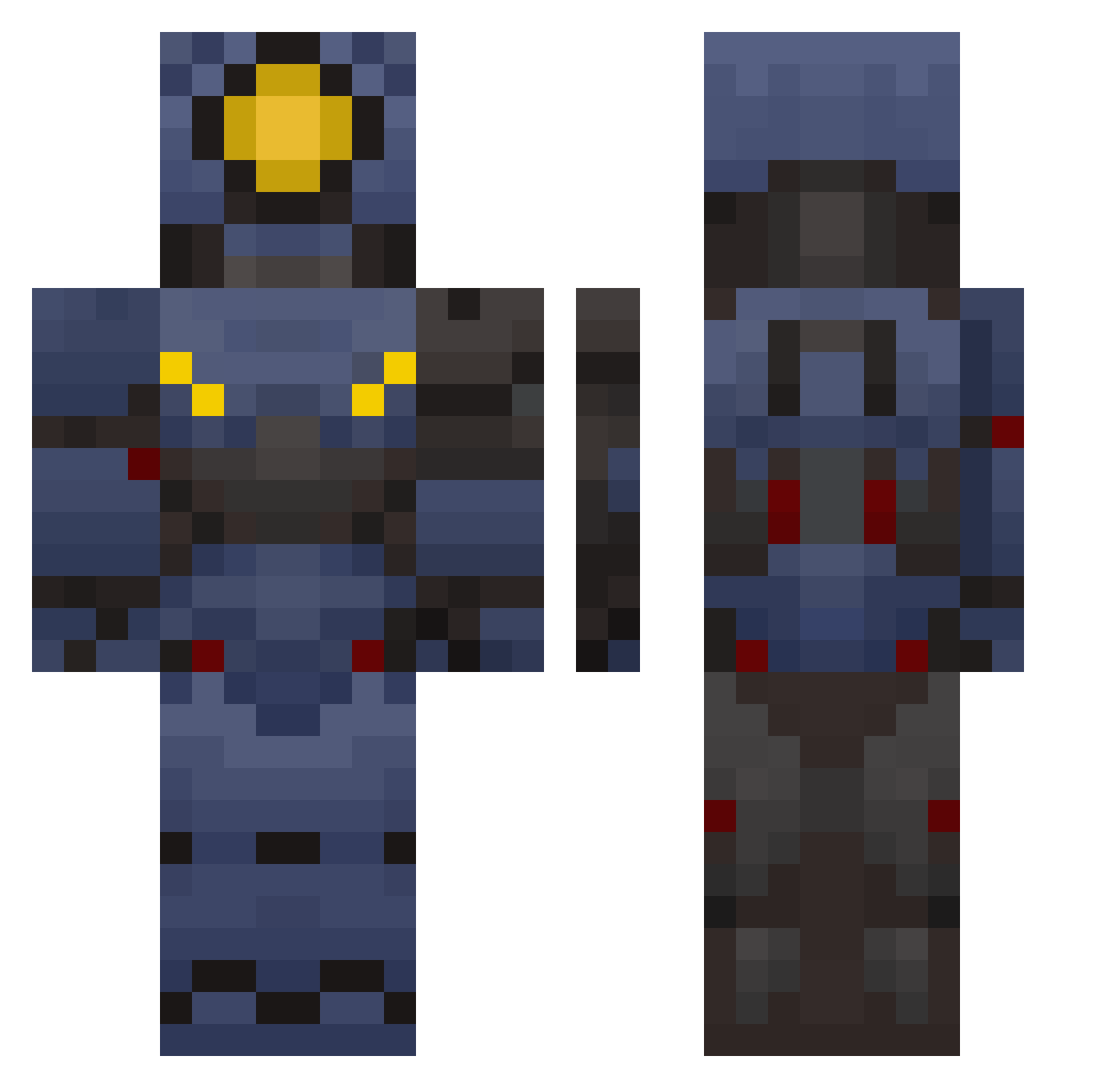
Current Minecraft skin of the player fishmeowmeow, loaded from the official Mojang API. Rotate the 3D model with your mouse or finger, then download the skin as a PNG file and use it in Minecraft: Bedrock Edition or Java Edition for free. When fishmeowmeow changes their skin, this page updates automatically and the old skin stays in the history below.
Other players with this skin (97)
fishmeowmeow was the 16th player we have seen with this skin, first spotted on 09.08.2026. The same skin was seen on these players. Open a nickname to see their current skin and skin history.
 ewan2013 Karpiii_ WallLicker44 Bamholl KedArch GuiltyGator elpapuinsanowaza
 Lithium_Steel KAISER_v0 Jobiowen
 WestOnward JaneTho202 anatissarrio defnotswen JimmiJendry Achiles715 SilentDashin mwokei GeoChai12 ABshaw SoloNewMafio Kyslyrn _Internedas_
 TuffTeto Radon2137 BugeGuyre Sethy11 Turtii1 Miponix Babalik2005 JustAGuy7 DangoOopa tanner1323 Outlaw4470 Scoobe1562
 V1_ultrakillpeak JesusLovesWheat randomuser1031 TheEternalMiner recon393 TwistyZKitty iptis smg7606 LaPizzaVoladora inuuuuuuuuuuuuuu WarCriminal3556 Millie86 TheGoofyV1 Ethan9541
 lale1234 Kokosnussely GamingWizard1888 zeaphr IceColdChud Big_Peter55 thesaturngamer2 CoyotaTorolla selfcheckoutgoat Raserdragon Pacheco77
More V1 Minecraft skins
How to install the fishmeowmeow skin
- Press the Download button above to save the skin as a PNG file.
- Minecraft: Bedrock Edition (PE): open the Dressing Room from the main menu (or tap your character → Edit Character), go to Classic Skins → Owned, press the + (new skin) button, choose the downloaded PNG and pick the Classic (Steve) model. Works on PC and mobile; consoles cannot import custom skins.
- Minecraft: Java Edition: open the Minecraft Launcher, go to the Skins tab, click New Skin, load the PNG, pick the Classic (Steve) model and press Save & Use. You can also upload it at minecraft.net → Profile → Change Skin.
The skin does not show up after import - what should I do?
Restart Minecraft and open the Dressing Room again - imported skins sometimes appear only after a restart. Also make sure you selected the imported skin and picked the Classic (Steve) model.
Which model should I choose, Classic or Slim?
This skin is designed for the Classic (Steve) model. If you pick the wrong model, the arms of the skin will look stretched or squeezed.
Is the skin of fishmeowmeow free to download?
Yes. Press Download, save the PNG file and use it in Minecraft: Bedrock Edition or Java Edition - no payment or registration needed. The skin also works on multiplayer servers and Realms.
More skins
Looking for more? Go back to all Minecraft skins and check the top skins of the week, month and all time, or find any player's skin by nickname.